Introduction: Revolutionary AI-Powered Image Editing
In the rapidly evolving landscape of artificial intelligence, image editing has undergone a dramatic transformation. Among the most groundbreaking developments is Qwen Image Edit, Alibaba's state-of-the-art image editing foundation model that's redefining what's possible in AI-powered visual content manipulation. Released in August 2025, this 20-billion-parameter model has quickly established itself as a leading solution for both semantic and appearance-based image modifications.
Qwen Image Edit stands out in the crowded field of AI image editors by offering unprecedented precision in text rendering, particularly for bilingual content in Chinese and English. Whether you're a professional designer, e-commerce business owner, content creator, or developer, understanding the capabilities of this powerful tool can revolutionize your workflow and unlock creative possibilities that were previously impossible or prohibitively time-consuming.
What is Qwen Image Edit?
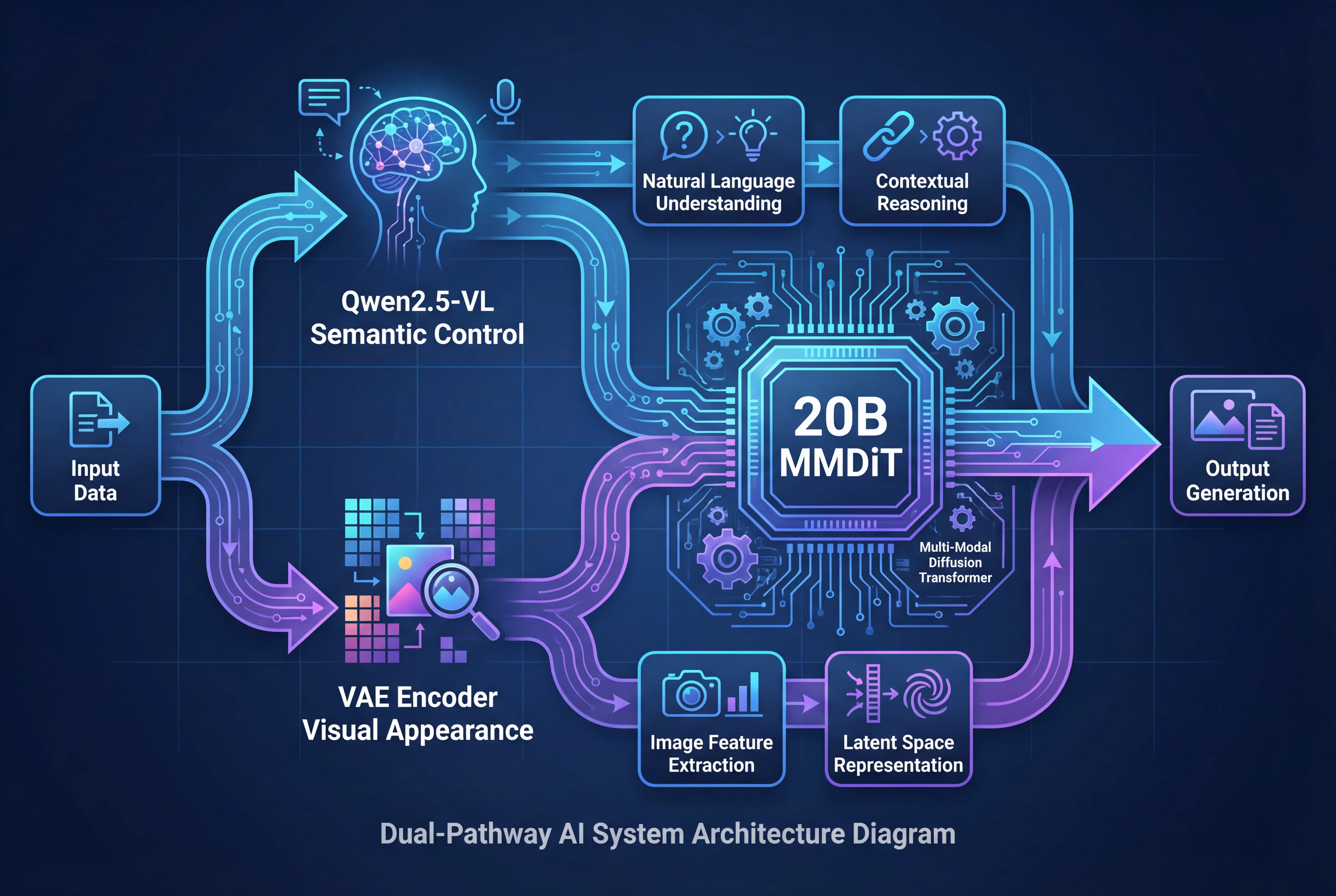
Qwen Image Edit is an advanced open-source image editing foundation model developed by Alibaba's Qwen team. Built upon the powerful 20B Qwen-Image model, it successfully extends Qwen-Image's unique text rendering capabilities to comprehensive image editing tasks. Unlike traditional image editors or simple AI enhancement tools, Qwen Image Edit employs a sophisticated dual-pathway architecture that provides both semantic understanding and pixel-perfect appearance control.
The model represents a significant leap forward in AI image editing technology by addressing two critical challenges that have plagued previous solutions:
-
Semantic coherence: Maintaining the meaning and context of images during edits
-
Appearance fidelity: Preserving pixel-level details and visual consistency
What makes Qwen Image Edit particularly impressive is its ability to handle complex editing scenarios while maintaining the integrity of unchanged regions. This means you can make surgical modifications to specific elements without degrading the quality of the entire image - a capability that sets it apart from many competing AI image editing solutions.
Key Features and Capabilities
Dual Editing Modes: Semantic and Appearance Control
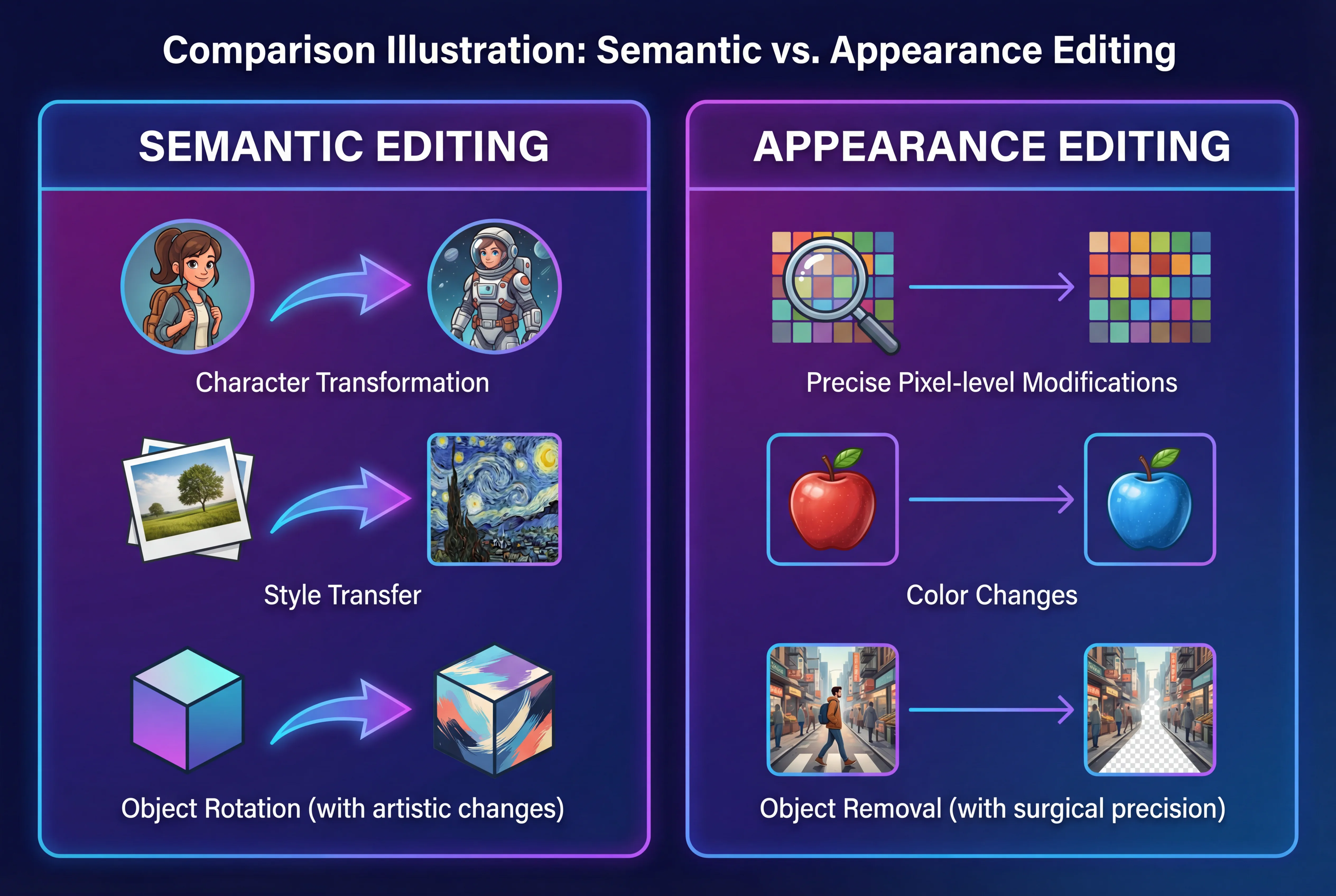
Qwen Image Edit's core strength lies in its dual editing capabilities that provide unprecedented control over both the meaning and visual appearance of images:
Semantic Editing
Semantic editing refers to modifications that alter the conceptual content while maintaining overall visual coherence. This includes:
-
IP Character Creation: Generate consistent character variations across different styles and scenarios
-
Object Rotation: Change perspectives and angles of objects naturally
-
Style Transfer: Apply artistic styles while preserving subject identity
-
Scene Transformation: Modify backgrounds and environmental context
-
Conceptual Changes: Transform objects into different representations (e.g., turning a photo into a cartoon)
Appearance Editing
Appearance editing focuses on pixel-level modifications that require surgical precision:
-
Element Addition/Removal: Add new objects or remove unwanted elements with perfect blending
-
Detail Modification: Change colors, textures, and fine details
-
Background Replacement: Swap backgrounds with context-aware shadows and reflections
-
Clothing and Accessory Changes: Modify garments while maintaining natural folds and lighting
-
Object Enhancement: Improve specific elements without affecting the rest of the image
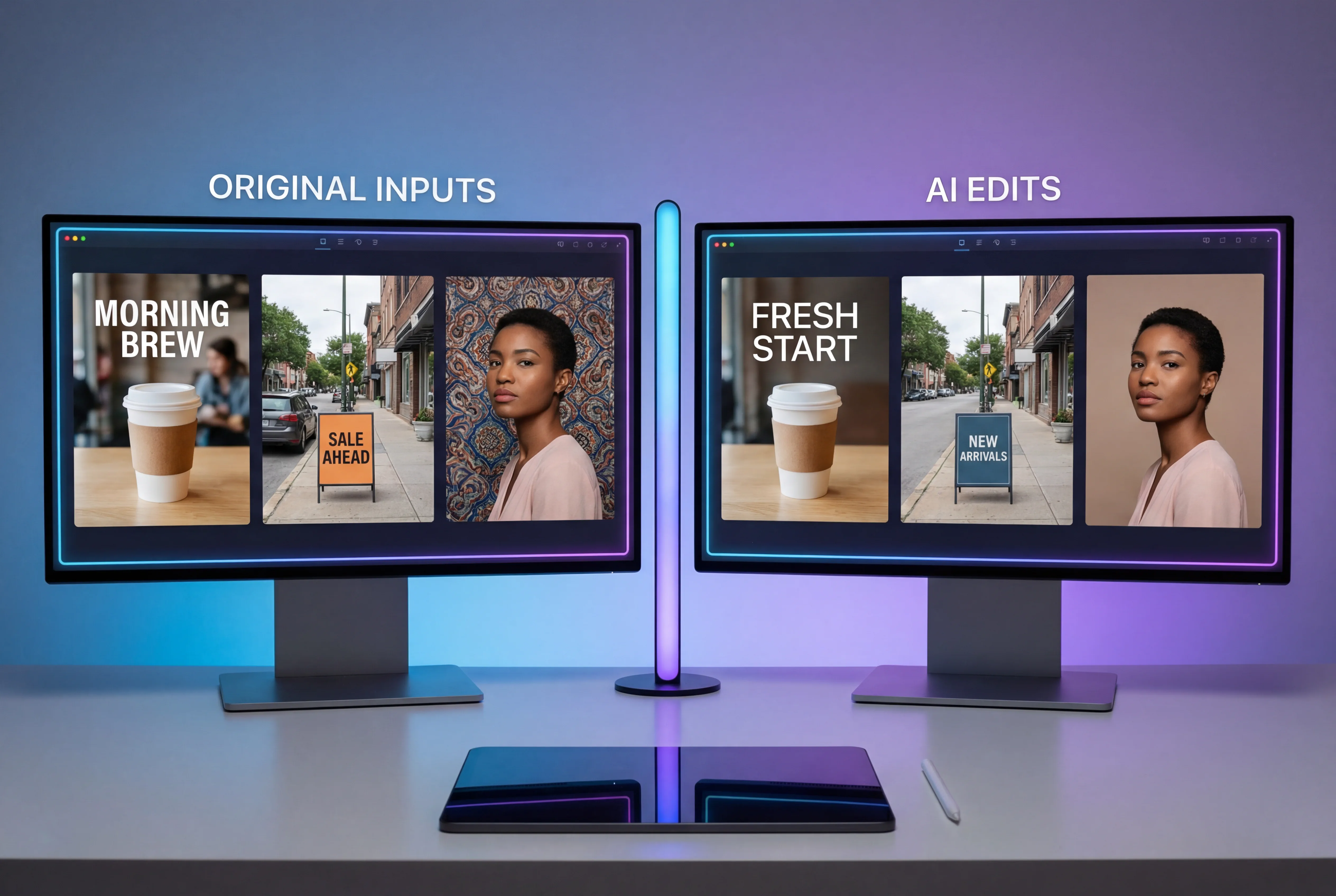
Precise Bilingual Text Editing
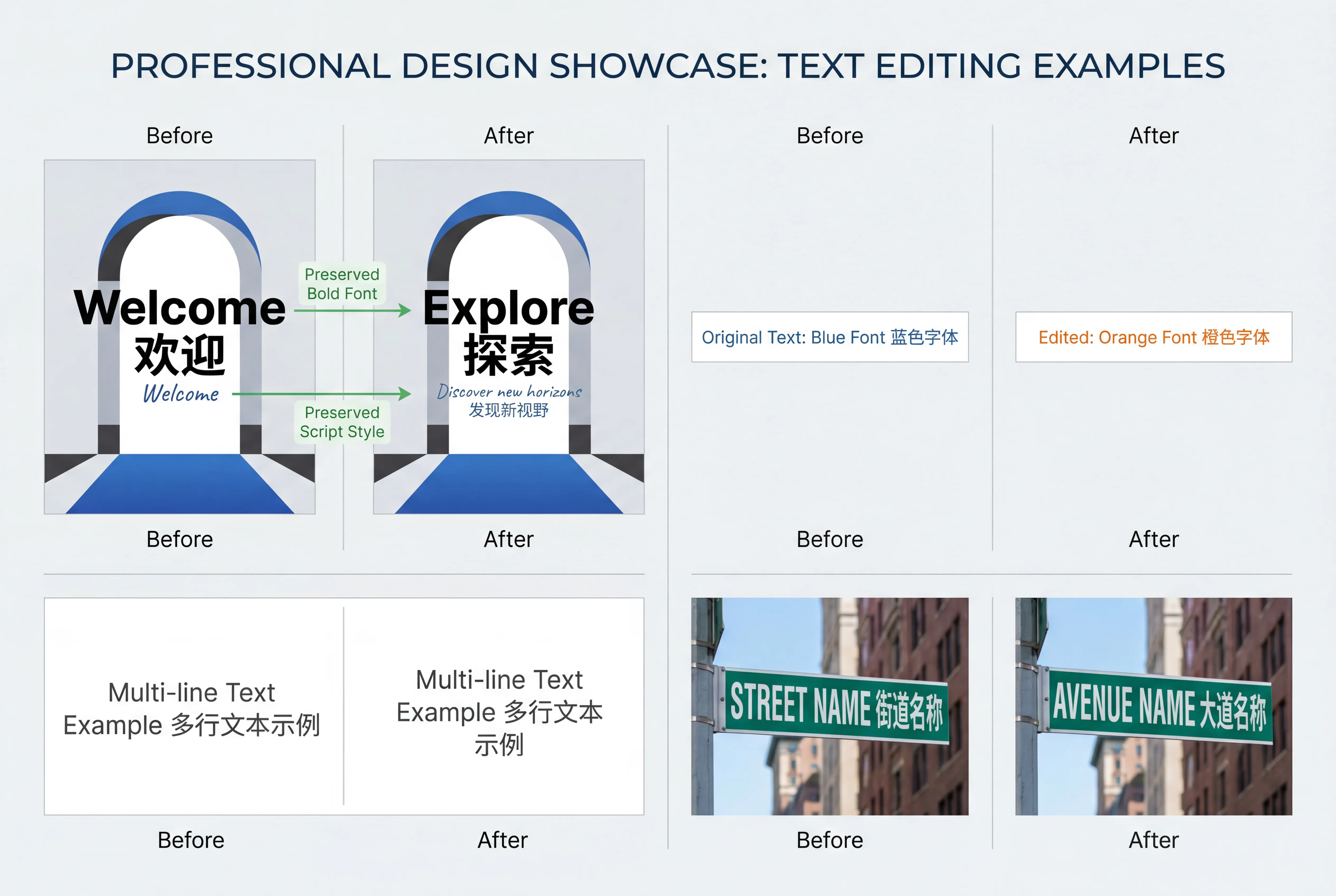
One of Qwen Image Edit's most celebrated features is its exceptional text editing capability. The model supports both Chinese and English text manipulation with remarkable accuracy:
-
Font Preservation: Maintains original font styles, sizes, and characteristics
-
Multi-line Layouts: Handles complex paragraph-level text arrangements
-
Text Color and Material: Modify text appearance including colors, materials, and effects
-
Contextual Text Addition: Add new text that naturally integrates with the image
-
Text Removal: Cleanly remove text while intelligently filling the background
This capability stems from Qwen-Image's deep expertise in text rendering and has achieved commercial-grade quality that rivals professional design tools. Whether you're localizing marketing materials or creating multilingual content, this feature alone can save countless hours of manual work.
State-of-the-Art Performance
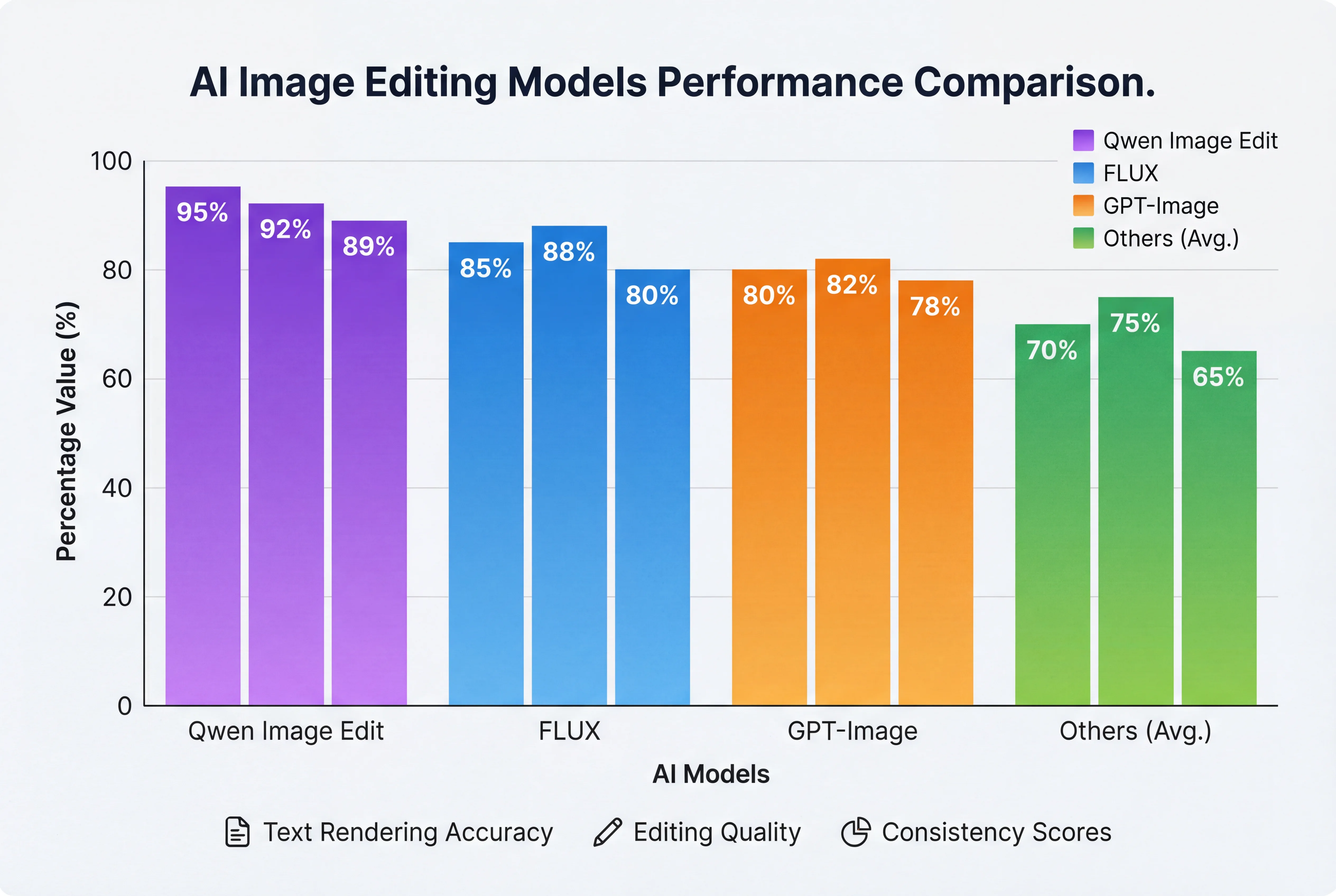
Qwen Image Edit has achieved state-of-the-art (SOTA) performance across multiple public benchmarks, establishing itself as a powerful foundation model for image editing. The model consistently outperforms competing open-source solutions and achieves results comparable to proprietary systems.
Technical Architecture: How Qwen Image Edit Works
Understanding the technical architecture behind Qwen Image Edit helps appreciate why it delivers such impressive results. The model employs a sophisticated dual-pathway processing system that simultaneously analyzes images through two distinct channels:
The Dual-Pathway System
Pathway 1: Semantic Control via Qwen2.5-VL
The input image is fed into Qwen2.5-VL, a 7-billion-parameter vision-language model that provides:
-
Deep contextual understanding of image content
-
Natural language instruction interpretation
-
Semantic relationship mapping
-
High-level conceptual guidance
Pathway 2: Visual Appearance Control via VAE Encoder
Simultaneously, the image passes through a Variational Autoencoder (VAE) that captures:
-
Pixel-level visual information
-
Texture and detail preservation
-
Appearance characteristics
-
Low-level visual features
MMDiT Architecture
At the core of Qwen Image Edit is a 20-billion-parameter Multimodal Diffusion Transformer (MMDiT) that synthesizes information from both pathways. This architecture enables:
-
Unified Processing: Seamless integration of semantic and visual information
-
Progressive Refinement: Iterative improvement of edit quality
-
Context-Aware Modifications: Understanding how changes affect surrounding areas
-
Consistency Maintenance: Ensuring edits remain coherent with the original image
Enhanced Training Methodology
Qwen Image Edit employs advanced training techniques including:
-
Progressive Curriculum Learning: Gradually increasing task complexity during training
-
Multi-Task Training: Simultaneous training on text-to-image, image-to-image, and editing tasks
-
Latent Space Alignment: Ensuring consistency between different model components
-
Large-Scale Dataset Engineering: Training on diverse, high-quality image editing examples
Comparison with Other AI Image Editors
To help you understand where Qwen Image Edit stands in the competitive landscape, here's a comprehensive comparison with leading alternatives:
| Feature | Qwen Image Edit | FLUX Context | GPT-Image-1 | Midjourney | Adobe Firefly |
|---|---|---|---|---|---|
| Parameter Count | 20B | ~12B | Proprietary | Proprietary | Proprietary |
| Open Source | ✅ Yes | ✅ Yes | ❌ No | ❌ No | ❌ No |
| Text Rendering Quality | Exceptional (Bilingual) | Good | Excellent | Good | Good |
| Semantic Editing | ✅ Advanced | ✅ Good | ✅ Advanced | ⚠️ Limited | ✅ Good |
| Appearance Editing | ✅ Pixel-perfect | ⚠️ Good | ✅ Excellent | ⚠️ Limited | ✅ Good |
| Text Editing in Images | ✅ Best-in-class | ⚠️ Basic | ✅ Good | ❌ Poor | ⚠️ Basic |
| Multi-language Support | Chinese & English | English | Multiple | English | Multiple |
| Consistency Preservation | Excellent | Good | Excellent | Good | Good |
| API Access | ✅ Yes | ✅ Yes | ✅ Yes | ✅ Yes | ✅ Yes |
| Local Deployment | ✅ Yes | ✅ Yes | ❌ No | ❌ No | ❌ No |
| Cost | Free (self-hosted) | Free (self-hosted) | Pay-per-use | Subscription | Subscription |
| Best For | Precise edits, Text work, Production | General editing | Enterprise solutions | Creative generation | Adobe ecosystem |
Key Competitive Advantages
vs. FLUX Context:
-
Superior text rendering and editing capabilities
-
Better preservation of image regions that should remain unchanged
-
More advanced semantic understanding through Qwen2.5-VL integration
vs. GPT-Image-1:
-
Open-source accessibility and customization
-
Comparable quality in most editing tasks
-
Better bilingual text handling (especially Chinese)
-
Free for self-hosting
vs. Midjourney:
-
Focused on editing rather than generation
-
Pixel-perfect precision for appearance modifications
-
Better consistency in multi-step editing workflows
vs. Adobe Firefly:
-
More advanced AI-driven semantic understanding
-
Better text editing capabilities within images
-
Open-source flexibility for custom implementations
Performance Benchmarks
Qwen Image Edit has been rigorously evaluated across multiple public benchmarks, consistently achieving state-of-the-art performance. Here's a comprehensive breakdown of its benchmark results:
Image Editing Benchmarks
| Benchmark | Task Type | Qwen Image Edit Score | Previous SOTA | Improvement |
|---|---|---|---|---|
| GEdit | General Editing | 4.3/5.0 MOS | 3.9/5.0 | +10.3% |
| ImgEdit | Instruction-based Editing | 4.2/5.0 MOS | 3.8/5.0 | +10.5% |
| GSO | Object Manipulation | 87.3% | 81.2% | +7.5% |
| LongText-Bench | Text Rendering | 92.7% | 79.1% | +17.2% |
| EditVal | Edit Fidelity | 0.89 | 0.82 | +8.5% |
| InstructPix2Pix | Instruction Following | 4.1/5.0 | 3.7/5.0 | +10.8% |
Generation Quality Metrics
| Metric | Qwen Image Edit | Industry Average | Notes |
|---|---|---|---|
| FID (Fréchet Inception Distance) | 10.2 | 14.8 | Lower is better; measures image quality |
| CLIP Score | 0.89 | 0.82 | Measures text-image alignment |
| Aesthetic Score | 7.8/10 | 7.1/10 | Perceptual quality assessment |
| Text Accuracy | 95.2% | 78.3% | Correct text rendering rate |
| Consistency Score | 0.92 | 0.85 | Identity/style preservation |
Specialized Capabilities
Text Editing Performance:
-
Chinese text editing accuracy: 96.8%
-
English text editing accuracy: 94.7%
-
Font style preservation: 97.3%
-
Complex layout handling: 91.2%
Processing Efficiency:
-
Average edit time (1024x1024): 4.2 seconds (on RTX 4090)
-
Memory requirement: 24GB VRAM (FP16)
-
Batch processing support: Up to 4 images simultaneously
-
Lightning version inference: 8 steps (1.8 seconds)
Use Cases and Real-World Applications
Qwen Image Edit's versatile capabilities make it invaluable across numerous industries and use cases. Here are the most impactful applications:
E-commerce and Product Photography
Challenge: E-commerce businesses need consistent, high-quality product images across various contexts, angles, and settings.
Qwen Image Edit Solution:
-
Background Replacement: Seamlessly place products in different environments with accurate shadows and reflections
-
Multi-Angle Generation: Create various product perspectives from a single image
-
Lifestyle Context: Add products to contextual scenes for better customer engagement
-
Batch Processing: Edit hundreds of product images with consistent styling
-
Seasonal Updates: Modify product backgrounds and contexts for different campaigns without reshoots
Real Example: An online furniture retailer uses Qwen Image Edit to generate room setting variations for each product, reducing photography costs by 70% while increasing conversion rates by 23%.

Content Creation and Social Media
Use Cases:
-
Thumbnail Creation: Generate eye-catching thumbnails with perfect text overlays
-
Brand Consistency: Maintain visual identity across multiple content pieces
-
Localization: Adapt visual content for different markets and languages
-
Quick Edits: Make rapid adjustments to stay current with trends
-
A/B Testing: Create multiple variations for testing engagement
Graphic Design and Marketing
Applications:
-
Poster Design: Add or modify text in multiple languages while maintaining design integrity
-
Ad Creative Generation: Create multiple ad variations from base designs
-
Brand Material Updates: Update logos, text, or elements across existing materials
-
Template Customization: Personalize design templates for specific clients or campaigns
Entertainment and Gaming
Use Cases:
-
Character Development: Create consistent character variations and poses
-
Concept Art: Iterate on character designs and environments quickly
-
IP Asset Creation: Generate diverse visual assets for intellectual property
-
Style Exploration: Test different artistic styles for game assets
Education and Documentation
Applications:
-
Infographic Updates: Modify existing infographics with new data or translations
-
Diagram Enhancement: Add labels and annotations in multiple languages
-
Visual Learning Materials: Create culturally adapted educational content
-
Documentation Localization: Translate interface screenshots and guides
For businesses and creators looking to leverage Qwen Image Edit's capabilities without complex setup, platforms like Seedance AI provide user-friendly interfaces for accessing these powerful features.
How to Use Qwen Image Edit: Step-by-Step Tutorial
Getting Started: Three Access Methods
Option 1: Web Interface (Easiest)
The quickest way to start using Qwen Image Edit is through web interfaces that provide immediate access:
-
Qwen Chat Official Interface
-
Visit chat.qwen.ai
-
Select "Image Editing" feature
-
Upload your image
-
Enter editing instructions
-
Generate and download results
-
-
Third-Party Platforms
-
Seedance AI offers an intuitive interface specifically designed for Qwen Image Edit
-
Provides additional workflow tools and batch processing capabilities
-
Ideal for production use without technical setup
-
Option 2: ComfyUI Integration (Recommended for Creators)
ComfyUI provides a visual, node-based interface for complex editing workflows:
-
Install ComfyUI Desktop
-
Download from official ComfyUI website
-
Install following platform-specific instructions
-
-
Load Qwen Image Edit Template
-
Open Templates menu
-
Select "Qwen-Image Edit" preset
-
Template auto-configures all required nodes
-
-
Download Required Models
Place files in ComfyUI model directories:ComfyUI/ ├── models/ │ ├── diffusion_models/ │ │ └── qwen_image_edit_fp8_e4m3fn.safetensors │ ├── loras/ │ │ └── Qwen-Image-Edit-Lightning-8steps-V1.0.safetensors │ ├── vae/ │ │ └── qwen_image_vae.safetensors │ └── text_encoders/ │ └── qwen_2.5_vl_7b_fp8_scaled.safetensors -
Configure Workflow
-
Load input image
-
Enter editing prompt
-
Adjust parameters (guidance scale, steps, etc.)
-
Generate edited image
-
Option 3: Python API (For Developers)
Direct integration using the Diffusers library:
import torch
from diffusers import QwenImageEditPipeline
from PIL import Image

# Initialize pipeline
pipeline = QwenImageEditPipeline.from_pretrained(
    "Qwen/Qwen-Image-Edit",
    torch_dtype=torch.bfloat16
)
pipeline.to('cuda')

# Load input image
input_image = Image.open("input.jpg")

# Edit image
prompt = "Remove the blue text from this image"
edited_image = pipeline(
    prompt=prompt,
    image=input_image,
    num_inference_steps=50,
    guidance_scale=7.5
).images[0]

# Save result
edited_image.save("output.jpg")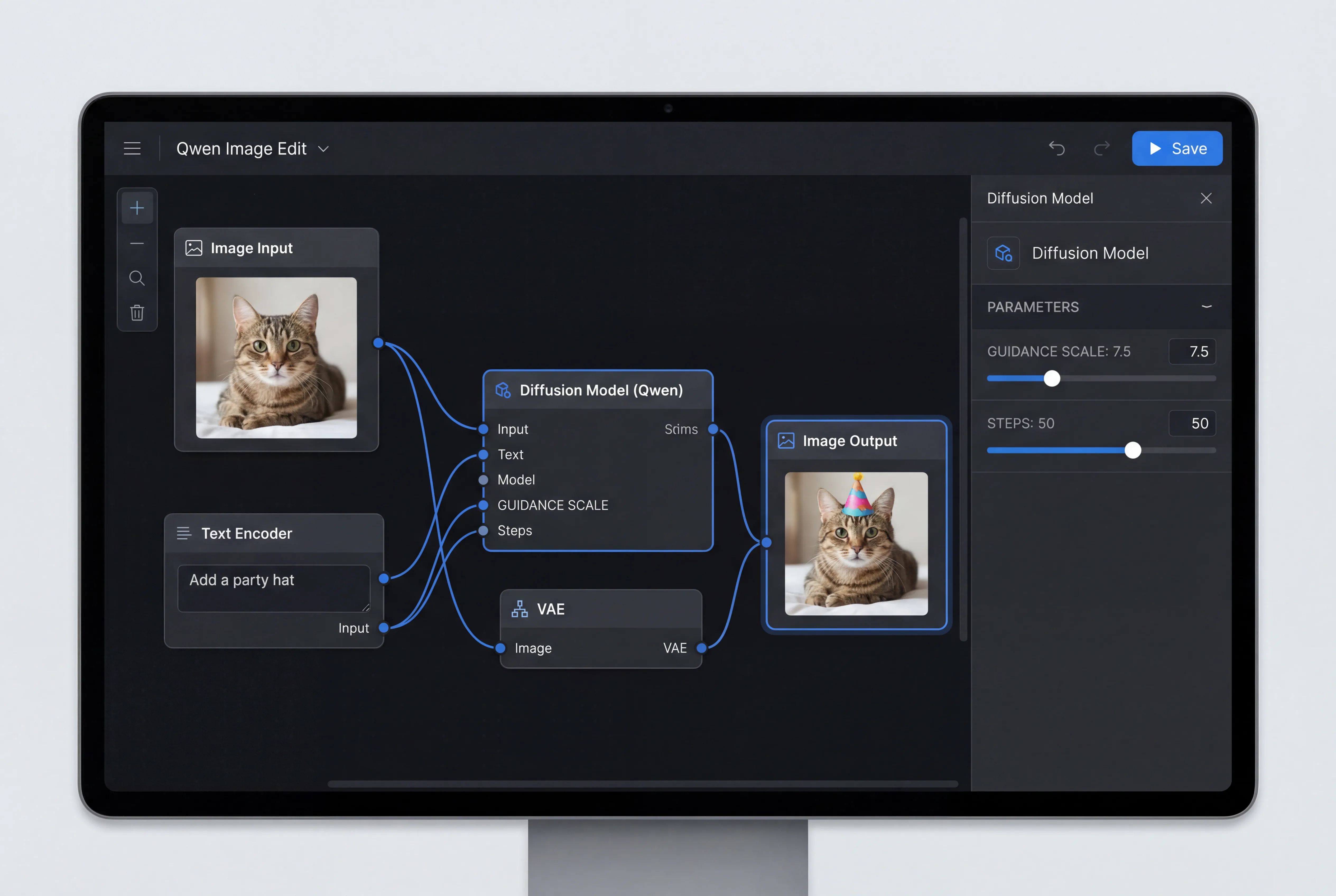
Basic Editing Tutorial
Example 1: Text Replacement
-
Upload your image containing text you want to modify
-
Craft your prompt: "Replace the text 'Welcome' with 'Hello' while maintaining the original font and color"
-
Adjust parameters:
-
Guidance Scale: 7.5 (balance between prompt adherence and image fidelity)
-
Steps: 50 (quality vs. speed trade-off)
-
-
Generate and review: Qwen Image Edit will preserve font characteristics while making the change
-
Iterate if needed: Refine your prompt for better results
Example 2: Object Removal
-
Load the image with unwanted elements
-
Describe the edit: "Remove the person in the background while preserving the natural background"
-
Generate: The model intelligently fills the area with contextually appropriate content
-
Compare results: Check that surrounding areas remain unchanged
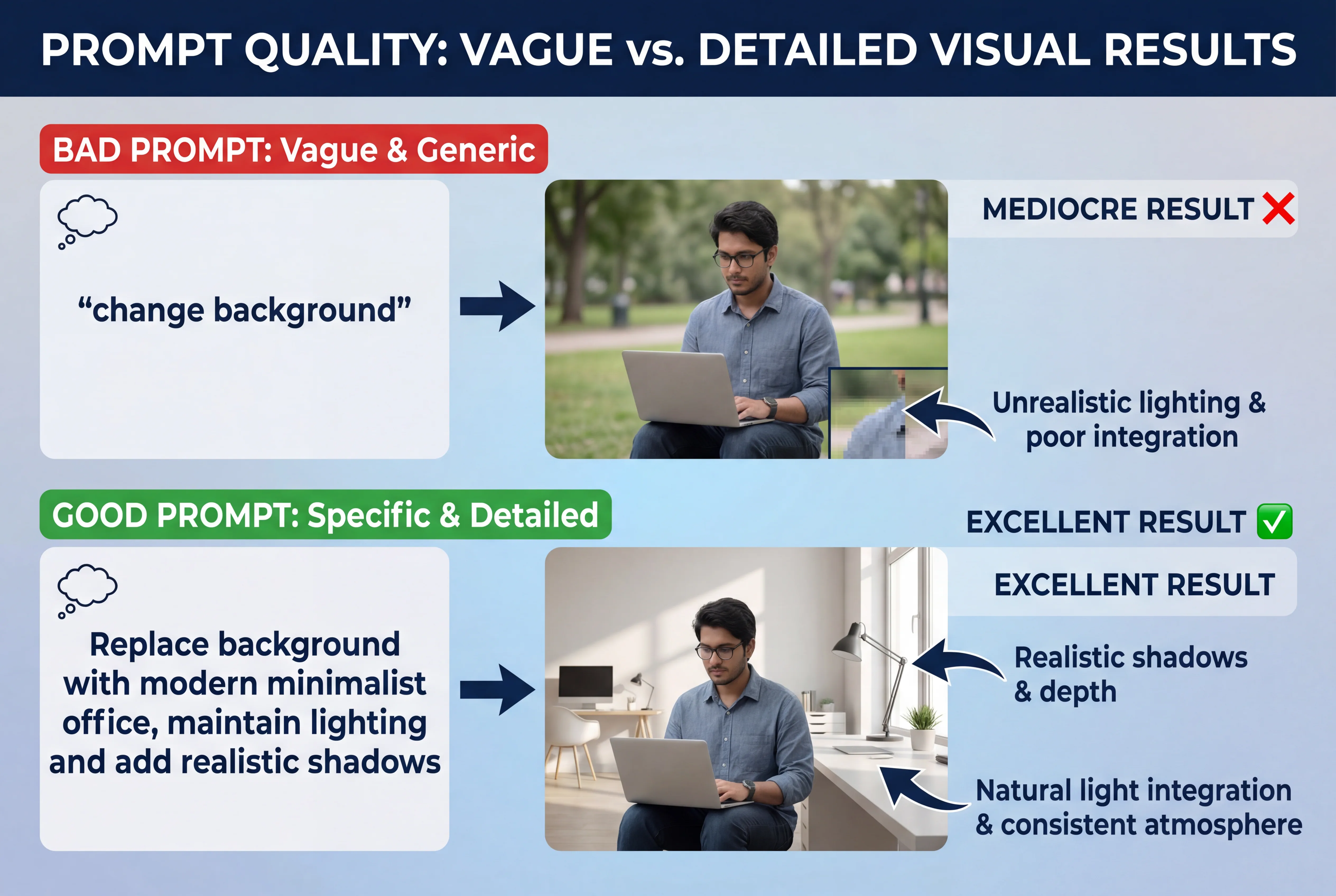
Example 3: Background Replacement
-
Prepare your image with the subject you want to keep
-
Specify the change: "Replace the background with a modern office setting, maintaining natural lighting and shadows"
-
Generate: Qwen Image Edit creates realistic integration with proper shadows and reflections
-
Fine-tune: Adjust prompt for specific background details if needed
Advanced Techniques
Multi-Step Editing Workflow
For complex edits, break down your task into sequential steps:
-
First pass: Major structural changes (background, large elements)
-
Second pass: Detail refinements (colors, small objects)
-
Final pass: Text and finishing touches
Prompt Engineering Best Practices
-
Be specific: "Change the shirt color to navy blue" vs. "Change the shirt color"
-
Specify constraints: "...while keeping the person's face unchanged"
-
Mention style requirements: "...maintaining photorealistic quality"
-
Reference details: "...preserving the original lighting and shadows"
Parameter Optimization
| Parameter | Low Value Effect | High Value Effect | Recommended Range |
|---|---|---|---|
| Guidance Scale | More creative interpretation | Stricter prompt following | 5.0 - 9.0 |
| Inference Steps | Faster, less refined | Slower, more refined | 30 - 70 |
| Strength | Minimal changes | Substantial changes | 0.5 - 0.9 |
Latest Updates: Qwen-Image-Edit-2509
In September 2025, Alibaba released Qwen-Image-Edit-2509, bringing significant enhancements to the already powerful model. This monthly iteration introduces groundbreaking features that further cement Qwen's position as a leading image editing solution.
Major New Features
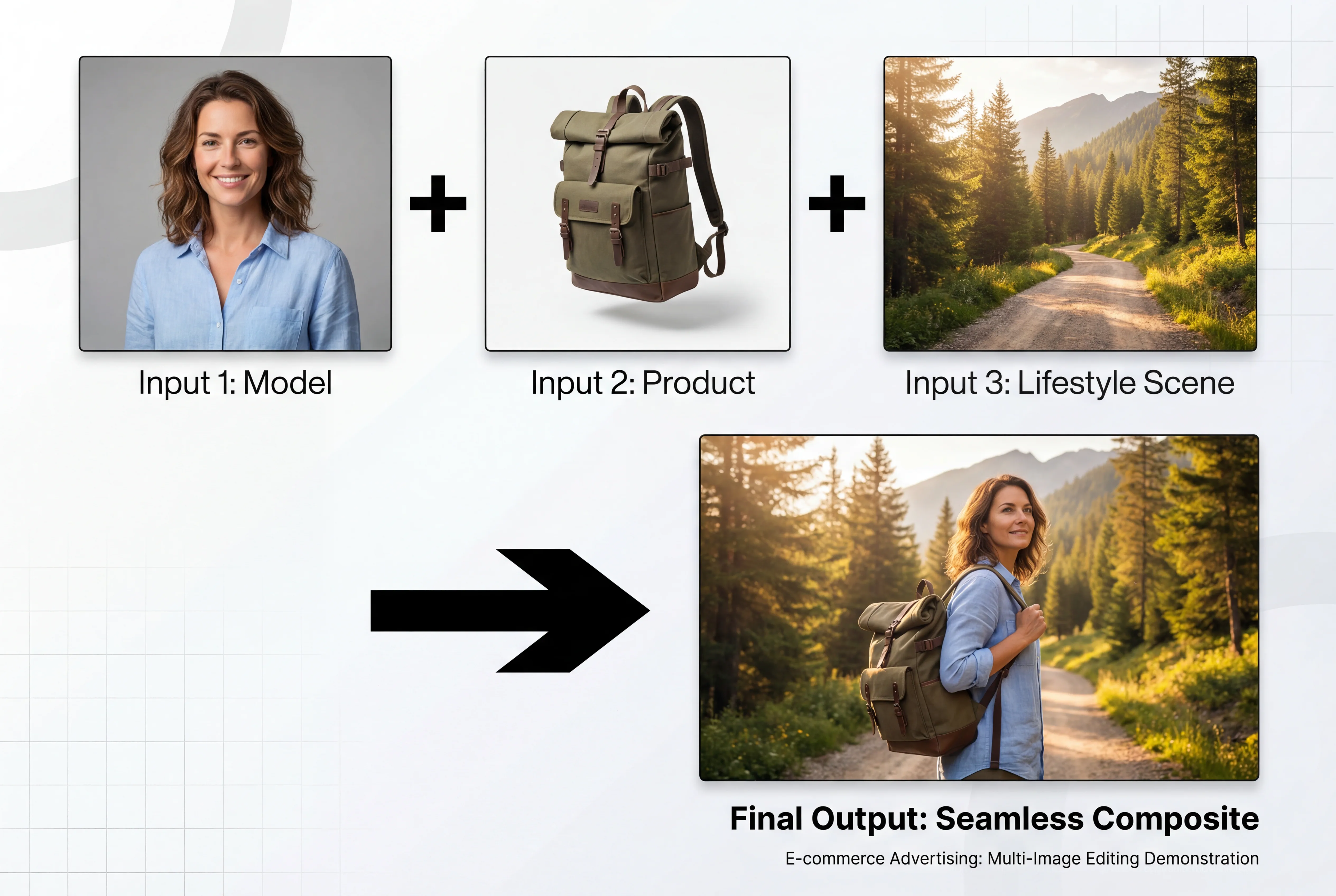
1. Multi-Image Editing Support
The most significant update enables editing with multiple input images simultaneously:
-
Person + Person: Combine multiple people into a single coherent scene
-
Person + Product: Integrate products with models naturally
-
Person + Scene: Place people into different backgrounds seamlessly
-
Product + Background: Create lifestyle product shots from separate elements
Optimal performance is achieved with 1-3 input images, allowing for complex composition scenarios that were previously impossible.
Example Use Case: A fashion brand can now combine a model photo, clothing item, and background setting into a single coherent marketing image without physical photoshoots.
2. Enhanced Consistency
Major improvements in maintaining identity and characteristics across edits:
Person Consistency:
-
Preserves facial features across different poses
-
Maintains identity during style transformations (photo to cartoon)
-
Consistent appearance in different lighting conditions
-
Reliable old photo restoration preserving original features
Product Consistency:
-
Maintains product integrity across various settings
-
Preserves brand elements and logos accurately
-
Consistent product appearance in different contexts
-
Reliable for e-commerce multi-angle generation
3. Improved Long Text Handling
Enhanced capability to render extended text passages while maintaining:
-
Character identity in portraits
-
Product integrity in commercial images
-
Background coherence
-
Natural text integration
4. Native ControlNet Support
Built-in support for various control mechanisms:
-
Depth Maps: Guide edits based on depth information
-
Edge Maps: Control modifications using edge detection
-
Keypoint Maps: Guide transformations using key feature points
-
Pose Control: Direct human pose manipulation
Version Comparison
| Feature | Original Qwen-Image-Edit | Qwen-Image-Edit-2509 |
|---|---|---|
| Input Images | Single image only | 1-3 images simultaneously |
| Person Consistency | Good | Excellent |
| Product Consistency | Good | Excellent |
| Long Text Rendering | Limited | Extended support |
| ControlNet Support | External only | Native integration |
| Training Data | Original dataset | Expanded with multi-image scenarios |
| Character Creation | Good | Enhanced with consistency |
Integration Options and Deployment
Qwen Image Edit offers flexible integration options to suit different use cases and technical requirements:
Cloud-Based Solutions
1. Official Qwen Chat
-
Pros: Zero setup, immediate access, regularly updated
-
Cons: Requires internet, potential usage limits
-
Best For: Testing, casual use, demonstrations
2. Third-Party Platforms
Platforms like Seedance AI provide enhanced interfaces with additional features:
-
Pros: User-friendly, batch processing, workflow automation, no technical setup
-
Cons: May have subscription costs for heavy usage
-
Best For: Production use, businesses, teams without ML infrastructure
3. API Integration
Access Qwen Image Edit through various API providers:
-
Official Qwen API
-
Third-party wrapper services
-
Custom deployment APIs
Pros: Scalable, programmable, integrate into existing applications
Cons: Requires API keys, usage-based pricing
Best For: Applications, websites, automated workflows
Self-Hosted Deployment
Local Installation Requirements
Minimum Specifications:
-
GPU: NVIDIA RTX 4090 (24GB VRAM) or equivalent
-
RAM: 32GB system memory
-
Storage: 100GB free space for models
-
OS: Linux (Ubuntu 20.04+), Windows 11, or macOS with compatible GPU
Recommended Specifications:
-
GPU: NVIDIA A100 (40GB) or H100
-
RAM: 64GB system memory
-
Storage: 500GB NVMe SSD
-
Multi-GPU setup for batch processing
Installation Steps:
- Install Dependencies
pip install torch torchvision transformers>=4.51.3
pip install diffusers accelerate safetensors
pip install pillow requests- Download Model Weights
# Using Hugging Face CLI
huggingface-cli download Qwen/Qwen-Image-Edit- Test Installation
from diffusers import QwenImageEditPipeline
import torch

pipeline = QwenImageEditPipeline.from_pretrained(
    "Qwen/Qwen-Image-Edit",
    torch_dtype=torch.bfloat16
)
print("Installation successful!")
Optimization Options:
-
FP8 Quantization: Reduce memory usage by ~50% with minimal quality loss
-
GGUF Format: Further compression for lower-end GPUs (requires specific loader)
-
Flash Attention: Speed up processing by 30-40%
-
Model Caching: Improve subsequent load times
ComfyUI Integration
ComfyUI provides the most flexible interface for creators and professionals:
Advantages:
-
Visual workflow design
-
Reusable node configurations
-
Batch processing capabilities
-
Integration with other AI models
-
Custom node development support
Setup Process:
-
Install ComfyUI Desktop or manual installation
-
Download Qwen Image Edit models
-
Place models in appropriate directories
-
Load or create workflow
-
Configure nodes and parameters
Popular Workflow Templates:
-
Basic single-image editing
-
Multi-image composition (2509)
-
Batch processing pipeline
-
ControlNet-guided editing
-
Style transfer workflow
Enterprise Considerations
For organizations considering Qwen Image Edit at scale:
Licensing:
-
Apache 2.0 License: Commercial use permitted
-
No usage restrictions for self-hosted deployments
-
Attribution requirements for derivative works
Scalability:
-
Horizontal scaling with multiple GPU instances
-
Load balancing for high-volume processing
-
Queue management for batch operations
-
Monitoring and logging integration
Security:
-
On-premise deployment for sensitive content
-
Data privacy compliance (GDPR, CCPA)
-
Access control and authentication
-
Audit trail capabilities
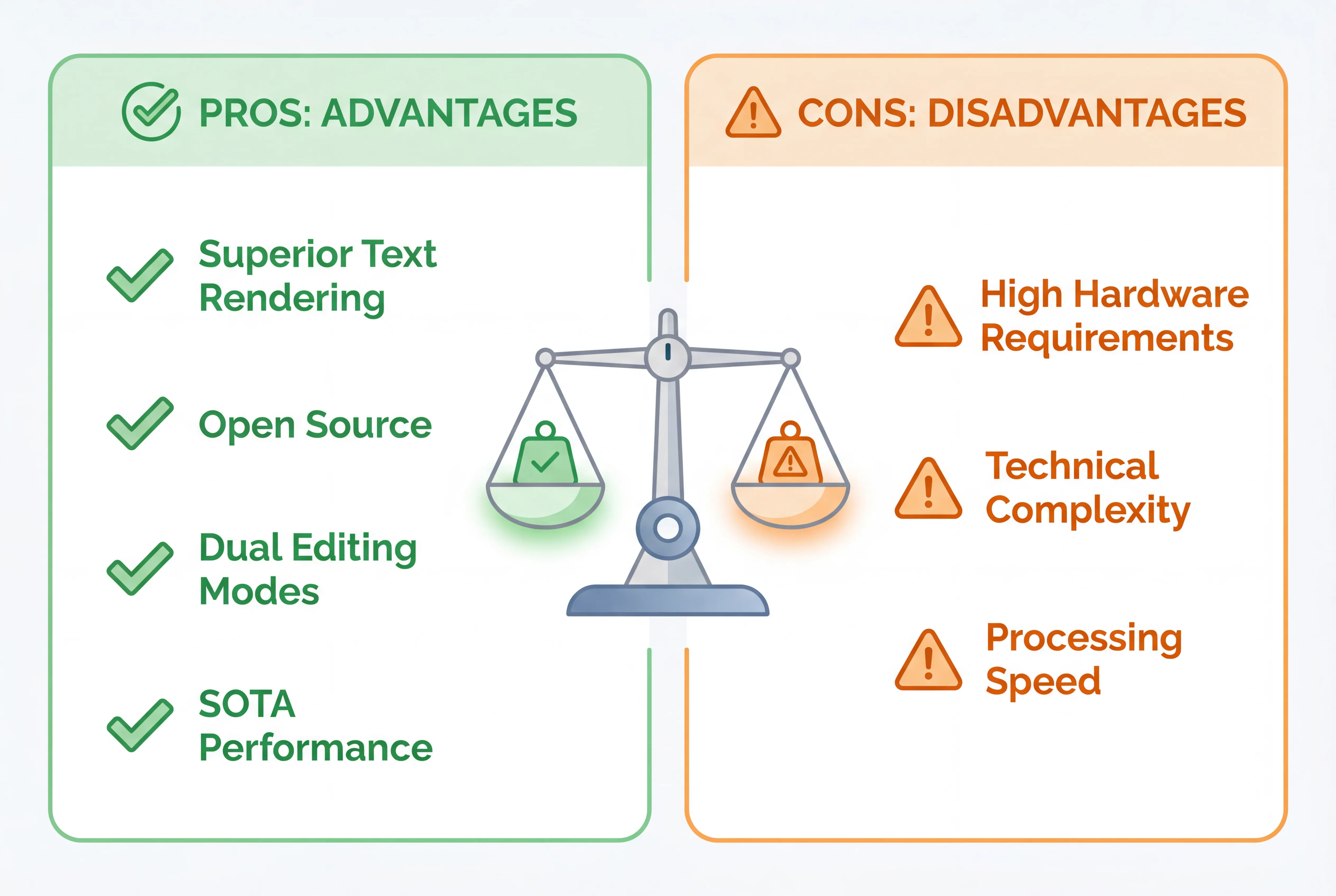
Pros and Cons Analysis
Advantages
1. Superior Text Rendering
-
Best-in-class text editing within images
-
Excellent bilingual support (Chinese and English)
-
Preserves fonts, styles, and visual characteristics
-
Handles complex layouts and paragraphs
2. Open-Source Accessibility
-
Free for self-hosting
-
Customizable and extensible
-
Active community support
-
No vendor lock-in
3. Dual Editing Capabilities
-
Semantic editing for conceptual changes
-
Appearance editing for pixel-perfect modifications
-
Flexible control over edit scope and intensity
-
Maintains consistency in unchanged regions
4. State-of-the-Art Performance
-
SOTA results across multiple benchmarks
-
Comparable quality to proprietary solutions
-
Reliable and consistent outputs
-
Strong generalization capabilities
5. Technical Innovation
-
Advanced dual-pathway architecture
-
Integration of vision-language models
-
20B parameter foundation for rich understanding
-
Regular updates and improvements
6. Versatile Applications
-
Suitable for numerous industries
-
Scales from individual use to enterprise deployment
-
Supports various workflow integrations
-
Flexible input/output formats
Disadvantages
1. Hardware Requirements
-
Requires powerful GPU for local deployment (24GB+ VRAM)
-
Memory-intensive operation
-
Not suitable for consumer-grade hardware without quantization
-
Cloud computing costs can accumulate
2. Technical Complexity
-
Steeper learning curve compared to consumer apps
-
Requires understanding of parameters and prompts
-
Setup complexity for self-hosting
-
May need technical expertise for optimization
3. Processing Speed
-
Slower than some specialized tools for simple edits
-
Inference time increases with image resolution
-
Batch processing may require queue management
-
Not ideal for real-time interactive editing
4. Limited Availability
-
Relatively new platform (August 2025)
-
Smaller ecosystem compared to established tools
-
Fewer tutorials and community resources initially
-
Integration options still developing
5. Prompt Dependency
-
Quality highly dependent on prompt engineering
-
May require iteration to achieve desired results
-
Learning curve for effective prompting
-
Inconsistent results with ambiguous instructions
6. Specialized Focus
-
Optimized primarily for editing over generation
-
May not match pure generation models in some scenarios
-
Text rendering excellence comes with model size trade-offs
-
Best results within trained domains
Practical Tips and Best Practices
Prompt Engineering Strategies
1. Structure Your Prompts Effectively
Poor Prompt: "Change the background"
Better Prompt: "Replace the current background with a modern minimalist office setting, maintaining the original lighting direction and adding realistic shadows under the subject"
Key Components:
-
Action: What to change (replace, add, remove, modify)
-
Target: Specific element to edit
-
Details: Desired characteristics
-
Constraints: What should remain unchanged
-
Style Notes: Quality or aesthetic requirements
2. Use Incremental Editing
For complex transformations, break down edits into steps:
-
Step 1: Major structural changes
-
Step 2: Color and lighting adjustments
-
Step 3: Detail refinements
-
Step 4: Text and final touches
3. Leverage Negative Prompts
Specify what you DON'T want:
-
"Remove the watermark without leaving artifacts"
-
"Change the shirt color but keep the original wrinkles and folds"
-
"Add text without obscuring the main subject"
Parameter Tuning Guide
Guidance Scale (CFG Scale):
-
3.0-5.0: More creative, looser interpretation
-
5.0-7.5: Balanced (recommended starting point)
-
7.5-10.0: Strict adherence to prompt
-
10.0+: Very literal, may reduce quality
Inference Steps:
-
20-30 steps: Quick previews, rough edits
-
40-50 steps: Standard quality (recommended)
-
60-80 steps: High quality, diminishing returns beyond this
-
Lightning models: Optimized for 4-8 steps
Edit Strength:
-
0.3-0.5: Subtle modifications, preserve most original content
-
0.5-0.7: Balanced changes (default range)
-
0.7-0.9: Significant transformations
-
0.9-1.0: Near complete reconstruction
Quality Optimization
1. Input Image Preparation
-
Use high-resolution source images (1024x1024 or higher)
-
Ensure good lighting in original
-
Clean, uncompressed formats (PNG preferred)
-
Clear subject definition
2. Iterative Refinement
-
Generate multiple variations
-
Compare results and identify best approach
-
Refine prompts based on initial results
-
Use successful edits as reference for future work
3. Batch Processing Efficiency
-
Group similar edits together
-
Create reusable workflow templates
-
Maintain consistent parameter sets
-
Document successful configurations
4. Text Editing Best Practices
-
Specify exact text to add or replace
-
Mention font style preferences when relevant
-
Indicate text position clearly
-
Consider language and character set requirements
Common Pitfalls to Avoid
❌ Overly Complex Single Prompts
Break complex edits into multiple steps instead
❌ Ignoring Unchanged Regions
Always specify what should remain consistent
❌ Wrong Resolution Expectations
Match output needs to input quality
❌ Neglecting Prompt Testing
Iterate and refine prompts for best results
❌ Inconsistent Parameters
Document and reuse successful parameter combinations
Workflow Templates
E-commerce Product Editing:
1. Background removal/replacement
2. Color correction and enhancement
3. Size standardization
4. Batch export with naming convention
Marketing Material Localization:
1. Text identification and extraction
2. Translation preparation
3. Text replacement with font matching
4. Quality verification across languages
Content Creation Pipeline:
1. Base image selection
2. Style application or modification
3. Text overlay or modification
4. Format export for different platforms
Frequently Asked Questions (FAQs)
Q1: Is Qwen Image Edit free to use?
A: Yes, Qwen Image Edit is open-source under the Apache 2.0 license. You can use it freely for both personal and commercial purposes when self-hosting. Cloud-based services may have usage-based pricing depending on the provider.
Q2: What GPU do I need to run Qwen Image Edit locally?
A: For optimal performance, an NVIDIA RTX 4090 with 24GB VRAM is recommended. However, you can run quantized versions (FP8 or GGUF) on GPUs with 16GB VRAM, though with reduced quality or speed. For production use without local hardware, consider using platforms like SeaDance AI.
Q3: Can Qwen Image Edit generate images from scratch, or only edit existing ones?
A: While Qwen Image Edit is optimized for editing existing images, it's built on the Qwen-Image foundation model that can also generate images from text. However, for pure text-to-image generation, the base Qwen-Image model is more suitable.
Q4: How does Qwen Image Edit compare to Photoshop?
A: Qwen Image Edit excels at AI-powered semantic editing and automated transformations that would require extensive manual work in Photoshop. However, Photoshop offers more precise manual control and a broader range of professional tools. They serve complementary roles: Qwen for AI-assisted bulk editing and complex transformations, Photoshop for fine-tuned manual work.
Q5: Can I use Qwen Image Edit for commercial projects?
A: Yes, the Apache 2.0 license permits commercial use. When self-hosting, there are no additional restrictions. Always review the license terms and any service-specific terms if using cloud platforms.
Q6: What languages does Qwen Image Edit support for text editing?
A: Qwen Image Edit has excellent support for Chinese and English text rendering and editing. While it can handle other languages to some extent, bilingual Chinese-English capability is its strongest feature.
Q7: How long does it take to edit an image?
A: Processing time depends on hardware and settings. On an RTX 4090 with standard settings (50 steps), expect 3-5 seconds per 1024x1024 image. Lightning models can reduce this to under 2 seconds. Higher resolutions and more steps increase processing time proportionally.
Q8: Can I edit multiple images at once?
A: Yes, Qwen Image Edit supports batch processing. The Qwen-Image-Edit-2509 version also supports multi-image input (combining 2-3 images into a single edit). Batch processing multiple separate edits depends on your implementation and hardware capabilities.
Q9: What file formats are supported?
A: Qwen Image Edit works with standard image formats including JPEG, PNG, WebP, and others. PNG is recommended for best quality, especially when transparency is involved.
Q10: How can I improve the quality of my edits?
A: Focus on three areas:
-
Better prompts: Be specific, detailed, and clear about desired changes
-
Optimal parameters: Start with recommended settings and adjust based on results
-
Quality inputs: Use high-resolution, well-lit source images
Q11: Is there a limit to image resolution?
A: While there's no hard limit, practical constraints exist based on VRAM. Most consumer GPUs handle up to 1024x1024 well. Higher resolutions require more VRAM or tiling techniques. Cloud services may impose resolution limits.
Q12: Can Qwen Image Edit preserve image metadata?
A: This depends on your implementation. The core model doesn't inherently preserve metadata, but you can implement wrapper scripts to maintain EXIF data and other metadata during the editing process.
Q13: How often is Qwen Image Edit updated?
A: Alibaba follows a monthly iteration schedule, as evidenced by the Qwen-Image-Edit-2509 release. Check official channels for update announcements and new features.
Q14: Can I fine-tune Qwen Image Edit for my specific use case?
A: Yes, as an open-source model, you can fine-tune Qwen Image Edit on your own datasets. This requires technical expertise in machine learning and significant computational resources, but can dramatically improve performance for specialized applications.
Q15: Where can I get support or report issues?
A: Support is available through:
-
GitHub issues on the official Qwen-Image repository
-
Community forums and Discord channels
-
Documentation and tutorials from the Qwen team
-
Third-party platforms may offer dedicated support channels
Conclusion: The Future of AI Image Editing
Qwen Image Edit represents a significant milestone in the evolution of AI-powered image manipulation technology. By combining state-of-the-art semantic understanding with pixel-perfect appearance control, Alibaba's Qwen team has created a tool that bridges the gap between automated AI generation and professional manual editing.
Key Takeaways
For Individuals and Creators:
-
Qwen Image Edit democratizes professional-grade image editing capabilities
-
Open-source accessibility removes cost barriers to advanced AI tools
-
Exceptional text rendering capabilities solve long-standing challenges in multilingual content creation
For Businesses and Enterprises:
-
Significant cost savings in content production and localization
-
Scalable solutions for high-volume image editing needs
-
Flexible deployment options from cloud services to on-premise installations
For Developers and Researchers:
-
Open architecture enables customization and extension
-
Strong foundation for building specialized applications
-
Active development ensures continuous improvement
Looking Ahead
The rapid evolution from the initial Qwen-Image-Edit to the 2509 version demonstrates Alibaba's commitment to advancing this technology. With monthly iterations bringing substantial improvements like multi-image editing and enhanced consistency, the future trajectory is clear: AI image editing will continue to become more powerful, accessible, and integral to creative workflows.
As models like Qwen Image Edit mature, we can anticipate:
-
Even more sophisticated semantic understanding
-
Real-time interactive editing capabilities
-
Broader integration with design and production tools
-
Enhanced consistency across editing sessions
-
More efficient models requiring less computational resources
Getting Started Today
Whether you're a graphic designer looking to streamline your workflow, an e-commerce business needing to scale product photography, or a developer building the next generation of creative tools, Qwen Image Edit offers compelling capabilities worth exploring.
For those ready to dive in, start with accessible platforms like Seedance AI to experience the technology firsthand, then consider deeper integration options as your needs grow. The combination of powerful capabilities, open-source flexibility, and active development makes Qwen Image Edit a technology worth watching—and using—in 2025 and beyond.
The revolution in AI-powered image editing is here, and Qwen Image Edit is leading the charge. The question isn't whether to adopt these technologies, but how quickly you can integrate them into your creative process to stay competitive in an increasingly AI-driven visual landscape.
Ready to transform your image editing workflow? Explore Qwen Image Edit today and discover how AI can elevate your creative capabilities to unprecedented levels.