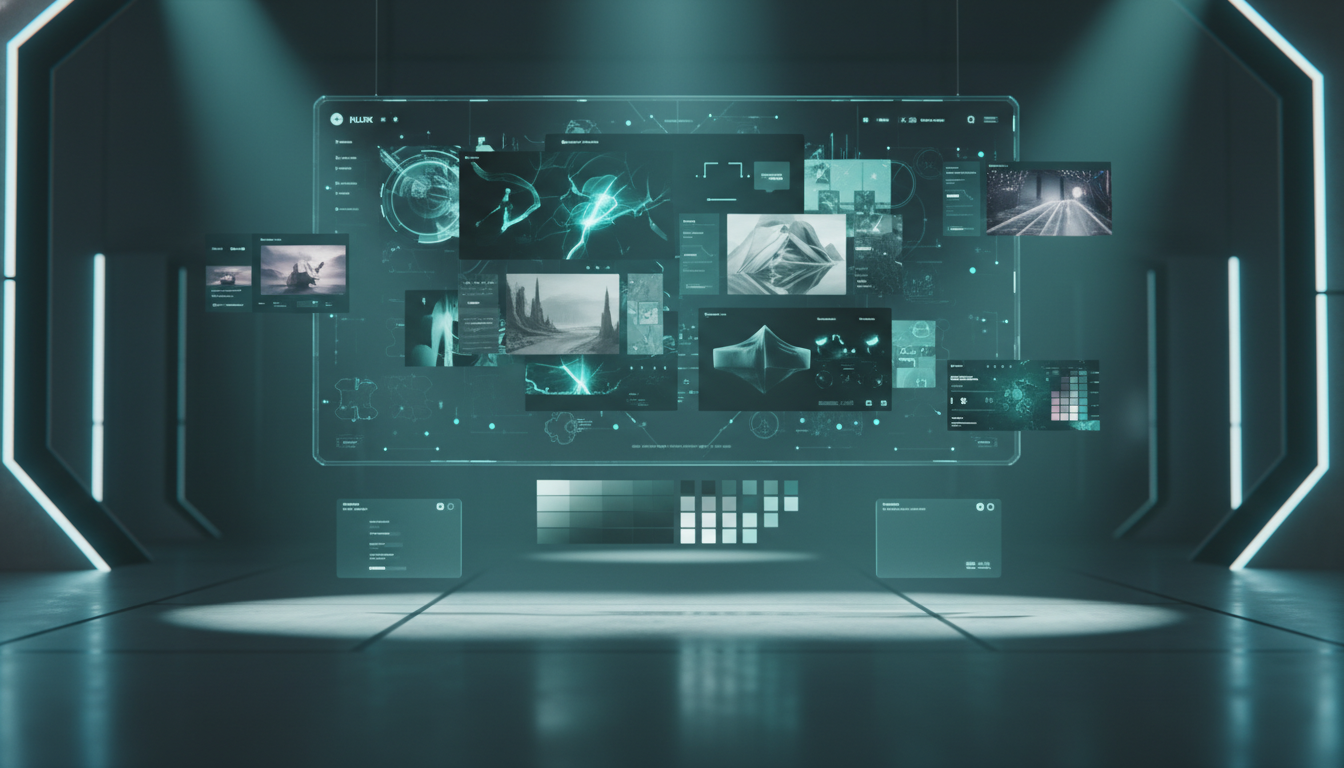
A visual overview of FLUX.2 as a modern image-generation system built around control, references, and production-ready output.
If you searched for "FLUX.2," the short answer is simple: FLUX.2 is one of the most production-oriented AI image families available in 2026. It is not just one model. It is a stack of variants from Black Forest Labs, each tuned for a different job: final-quality hero images, high-volume generation, typography-heavy layouts, open-weight local workflows, and sub-second interactive use.
That distinction matters because many articles flatten FLUX.2 into a single "review" and miss the real buying decision: which FLUX.2 variant fits your workflow, budget, latency target, and control requirements? This guide focuses on that decision. It is based on Black Forest Labs documentation, model pages, release notes, and the official FLUX.2 inference repository current as of March 19, 2026.
Here is the practical recommendation up front:
- Choose FLUX.2 [pro] if you want the default hosted production option.
- Choose FLUX.2 [flex] if readable text, precise prompt control, and small-detail preservation matter most.
- Choose FLUX.2 [max] if you want the strongest prompt following, the best final-quality output, and grounded generation with real-time web context.
- Choose FLUX.2 [klein] if you care most about latency, high volume, or consumer-GPU deployment.
- Choose FLUX.2 [dev] if you need open weights for local experimentation, research, or custom workflows.
What FLUX.2 Actually Is
FLUX.2 is Black Forest Labs' next-generation image generation and editing family. The core pitch is not only photorealism. It is controlled photorealism: generation and editing with multi-reference support, exact color matching, structured prompting, pose guidance, and high-resolution output up to 4MP.
In practice, FLUX.2 is strongest when you need one or more of these outcomes:
- Consistent characters or products across multiple images
- More reliable text rendering for posters, packaging, UI, or infographics
- Better prompt adherence than "vibe-first" generators
- Hosted production speed without giving up editing quality
- A local or open-weight path for teams that do not want to depend entirely on a closed endpoint
That is why FLUX.2 shows up across very different workflows:
- Product marketing and catalog generation
- Brand-consistent ad variants
- Storyboarding and pre-visualization
- UI mockups and typography-heavy design work
- Character-consistent entertainment assets
- Interactive apps that need image generation fast enough to feel real time
FLUX.2 Models at a Glance
The most important thing to understand is that FLUX.2 is a family, not a single SKU.
| Model | Best for | Reference image support | Standout capability | Deployment |
|---|---|---|---|---|
| FLUX.2 [max] | Highest-quality final assets | Up to 8 via API, up to 10 in Playground | Grounding search with real-time web context | Hosted |
| FLUX.2 [pro] | Production workflows at scale | Up to 8 via API, up to 10 in Playground | Best default balance of speed and quality | Hosted |
| FLUX.2 [flex] | Typography, detail preservation, prompt control | Up to 10 | Adjustable steps and guidance | Hosted |
| FLUX.2 [dev] | Local development and customization | Recommended max 6 | Open weights and full customization | Self-hosted |
| FLUX.2 [klein] 4B / 9B | Real-time and high-volume generation | Up to 4 | Sub-second inference on capable hardware | API or local |
A few details are easy to miss but important in real usage:
max,pro, andflexare the hosted premium path.flexis the only hosted FLUX.2 variant with exposedstepsandguidancecontrols.kleinis not merely a cheaper version. It is a latency-oriented branch designed for interactive products.devis not the best choice for a non-technical team that just wants images fast. It matters when ownership and customization matter more than convenience.
If you want the shortest visual summary of the family, this chart is the right mental model:
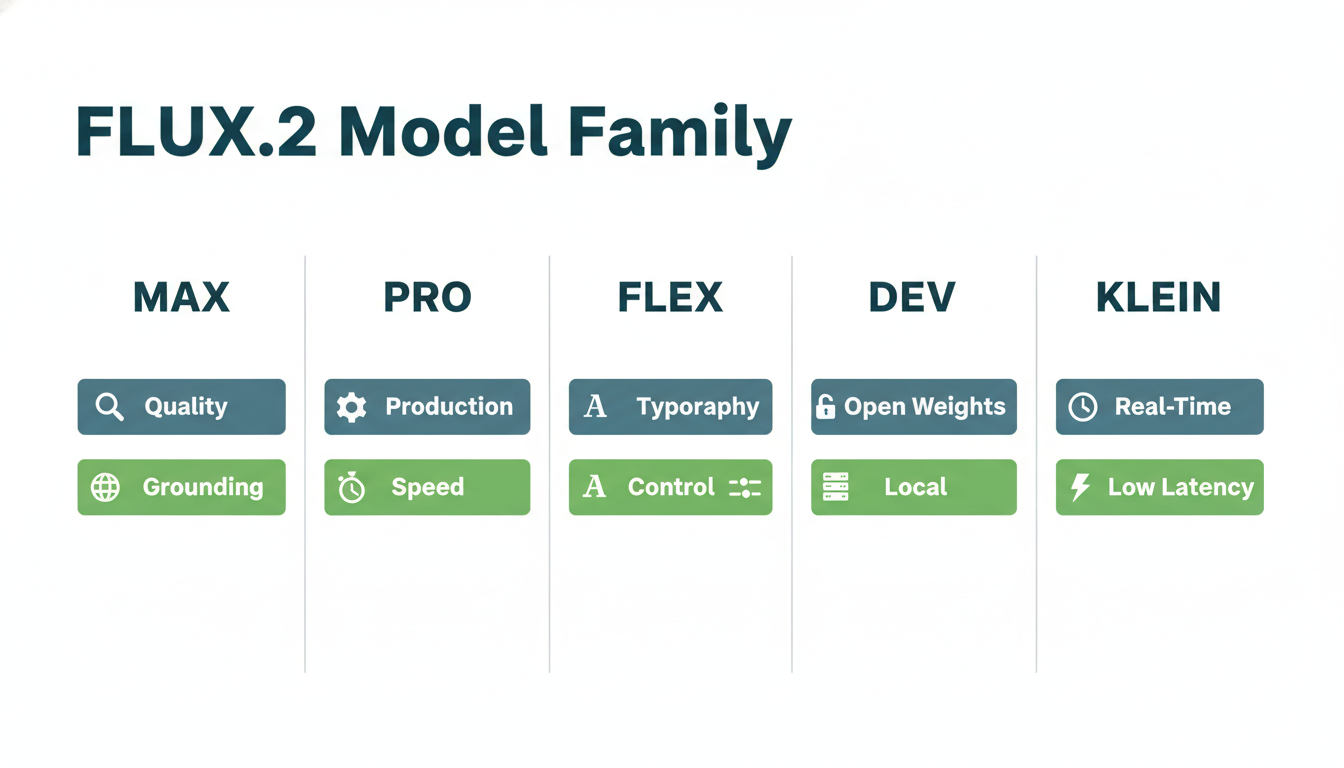
Use this as a quick filter: pro for general production, flex for text and control, max for premium finals, dev for open workflows, and klein for low-latency generation.
What Changed Recently in 2026
If you read older FLUX.2 articles, many are already outdated because Black Forest Labs shipped several meaningful updates after the initial FLUX.2 rollout.
January 15, 2026: FLUX.2 [klein] launched
This was the biggest expansion of the family. klein introduced:
- Sub-second inference for interactive generation
- Two main sizes, 4B and 9B
- Consumer-GPU viability, with the 4B line positioned around ~13GB VRAM
- A clearer split between open, fast deployment and premium hosted models
For teams building creative tools, demos, personalization features, or internal prototyping utilities, klein made FLUX.2 much more practical.
January 29, 2026: FLUX.2 [flex] got faster
Black Forest Labs reported that flex became up to 3x faster while preserving the same quality. That matters because flex is the control-heavy model, and historically the control-heavy option is the one users abandon first when latency becomes annoying.
March 3, 2026: FLUX.2 [pro] got faster
Black Forest Labs reported that pro is now approximately 2x faster across text-to-image and image editing, with no quality loss and no price change. They also introduced the flux-2-pro-preview endpoint for the newest improvements while keeping the original flux-2-pro endpoint as a more stable snapshot for reproducibility.
For most teams, this update strengthens the case for pro as the default first model to evaluate.
Where FLUX.2 Is Strongest
The most useful way to evaluate FLUX.2 is not "Is it the best image model?" but "What jobs does it handle especially well?"
1. Multi-reference generation and editing
Black Forest Labs built FLUX.2 around in-context control. The official docs position the family around the ability to combine multiple source images while maintaining identity across complex scenes.
That makes FLUX.2 unusually practical for:
- Product shots in multiple environments
- Ad variants that keep the same face or item consistent
- Fashion or editorial campaigns with stable styling
- Composite scenes where one image defines the subject, another the style, and another the setting
This is a big reason FLUX.2 feels more like a production tool than a toy.
2. Text and typography
flex is explicitly positioned as the strongest FLUX.2 option for typography. If your work includes readable text in images, labels, packaging, posters, or UI-style mockups, this is one of the clearest reasons to prefer FLUX.2 over more aesthetic but less controllable generators.
3. Exact color control
FLUX.2 supports hex color matching, which is a small feature with outsized business value. Brand work breaks quickly when colors drift. If you are generating product variants, cosmetics, packaging, or campaign visuals, being able to attach a specific hex value to a specific object is more useful than generic "make it more red" prompting.
4. Structured prompting
For automation and repeatability, structured prompting matters more than raw image quality. FLUX.2 supports JSON-style prompting for scenarios where you want a prompt to behave more like a spec than a paragraph.
5. Grounded generation on max
max adds grounding search, which means it can pull in real-time web context for current events, products, places, or styles. That is not something you need for every project, but it is extremely useful when your prompt depends on time-sensitive information.
Where FLUX.2 Still Has Limits
No complete guide should pretend the model is perfect. FLUX.2 is strong, but it has boundaries that affect real projects.
Negative prompts are not the answer
Black Forest Labs' prompt guides are explicit: FLUX.2 does not support negative prompts in the usual way users expect. You should describe the visual result you want, not a list of things to remove.
That means these pairs are not equivalent:
- Bad:
no crowd, no blur, no clutter - Better:
quiet empty plaza, sharp focus throughout, minimal clean composition
This is a workflow shift for users coming from older diffusion habits.
Variant differences are meaningful
Many posts online say "FLUX.2 supports up to 10 references" without clarifying that limits vary by model and interface. That shortcut creates confusion. In practice:
kleinis limited to up to 4 reference imagesmaxandproare up to 8 by API and up to 10 in Playgroundflexreaches up to 10 reference imagesdevis best treated more conservatively, with around 6 as the recommended maximum
Hosted quality vs local control is still a tradeoff
If you want the easiest high-end experience, you will likely start with hosted pro, flex, or max. If you want local control, lower long-run cost, or custom training paths, you move toward dev or klein. There is no single winner for every team.
How to Prompt FLUX.2 Better
This is the part many guides underserve. Better results with FLUX.2 come less from magical prompt hacks and more from clear visual specification.
Black Forest Labs recommends a simple structure:
Subject + Action + Style + Context
That framework works because it keeps the prompt visual and ordered.
Before you think about advanced controls, it helps to see the structure as a compact checklist:
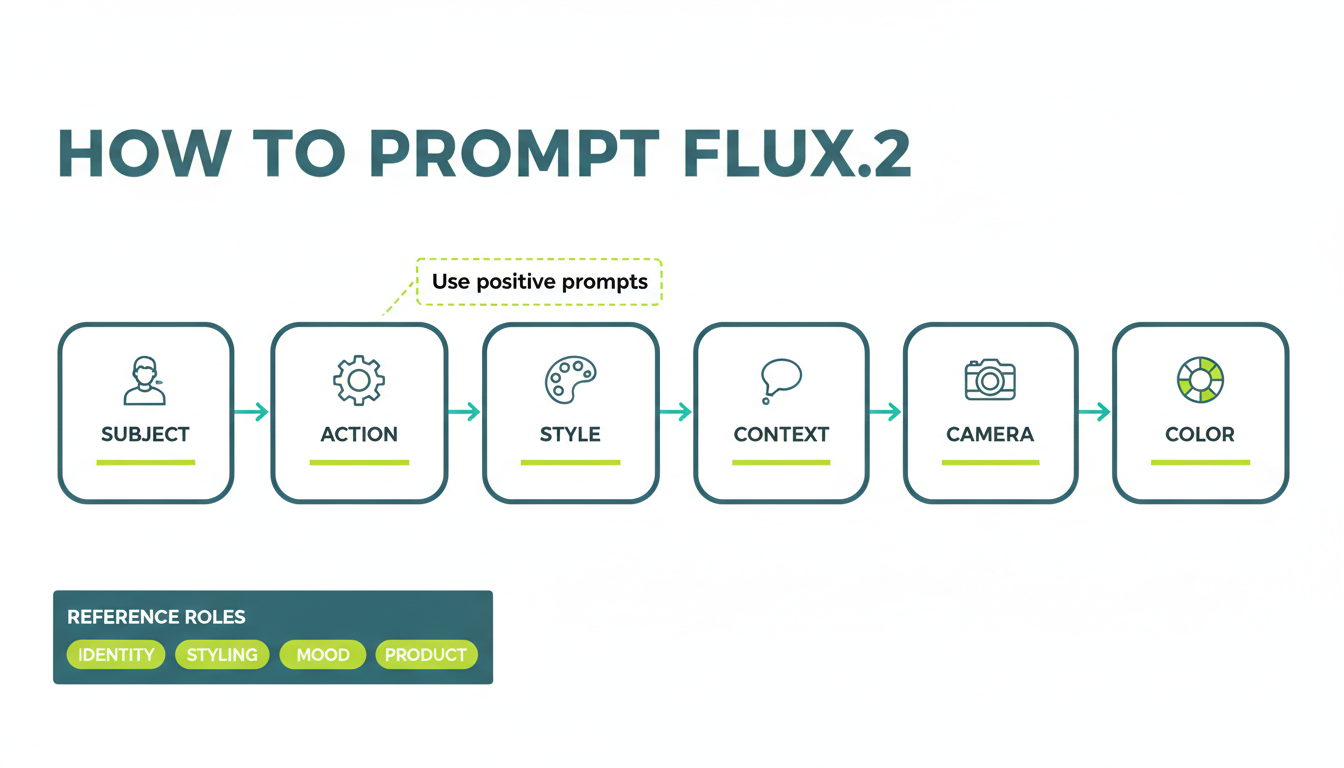
The prompt order matters. Start with the main subject, then lock the action, visual style, and context before adding camera, color, and reference-role details.
Put the most important thing first
FLUX.2 pays more attention to what comes first. Front-load the prompt with:
- Main subject
- Key action or pose
- Critical style direction
- Essential setting and lighting
- Secondary details
For example:
Premium skincare bottle standing on matte stone, front-facing pack shot, soft top light, clean gray studio background, sharp label typography, luxury commercial photographyThis works better than a long prompt that buries the product under atmosphere and filler.
Use medium-length prompts for most work
Black Forest Labs' guide suggests:
- 10 to 30 words for fast concept exploration
- 30 to 80 words for most production work
- 80+ words for complex scenes that truly need detail
Long prompts are not automatically better. If every sentence is not pulling visual weight, you are usually adding noise.
Describe text clearly
If you need readable text inside the image:
- Put the words in quotation marks
- Say where the text appears
- Say what material or style the text should use
Example:
Minimal storefront at night, the text "OPEN LATE" appears in bright red neon above the door, clean black facade, rainy sidewalk reflections, cinematic street photographyUse positive prompts instead of negative prompts
Instead of saying what to avoid, describe the replacement image.
- Instead of
no people, writeempty street - Instead of
no blur, writesharp focus throughout - Instead of
no clutter, writeminimal clean composition
Add camera and lighting references for photorealism
For more realistic results, FLUX.2 responds well to:
- Camera names
- Lens lengths like
35mmor85mm - Aperture values like
f/2.8 - Lighting styles like
Rembrandt lightingorgolden hour - Film or era cues like
Kodak Portra 400or2000s digicam
Assign clear roles to reference images
If you use multiple references, do not upload them and hope for the best. State the role of each one in plain language.
A practical mental model is:
- Image 1 = subject identity
- Image 2 = styling or wardrobe
- Image 3 = background or mood
- Image 4 = product details or brand cues
Use flex when you need control over detail vs speed
flex exposes two controls that matter a lot:
steps: up to 50. Higher usually means more detail and more latency.guidance: 1.5 to 10, default 4.5. Higher guidance means tighter prompt adherence.
A practical rule of thumb:
- Use higher
stepswhen typography and fine texture matter. - Increase
guidancewhen the model keeps drifting away from your spec. - Do not max both values by default. Start with the default mindset, then adjust only when the output misses in a specific way.
Here is a structured prompt example for production work:
{
  "subject": "electric teal running shoe",
  "action": "3/4 angle hero pack shot",
  "background": "wet night street with reflected neon",
  "lighting": "soft key light from upper left, subtle rim light",
  "text": "the billboard in the background reads \"LIMITLESS ENERGY\"",
  "style": "premium commercial photography",
  "camera": "shot on Sony A7IV, 50mm lens, f/4",
  "color": "shoe upper uses hex #00B7B2"
}
Pricing, Hardware, and Deployment Reality
A complete FLUX.2 guide also needs to answer the operational questions: How much does it cost, and where should you run it?
Official pricing direction
Black Forest Labs uses credit-based pricing, with 1 credit = $0.01 USD, and FLUX.2 pricing scales with model and resolution.
At a high level, official documentation describes the family like this:
| Model | Official pricing direction | What that means in practice |
|---|---|---|
| FLUX.2 [max] | From $0.07 / MP | Premium final-output tier |
| FLUX.2 [pro] | From $0.03 / MP | Default hosted production value tier |
| FLUX.2 [flex] | $0.06 / MP | Pay more for control and typography |
| FLUX.2 [klein] 4B | From $0.014 / image | Lowest-cost interactive hosted option |
| FLUX.2 [klein] 9B | From $0.015 / image | Better quality-speed balance than 4B |
| FLUX.2 [dev] | Free for non-commercial local use | Self-hosted experimentation path |
For hosted work, remember that resolution matters. A 4MP image costs more than a 1MP image, so the "best" model on paper is not always the best model for your actual budget.
Licensing and ownership considerations
This is another area where shortcuts online cause mistakes.
devis the open-weight route, but it is not a blanket commercial license by default.klein 4Bis Apache 2.0.klein 9Buses FLUX NCL.- Hosted commercial usage depends on the provider and the terms of the endpoint you choose.
If you are building a business workflow, treat licensing as part of model selection, not something to read later.
Local vs hosted: which is smarter?
| If you need... | Better starting point | Why |
|---|---|---|
| Lowest friction and strong quality | FLUX.2 [pro] | Good default balance of quality and speed |
| Best final image quality | FLUX.2 [max] | Strongest prompt following and grounding |
| Text-heavy design work | FLUX.2 [flex] | Better control over typography and detail |
| Real-time or very high-volume generation | FLUX.2 [klein] | Sub-second and cost-efficient |
| Self-hosting, experimentation, custom training direction | FLUX.2 [dev] | Open weights and local control |
In other words, the right FLUX.2 model is mostly a workflow decision, not a leaderboard decision.
How to Choose the Right FLUX.2 Variant
If you do not want to overthink it, use this simple decision framework.
Start with pro if you are unsure
pro is the safest first evaluation model for most teams because it now benefits from the March 3, 2026 speed upgrade, stays production-friendly, and does not force users into control tuning.
Move to flex if your images include text or strict layouts
Use flex when you are creating:
- Posters
- Packaging
- UI and product mockups
- Infographics
- Marketing layouts where small text must remain legible
Move to max when the final asset matters more than cost
Use max when you care about:
- Highest-stakes hero visuals
- Stronger prompt faithfulness
- Real-time grounded generation for current information
- Final-candidate assets rather than broad exploration
Move to klein when latency is the product
Use klein when your product needs generation to feel immediate:
- Consumer apps
- Internal creative tools
- Bulk variation systems
- Fast experimentation loops
- Edge or local deployment on smaller hardware
Move to dev when control matters more than convenience
Use dev if your team wants:
- Open-weight experimentation
- A local-first stack
- Fine-tuning or research-oriented workflows
- More direct ownership over how the model is deployed
Using FLUX.2 on Seedance AI
If you want to use FLUX.2 without managing BFL organizations, credits, and endpoint selection yourself, the simplest path is to use it through Seedance AI's FLUX.2 workspace.
The natural positioning for Seedance AI inside this workflow is clear: it is a one-stop AI creation platform where FLUX.2 can sit alongside other image and video models instead of becoming an isolated tool in your stack. That is especially useful if your real workflow looks like this:
- Generate product or campaign visuals with FLUX.2
- Turn the winning static assets into motion with an AI video model
- Compare outputs across multiple model families without rebuilding the workflow each time
- Keep image generation inside the same environment where your broader creative pipeline already runs
For many teams, that operational convenience matters as much as small quality differences between endpoints.
FAQ
FLUX.2 vs Midjourney: which is better?
It depends on the job. Midjourney is still strong for stylized aesthetic exploration. FLUX.2 is usually the better fit when you need multi-reference control, more dependable typography, brand color precision, editing workflows, or a clearer path from experimentation to production.
Which FLUX.2 variant is best for readable text?
Start with FLUX.2 [flex]. It is the variant Black Forest Labs explicitly positions around typography and fine-grained control.
FLUX.2 pricing: how much does it cost?
Official hosted pricing depends on the variant and output size. As summarized above, max starts from $0.07 / MP, pro from $0.03 / MP, flex is $0.06 / MP, and klein starts around $0.014 to $0.015 per image depending on the model size.
Can you run FLUX.2 locally?
Yes, but the answer depends on the variant. dev is the open-weight local path for advanced users. klein is the local path if speed and lighter hardware requirements matter most, with the 4B model positioned for consumer hardware around the 13GB VRAM range.
Does FLUX.2 support negative prompts?
No, not in the usual way people expect. The official guidance is to describe the positive visual result you want instead of listing what to avoid.
Is FLUX.2 good for brand-consistent campaign work?
Yes. That is one of its clearest strengths because the family is built around multi-reference generation, exact color control, and more structured prompting than many vibe-driven tools.
Final Verdict
As of March 19, 2026, the strongest way to think about FLUX.2 is this: it is not a single "best image generator" claim. It is a well-designed model family that covers several serious production scenarios unusually well.
Its core advantages are practical, not hype-driven:
- Clear model segmentation for different workflows
- Strong multi-reference editing and generation
- Better support for readable text than many competitors
- Useful control features like hex color matching, structured prompts, and pose guidance
- A real choice between hosted convenience and local deployment
If you only remember one takeaway, make it this one: start with pro, move to flex for text-heavy work, move to max for premium finals, and move to klein or dev when latency or ownership matters more than convenience.
That decision framework will take you further than any generic "FLUX.2 review score" ever will.