For years, the promise of AI video generation has come with a significant caveat: the "Silent Movie" problem. While models could generate stunning visuals—dragons soaring over castles, cyber-punk cityscapes, or photorealistic human portraits—the output was always eerily silent. Creators were forced to stitch together visuals with separate AI music tools, voiceover generators, and sound effect libraries, often resulting in disjointed, "uncanny valley" content where lips moved but didn't quite match the words.
Enter Kling 2.6.
Released by Kuaishou Technology, Kling 2.6 isn't just another incremental update in the crowded AI video race. It represents a paradigm shift: native audio-visual generation. For the first time, an accessible, production-grade model allows you to "hear the picture and see the sound," generating synchronized dialogue, ambient noise, and sound effects in the same pass as the video pixels.
If you are tired of the complex workflow of stitching video and audio separately, this comprehensive review will show you why Kling 2.6 might be the tool that finally streamlines your production pipeline. We’ll dive deep into its capabilities, compare it directly with giants like Sora 2 and Veo 3.1, and help you decide if it’s worth your time and budget.
What is Kling 2.6?
Kling 2.6 is the latest iteration of the Kling AI video generation model developed by the Chinese tech giant Kuaishou. While its predecessors (Kling 1.0 through 1.6) established a reputation for high-quality motion and cinematic aesthetics, version 2.6 is positioned specifically as an "Audio-Visual" breakthrough.
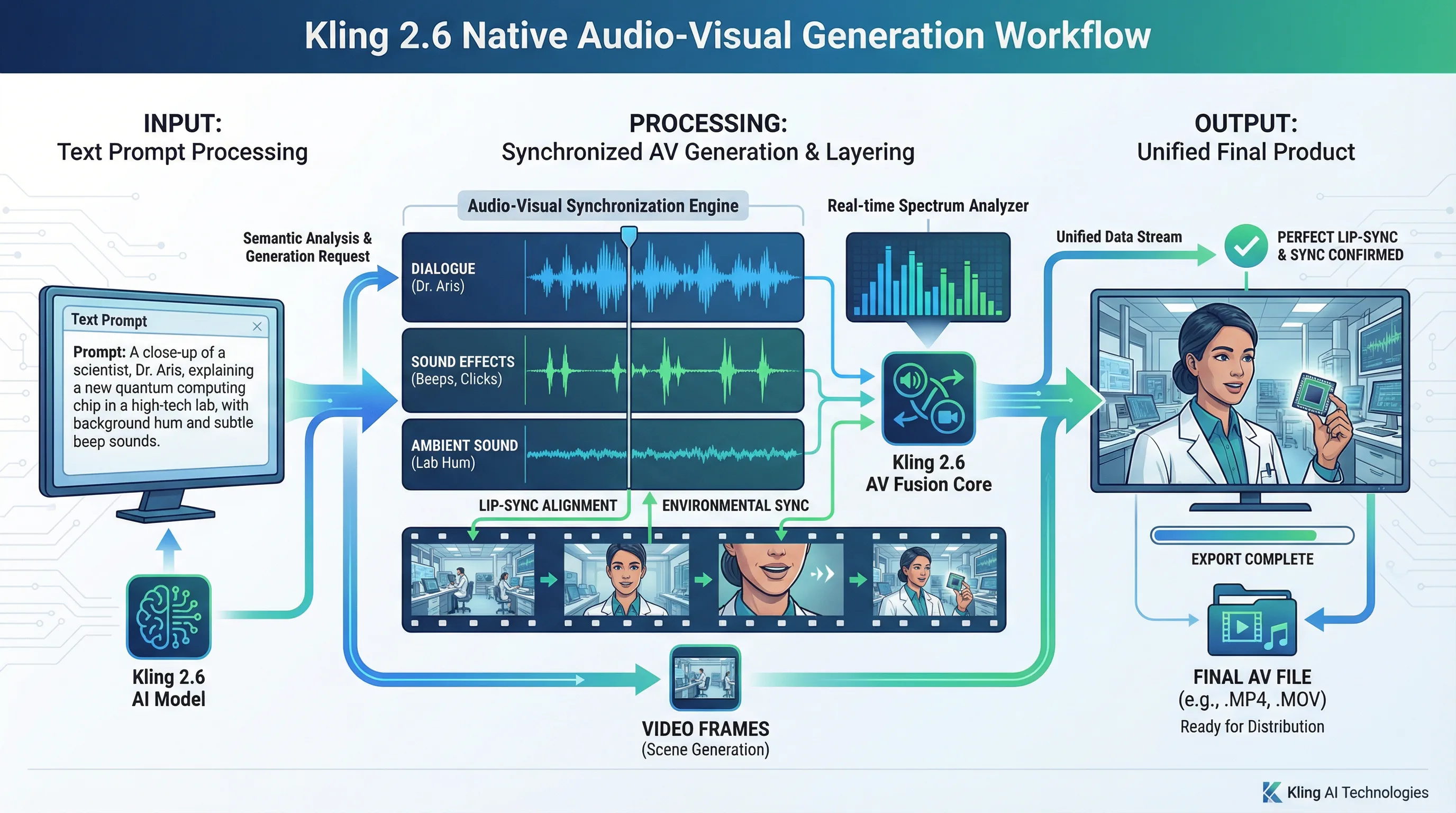
Unlike traditional pipelines that generate video first and then attempt to layer audio on top, Kling 2.6 understands the semantic relationship between sound and visuals. If you prompt for "a dog barking at a passing car," the model generates the visual of the dog, the motion of the bark, and the sound of the bark simultaneously. This ensures frame-accurate synchronization that post-processing methods struggle to achieve.
The Evolution: Why 2.6 Matters
-
Kling 1.0 - 1.5: Proved high-fidelity motion and 1080p generation.
-
Kling 1.6: Introduced better prompt adherence and longer durations.
-
Kling 2.6: Integrates the "auditory dimension," supporting bilingual dialogue (Chinese/English), synchronized lip movements, and environmental soundscapes.
Core Features & Capabilities
Kling 2.6 is a powerhouse of features designed for modern content creators. Here is what makes it tick.
1. Native Audio Generation
This is the headline feature. The model generates audio waveforms alongside video frames.
-
Dialogue: You can input specific lines of dialogue, and characters will speak them with appropriate emotional tone and lip synchronization. Currently, it excels in English and Chinese.
-
Sound Effects (SFX): Actions in the video trigger corresponding sounds—footsteps on gravel, glasses clinking, or explosions.
-
Ambient Sound: It automatically fills the silence with room tone, wind, traffic, or nature sounds suitable for the scene context.
2. High-Fidelity Text-to-Video
Even without audio, the visual generation quality has leaped forward. Kling 2.6 offers superior lighting, texture rendering, and camera movement compared to version 1.6. It handles complex lighting scenarios (like cinematic bokeh or neon reflections) with professional-grade polish.
3. Image-to-Video with Motion Control
One of the most powerful workflows for professionals is Image-to-Video (I2V). You can upload a mid-journey or Stable Diffusion generated image and have Kling 2.6 animate it.
-
Character Consistency: Because you start with a reference image, facial consistency is maintained throughout the shot.
-
Motion Brush: Users can define specific areas of the image to move (e.g., waving hair) while keeping other areas static, offering granular control over the animation.
4. Bilingual Support
Kuaishou has optimized the model for both English and Chinese prompts and dialogue. This makes it one of the few top-tier models that handles Asian languages natively with high accuracy, rather than relying on translation layers that often miss cultural nuances.
Kling 2.6 vs. The Giants: Sora 2 and Veo 3.1
The AI video landscape in 2026 is fiercely competitive. While OpenAI's Sora 2 and Google's Veo 3.1 are technological marvels, Kling 2.6 holds a unique position, particularly regarding accessibility and audio integration.
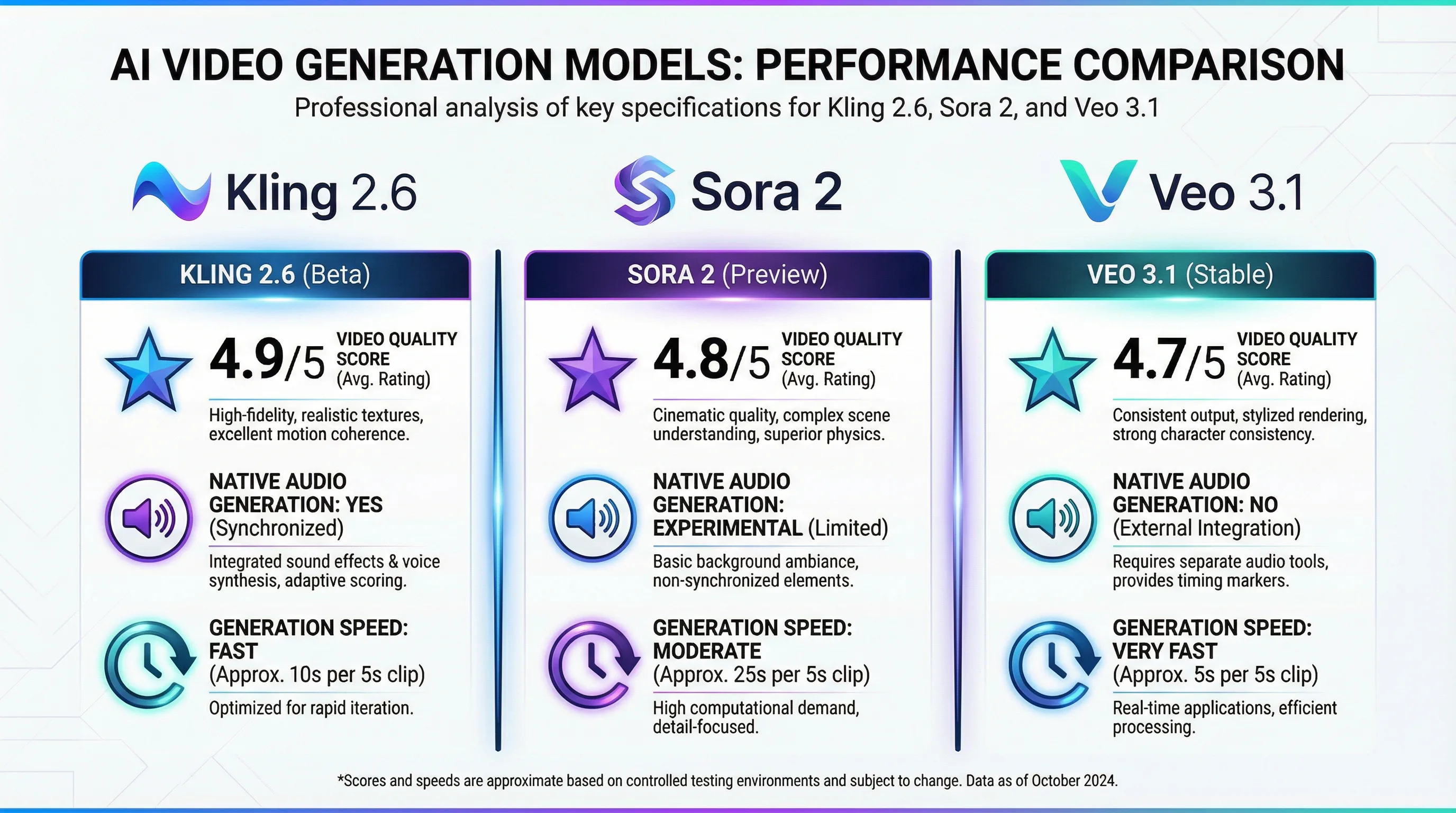
To see the model in action and try it yourself, you can visit Kling 2.6 on Seedance AI which offers streamlined access to these capabilities.
Detailed Feature Comparison
| Feature | Kling 2.6 | Sora 2 (OpenAI) | Veo 3.1 (Google) | Wan 2.6 (Alibaba) |
|---|---|---|---|---|
| Native Audio | Excellent. Syncs dialogue, SFX, and ambience in one pass. | Good, but often requires separate prompt layers. | Very Strong, integrates with YouTube data. | Good, but focuses more on music/rhythm. |
| Visual Realism | Cinematic. High contrast, stylized lighting. "Movie look." | Photorealistic. Best physics simulation in the industry. | Natural/Broadcast style. Very clean. | Artistic/Creative. Good for stylized content. |
| Access | High Availability. Public API and web interface open to all. | Restricted. Mostly research preview/limited rollouts. | Limited. Available in Workspace Labs/Vertex AI. | Open weights available (Open Source). |
| Generation Speed | Moderate. (Can be slow during peak hours). | Slow. Extremely compute-heavy. | Fast. Optimized for Google Cloud TPU. | Fast. |
| Max Duration | 5s - 10s (extendable to 3 mins). | Up to 1 minute native. | Up to 1 minute+. | Variable. |
| Pricing | Credit-based ($0.07 - $0.14/sec via API). | Expensive (High tier sub required). | Enterprise pricing / Vertex AI costs. | Free (if self-hosted) / Low cost via APIs. |
| Best For | Creators & Marketers. Ads, social media, short films. | Researchers & Studios. High-end VFX, simulations. | Enterprise. Corporate video, Youtube integration. | Developers. Custom fine-tuning. |
The Verdict on Comparison:
-
Choose Sora 2 if you need absolute physics perfection and are willing to wait (and pay) for it.
-
Choose Veo 3.1 if you are deep in the Google ecosystem and need long, consistent shots.
-
Choose Kling 2.6 if you are a creator who needs a "ready-to-publish" video with sound today. It balances quality, audio features, and accessibility better than any other current model.
Real-World Performance Testing
Specs are one thing, but how does Kling 2.6 perform in the trenches? We tested the model across various scenarios.
Visual Fidelity & Cinematic Quality
Kling 2.6 has a distinct "glossy" aesthetic. It tends to favor dramatic lighting and shallow depth of field, giving videos an instant high-production value look.
-
Strengths: Skin textures are incredible. It handles hair movement—notoriously difficult for AI—with surprising grace.
-
Weaknesses: In wide shots with many people, facial details on background characters can still blur or warp (the "smudged face" effect).
Audio Synchronization
This is where the model shines. In our tests, we generated a close-up of a woman saying, "The storm is coming."
-
Result: The lips pursed perfectly for the "S" and "P" sounds. The audio didn't sound like a pasted-on TTS (Text-to-Speech) track; it had room reverb that matched the visual of the rainy cabin she was in.
-
Limitation: Dialogue longer than 5-6 seconds can drift slightly out of sync. It works best for short, punchy lines.
Physics Simulation
While better than version 1.6, Kling 2.6 still lags behind Sora 2 in complex physics.
- Example: If you ask for a glass shattering, Kling 2.6 makes it look cool, but the shards might disappear or turn into liquid. Sora 2 tracks the shards more accurately. However, for 90% of marketing and social media use cases, Kling's "Hollywood Physics" is more than sufficient.
Pricing & Plans Breakdown
Kling operates on a "Credit" or "Inspiration Point" system. It's crucial to understand this because enabling native audio doubles the cost of generation.
For those looking to integrate this into their apps, or for heavy users, understanding the cost structure is vital. You can explore competitive access plans at Seedance AI's Kling 2.6 page.
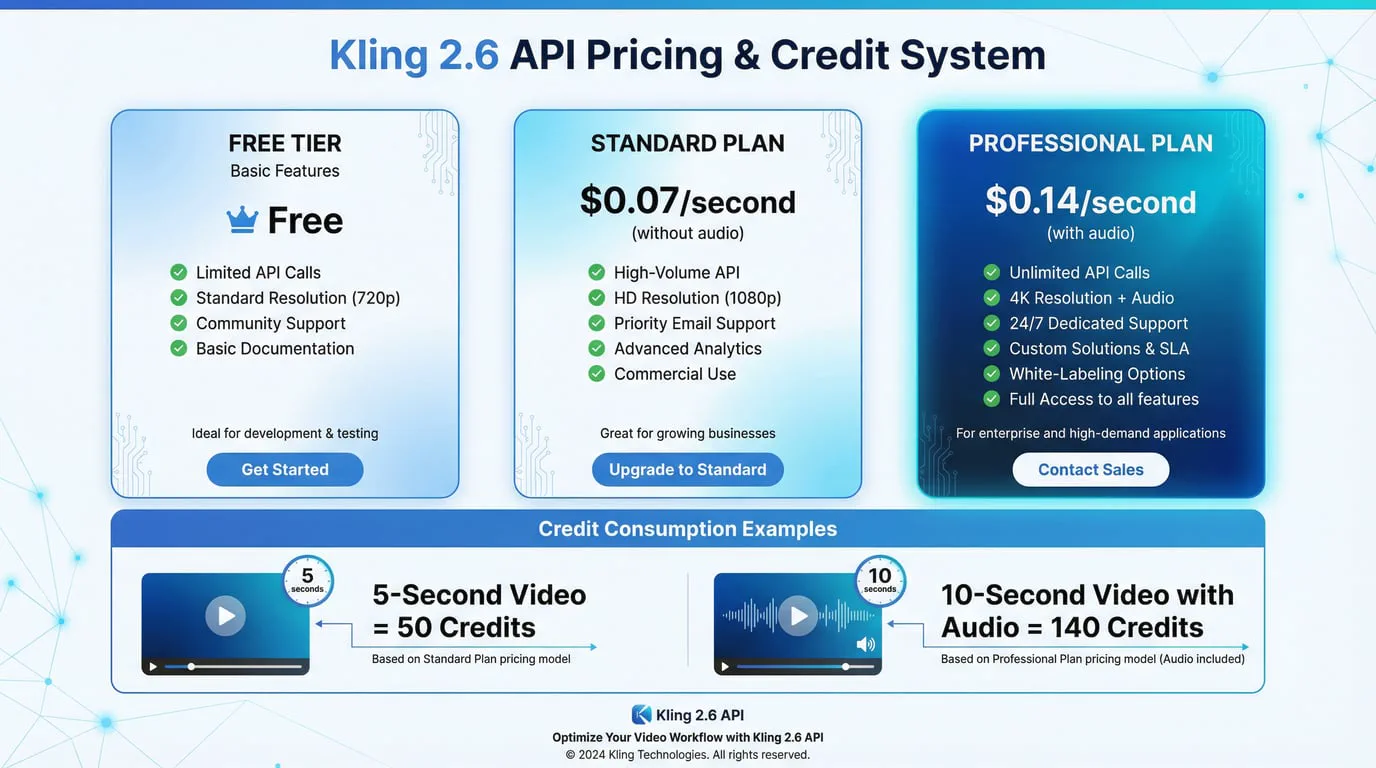
The Credit Economy
A typical daily login might grant free credits, but serious work requires a subscription.
| Plan Tier | Monthly Cost | Credits Included | Cost per 5s Video (Silent) | Cost per 5s Video (Audio) |
|---|---|---|---|---|
| Free Tier | $0 | ~66 Daily (reset) | ~10-15 credits | Not Available (often restricted) |
| Standard | ~$10 - $20 | ~660 - 3000 | 10 credits | 20 credits |
| Pro / Premier | ~$35 - $90 | ~8000+ | 10 credits | 20 credits |
| API Pricing | Pay-as-you-go | N/A | ~$0.07 per second | ~$0.14 per second |
Note: Pricing fluctuates based on regional promotions and third-party API providers. The "Audio Tax" is real—expect to pay roughly double for video + audio compared to just video.
How to Use Kling 2.6: Step-by-Step
Getting started is relatively straightforward, but mastering the prompt engineering is an art.
Step 1: Account Setup
Visit the Kling AI web portal or a partner platform like Seedance AI. You will likely need to verify your phone number or email.
Step 2: The Text-to-Video Workflow
-
Select Model: Choose "Kling 2.6" from the dropdown.
-
Prompting:
-
Visual Prompt: Describe the scene. "A cyberpunk detective smoking a neon cigarette in rain."
-
Audio Prompt: Don't forget this! "Sound of heavy rain, distant sirens, electronic hum."
-
Dialogue (Optional): "Detective says: 'It's going to be a long night.'"
-
-
Settings:
-
Set aspect ratio (16:9 for YouTube, 9:16 for TikTok).
-
Set duration (5s is the standard testing length).
-
Creativity Scale: Lower (0.3-0.5) follows the prompt strictly. Higher (0.7-0.9) gives the AI more artistic freedom.
-
Step 3: The Image-to-Video Workflow (Recommended)
For consistent characters, always generate your image first using Midjourney or Kling's own image model.
-
Upload your reference image.
-
Add a text prompt describing the motion only. " The detective turns his head slowly to the left."
-
Add the audio prompt.
-
Generate. This method yields significantly higher visual stability than Text-to-Video.
Pro Tip: The "Negative Prompt"
Kling 2.6 supports negative prompting. Always include:
"blur, distortion, morphing, low quality, bad audio, robotic voice, subtitles, watermark"
Best Use Cases & Applications
Who is Kling 2.6 actually for?
-
Social Media Content (UGC): This is the killer app. You can generate a talking avatar for a TikTok video that looks and sounds 95% real without hiring an actor or setting up lights.
-
Marketing & Ads: Rapid prototyping of storyboards. Ad agencies use it to pitch concepts to clients before shooting the real commercial. "Imagine a car driving through clouds"—Kling shows it with wind noise in minutes.
-
Faceless YouTube Channels: Combined with a script, you can generate B-roll that actually has matching ambient sound, increasing retention rates compared to silent stock footage.
-
E-Learning: Creating diverse avatars to deliver short training modules in different languages.
Common Issues & Solutions
No tool is perfect, and Kling 2.6 has some well-documented quirks.
1. The "Stuck at 99%" Bug
Problem: The generation bar hits 99% and hangs there for hours.
Cause: Usually server overload or a complex prompt that the inference engine is struggling to resolve.
Solution:
-
Refresh the page (your job might have actually failed).
-
Simplify the prompt.
-
Try during off-peak hours (Asia nighttime hours are often less congested).
2. The "Morphing" Effect
Problem: Objects change shape randomly (e.g., a coffee cup turns into a cat).
Solution: Increase the "Relevance" or "Fidelity" slider. Use Image-to-Video instead of Text-to-Video to anchor the visuals.
3. Credit Consumption
Problem: Burning through credits with bad generations.
Solution: Always test your prompt on the cheaper "Standard" or 1.6 model first to check the motion. Once satisfied with the prompt logic, switch to 2.6 + Audio for the final render.
Kling 2.6 API Integration for Developers
For developers building apps on top of Kling, the API is robust but expensive.
-
Endpoints: Standard REST API structure.
-
Latency: High. A 5-second video with audio can take 3-5 minutes to return in the queue. You must build asynchronous polling (webhook or polling status) into your app. Do not expect real-time generation.
-
Parameters: You have control over
camera_zoom,camera_tilt, andnegative_prompt.
Final Verdict: Is Kling 2.6 Worth It?
Kling 2.6 is a monumental step forward because it treats video and audio as a unified medium. It solves the biggest friction point in AI video creation—the silence.
Pros:
-
✅ Native Audio is a game-changer for workflow efficiency.
-
✅ Cinematic visual quality that rivals Sora.
-
✅ Excellent Image-to-Video consistency.
-
✅ Accessible to the public (unlike many research models).
Cons:
-
❌ Expensive (especially the audio tiers).
-
❌ Generation times can be slow/unstable.
-
❌ Physics simulation is good, not perfect.
Recommendation:
If you are a content creator looking to produce engaging, sound-rich video content for social media or marketing now, Kling 2.6 is arguably your best option. It delivers a "finished product" feel that silent models simply cannot match. While it may not have the infinite physics simulation of Sora 2, it is a tool you can actually use today to drive views and engagement.
Ready to start creating? Dive into the world of native audio-visual generation and experience the difference at Seadance AI's Kling 2.6 portal. The silent era of AI is over; it's time to make some noise.