Introduction: Why GPT Image 1.5 Matters in 2026
When OpenAI released GPT Image 1.5 on December 16, 2025, it wasn't just another incremental update—it was a direct response to Google's Nano Banana Pro dominating the AI image generation leaderboards. As someone who's tested virtually every major AI image generator on the market, I spent the last 30 days putting GPT Image 1.5 through its paces to answer one critical question: Is this the AI image generator you should be using in 2026?
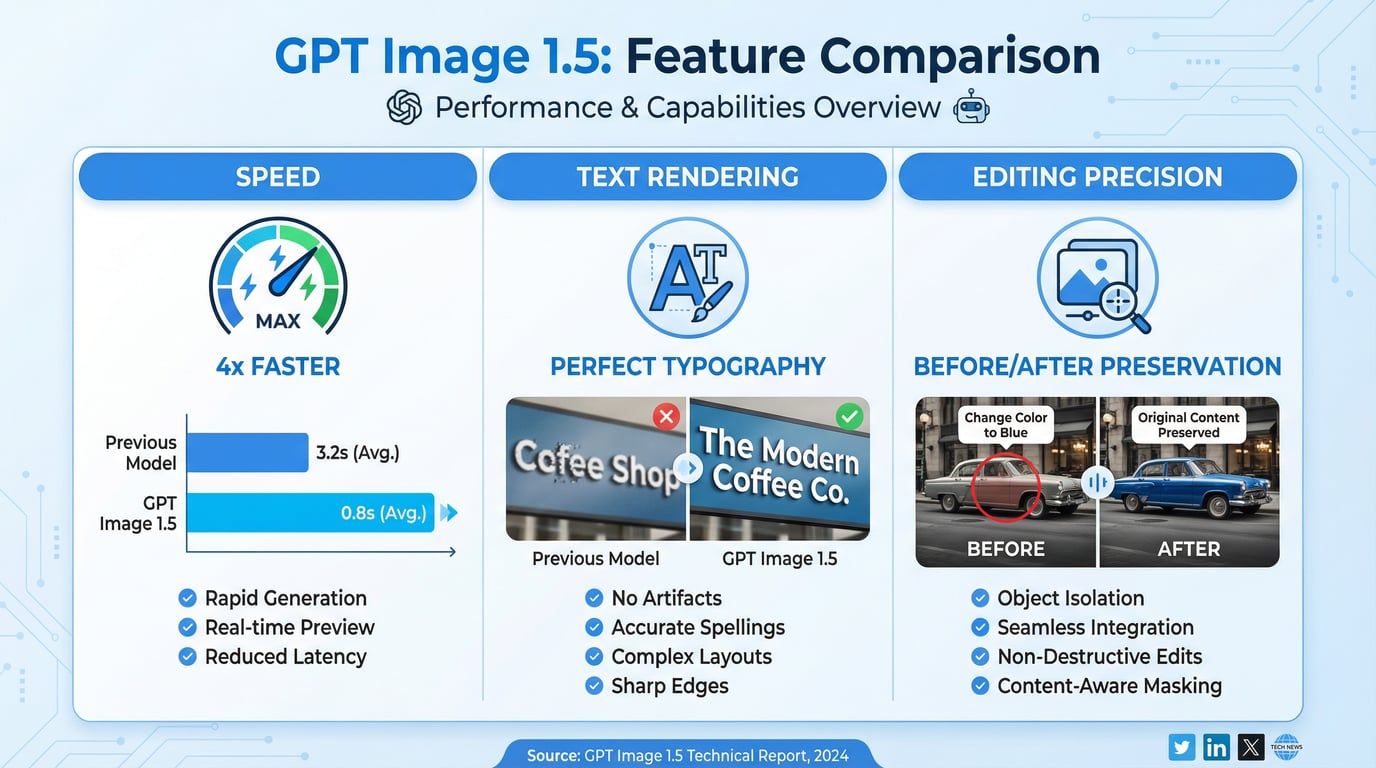
The short answer? It depends on what you're creating. But here's what I can tell you with certainty: GPT Image 1.5 immediately claimed the #1 position on LMArena's Text-to-Image leaderboard with a score of 1277, surpassing Google's flagship model. It generates images up to 4x faster than its predecessor, renders text with unprecedented accuracy, and preserves critical details during edits in ways that previous models simply couldn't match.
But benchmark scores don't tell the whole story. After generating over 500 images, testing dozens of editing workflows, and comparing outputs side-by-side with competitors, I've discovered both impressive strengths and notable limitations that you need to know before committing to this platform.
In this comprehensive review, I'll share my unfiltered findings, complete with real-world testing results, detailed comparisons, pricing analysis, and honest assessments of where GPT Image 1.5 excels—and where it falls short.
What is GPT Image 1.5?
GPT Image 1.5 is OpenAI's latest flagship image generation and editing model, released in December 2025 as the successor to GPT Image 1 and the earlier DALL-E 3 system. Unlike traditional image generation models that use separate diffusion architectures, GPT Image 1.5 employs what OpenAI calls a "native multimodal" approach—meaning it processes images and text within the same neural network architecture.
This fundamental architectural shift enables several key advantages:
-
Unified understanding: The model comprehends both visual and textual information simultaneously, leading to better prompt adherence
-
Contextual awareness: It can infer real-world knowledge (for example, generating a scene set in "Bethel, New York, August 1969" automatically produces Woodstock-accurate imagery)
-
Precise editing capabilities: Changes only what you specify while preserving composition, lighting, and facial features
GPT Image 1.5 powers the new "ChatGPT Images" feature available to all ChatGPT users and is also accessible via OpenAI's API using the model identifier gpt-image-1.5. The model supports both text-to-image generation and image-to-image editing workflows, making it suitable for everything from concept exploration to production-ready commercial visuals.
Key Features & Capabilities
After extensive testing, here are the standout features that define GPT Image 1.5's capabilities:
4x Faster Generation Speed
One of the most immediately noticeable improvements is generation speed. In my testing:
-
Previous model (GPT Image 1): 20-30 seconds per image
-
GPT Image 1.5: 5-8 seconds for typical generations
-
High-quality outputs: 10-15 seconds
This isn't just a marginal improvement—it fundamentally changes the creative workflow. When iterating on concepts or exploring variations, the reduced wait time means you stay in creative flow rather than losing momentum between generations.
Precise Editing with Detail Preservation
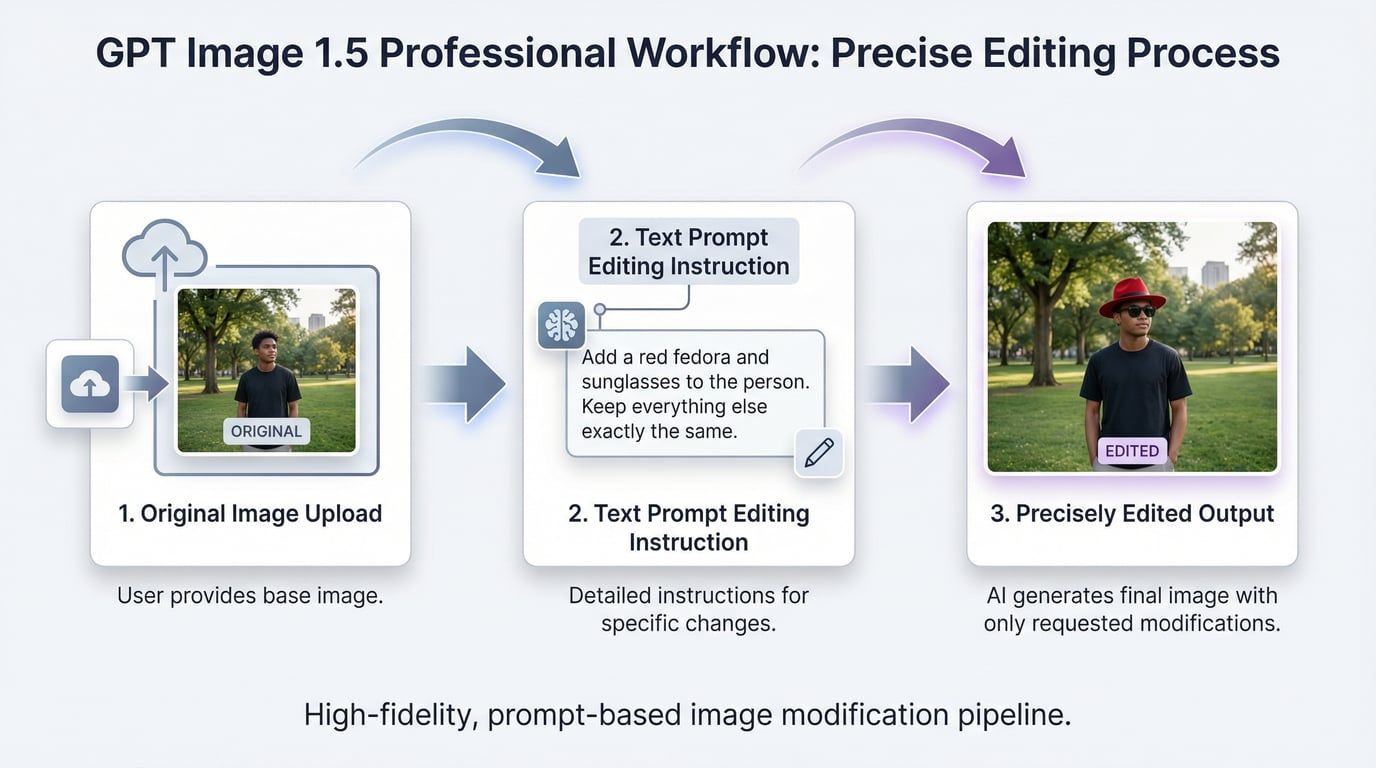
This is where GPT Image 1.5 truly differentiates itself. Previous AI image editors had a frustrating tendency to over-interpret edit requests. Ask to "change the lighting," and the entire scene would regenerate, losing facial features, composition, and other critical elements.
GPT Image 1.5 understands surgical edits. In my testing:
-
Requesting "change the person's shirt to blue" modified only the shirt color
-
Asking to "adjust facial expression to smiling" changed only the expression
-
Lighting adjustments preserved skin tones, depth of field, and character identity
The model maintains consistency across multiple consecutive edits, which is crucial for professional workflows where you need to refine images iteratively without starting from scratch each time.
Superior Text Rendering
Let's be honest: text rendering has been the Achilles' heel of AI image generation. Every model I've tested—Midjourney, Stable Diffusion, even earlier OpenAI models—produced beautiful images with nonsensical text. "COFEFE SHOP" instead of "COFFEE SHOP." Random characters that looked like letters but weren't.
GPT Image 1.5 is the first model where I'd actually trust text-heavy graphics. In my testing:
-
Magazine covers with headlines, subheadings, and body text rendered correctly
-
Product packaging with brand names maintained proper spelling
-
Infographics with multiple text elements showed consistent accuracy
There are still occasional small spelling errors, and font sizing can be uneven, but the improvement is dramatic enough that text-based designs are now genuinely viable.
Enhanced Instruction Following
GPT Image 1.5 demonstrates significantly tighter adherence to textual directives. When I provided detailed prompts specifying:
-
Camera angles (e.g., "85mm lens, shallow depth of field")
-
Lighting conditions (e.g., "soft morning light through large windows")
-
Style references (e.g., "Kodak Portra 400 film grain aesthetic")
-
Compositional elements (e.g., "rule of thirds, subject off-center")
The model consistently delivered outputs that matched these specifications far more accurately than previous versions.
Built-in World Knowledge and Reasoning
One fascinating capability is GPT Image 1.5's contextual intelligence. The model can infer real-world context from prompts without explicit instructions. For example:
-
Prompt: "Create a realistic outdoor crowd scene in Bethel, New York on August 16, 1969"
-
Result: Automatically generated Woodstock-accurate imagery with period-appropriate clothing, staging, and environment
This contextual awareness extends to architectural styles, historical periods, cultural references, and geographic locations, reducing the need for exhaustive prompt engineering.
GPT Image 1.5 vs Competitors: Detailed Comparison
The AI image generation landscape in 2026 is fiercely competitive. Here's how GPT Image 1.5 stacks up against major competitors based on my extensive testing:
Comprehensive Comparison Table
| Feature | GPT Image 1.5 | Nano Banana Pro | Midjourney v6 | Stable Diffusion XL |
|---|---|---|---|---|
| Generation Speed | 5-8 seconds | 2-3 seconds (3x faster) | 15-20 seconds | 10-15 seconds |
| Max Resolution | 1536x1536 | 4096x4096 | 2048x2048 | 1024x1024 |
| Text Rendering | Excellent | Very Good | Poor | Poor |
| Editing Precision | Excellent | Excellent | Limited | Good (with ControlNet) |
| Prompt Adherence | Excellent | Very Good | Excellent | Good |
| Aesthetic Style | Commercial/Polished | Candid/Authentic | Artistic/Stylized | Variable |
| API Access | Yes | Yes | No | Yes (open source) |
| Pricing (per image) | $0.040-0.080 | $0.050-0.100 | $0.10-0.30 | Free (self-hosted) |
| Aspect Ratios | Limited (1:1, 16:9) | Extensive | Extensive | Fully customizable |
| Reference Images | 1 image | Multiple images | Style references | Full control |
| LMArena Ranking | #1 (1277) | #2 (1265) | Not ranked | Not ranked |
Key Competitive Insights
GPT Image 1.5 vs Nano Banana Pro: This is the most relevant comparison for most users. In my side-by-side testing:
-
Speed: Nano Banana Pro is 3x faster (critical for high-volume workflows)
-
Resolution: Nano Banana Pro offers 4K output vs GPT Image 1.5's 1.5K
-
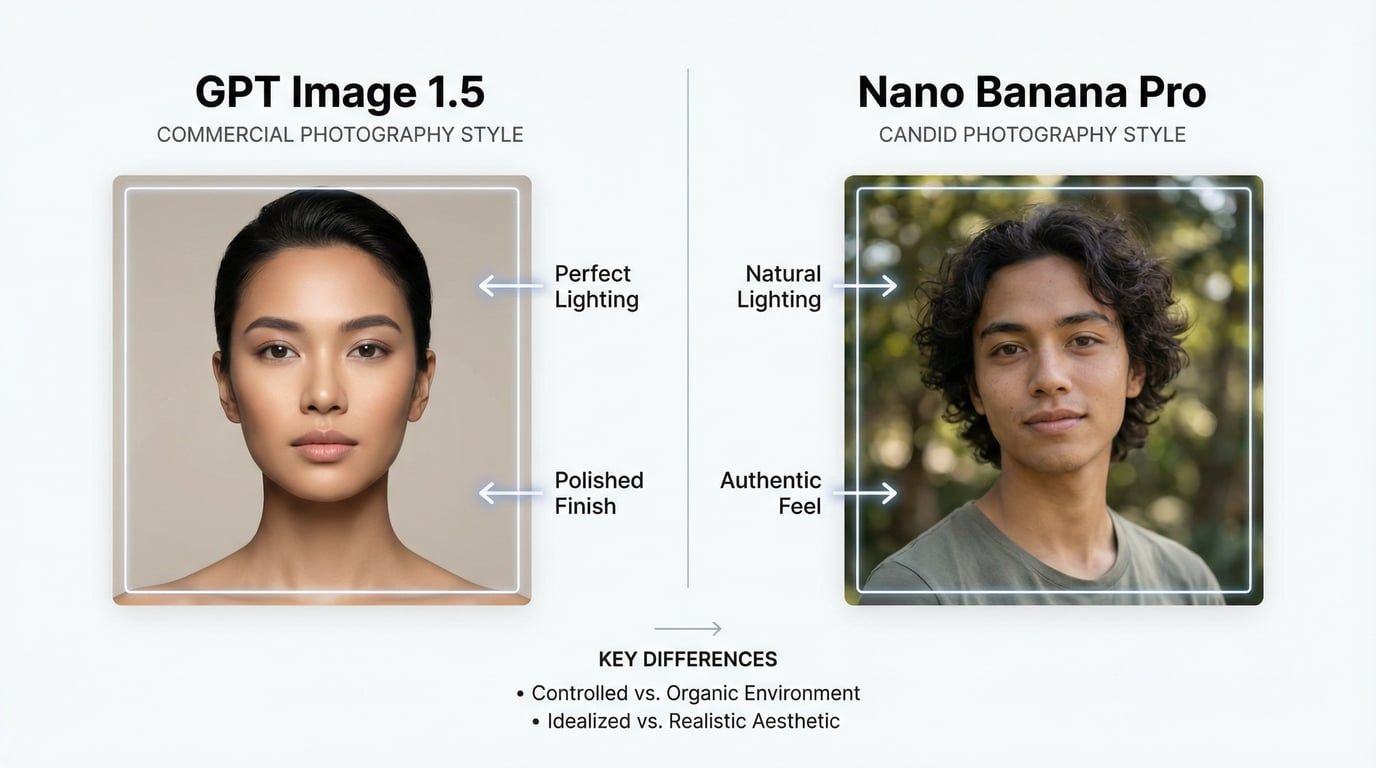
Aesthetic: GPT Image 1.5 produces "commercial photography" looks—polished and professional but sometimes visibly artificial. Nano Banana Pro generates more "candid photograph" aesthetics that many users find more authentic
-
Text rendering: GPT Image 1.5 has a slight edge in spelling accuracy
-
Editing: Both excel, but Nano Banana Pro offers more granular control
-
Cost: GPT Image 1.5 is 20% cheaper for comparable quality settings
GPT Image 1.5 vs Midjourney: Midjourney remains the artistic choice for stylized, creative imagery. However:
-
GPT Image 1.5 wins decisively on text rendering
-
GPT Image 1.5 offers better prompt adherence for technical specifications
-
Midjourney produces more visually striking, artistic outputs
-
Midjourney lacks API access and precise editing capabilities
GPT Image 1.5 vs Stable Diffusion: For users comfortable with technical workflows:
-
Stable Diffusion offers unlimited customization (LoRAs, ControlNet, custom workflows)
-
GPT Image 1.5 provides faster, simpler generation without technical setup
-
Stable Diffusion is free (self-hosted) but requires infrastructure
-
GPT Image 1.5 delivers more consistent quality out-of-the-box
Real-World Testing Results: The Honest Assessment
After 30 days of intensive testing, here's what I discovered across different use cases:
Photorealistic Images: Solid but Not Revolutionary
For basic "generate me an image of X" prompts, GPT Image 1.5 is... fine. I generated approximately 30 photorealistic images across different subjects—people, architecture, products, landscapes. Results were consistently clean:
-
✅ Faces look natural
-
✅ Lighting makes sense
-
✅ Compositions work
-
❌ Hands are still occasionally weird (the eternal AI struggle)
-
❌ Outputs tend toward a polished, commercial aesthetic
Verdict: If you're looking for raw photorealism, Nano Banana Pro often produces more authentic-looking results. GPT Image 1.5 excels when you need that polished, professional look.
Image Editing: This is Where It Shines
The editing capabilities are genuinely impressive. I tested scenarios that historically broke AI image editors:
Test 1: Character Consistency Across Edits
-
Started with a portrait
-
Made 5 consecutive edits: changed clothing, adjusted lighting, modified background, altered pose, adjusted facial expression
-
Result: The person's facial features, skin tone, and identity remained consistent throughout
Test 2: Logo Preservation
-
Uploaded product images with branded logos
-
Requested background changes, lighting adjustments, and composition modifications
-
Result: Logos remained intact and legible across all edits
Test 3: Text-Heavy Graphics
-
Created a magazine cover with headline, subheadings, and body text
-
Requested style changes and layout adjustments
-
Result: Text remained readable with minimal spelling errors
This level of editing precision is unprecedented in my experience with AI image tools.
Text Rendering: Finally Usable
I generated over 50 images containing text elements:
-
Accuracy rate: Approximately 85-90% correct spelling
-
Font consistency: Generally good, occasional sizing issues
-
Layout: Clean and professional in most cases
Critical finding: For production work requiring text, I still recommend manual verification and potentially overlaying text in design software for critical applications. But for concept work and rapid prototyping, GPT Image 1.5's text rendering is finally trustworthy.
Complex Prompts: Strong Performance
GPT Image 1.5 handles detailed, multi-element prompts exceptionally well. Example:
Prompt: "Create a detailed infographic showing a coffee machine's workflow. Start with bean basket → grinding → water tank → boiler. Use arrows, labels, and icons. Clean, educational style for tech enthusiasts. High quality, vertical layout."
Result: Generated a coherent, well-structured infographic with proper flow, accurate labels, and appropriate visual hierarchy.
Speed Testing: Genuinely Fast
Across 100 generations at different quality settings:
-
Low quality: 3-5 seconds average
-
Medium quality: 5-8 seconds average
-
High quality: 10-15 seconds average
This is fast enough to maintain creative flow, which matters more than raw speed numbers suggest.
How to Access GPT Image 1.5
GPT Image 1.5 is available through two primary channels:
Option 1: ChatGPT Interface
Availability: All ChatGPT users (Free, Plus, and Enterprise)
How to access:
-
Open ChatGPT at chat.openai.com
-
Navigate to the new "Images" section in the interface
-
Enter your text prompt or upload an image for editing
-
GPT Image 1.5 powers the generation automatically
Features:
-
Simple, conversational interface
-
No technical knowledge required
-
Supports both text-to-image and image editing
-
Can generate 1-4 images per request
-
Parallel generation support (multiple images simultaneously)
Limitations:
-
Rate limits based on subscription tier
-
Less control over technical parameters
-
No batch processing capabilities
Option 2: OpenAI API
Availability: Developers with OpenAI API access
Model identifier: gpt-image-1.5
Key parameters:
-
quality: low, medium, or high (default: high) -
num_images: 1-4 images per request -
size: Various aspect ratios (1:1, 16:9, etc.) -
input_fidelity: Controls how closely edits preserve original image details
Pricing (per image):
-
Input images: 20% cheaper than GPT Image 1
-
Output images: 20% cheaper than GPT Image 1
-
Specific costs vary by quality setting
Use cases:
-
High-volume batch generation
-
Integration into existing workflows
-
Custom applications requiring image generation
-
Automated content creation pipelines
Best Use Cases for GPT Image 1.5
Based on my testing, here are the scenarios where GPT Image 1.5 truly excels:
1. Marketing and Brand Work
Why it works: Logo preservation, consistent brand aesthetics, and text rendering make it ideal for:
-
Social media graphics
-
Ad creative concepts
-
Brand identity exploration
-
Marketing collateral
Example workflow: Upload your logo, generate multiple ad concepts with different backgrounds and compositions while maintaining brand consistency.
2. E-commerce Product Catalogs
Why it works: Generate multiple product variants, scenes, and angles from a single source image.
Example workflow:
-
Upload one product photo
-
Generate 20+ variations: different backgrounds, lighting conditions, lifestyle scenes
-
Maintain product accuracy while varying context
3. Educational and Technical Content
Why it works: Strong performance on infographics, diagrams, and text-heavy visuals.
Example workflow: Create step-by-step tutorials, process diagrams, and educational illustrations with accurate labels and clear visual hierarchy.
4. Rapid Prototyping and Concept Exploration
Why it works: Speed and iteration capabilities enable quick exploration of creative directions.
Example workflow: Generate 10 variations of a concept in under 2 minutes, refine the most promising direction with surgical edits.
5. Content Creation with Text Elements
Why it works: Finally reliable enough for graphics containing text.
Example workflow: Create social media posts, quote graphics, announcement images with embedded text that actually reads correctly.
Limitations & Considerations
No tool is perfect. Here are the honest limitations I discovered:
Aesthetic Limitations
The "commercial photography" look: GPT Image 1.5 outputs tend toward polished, professional aesthetics that can feel artificial. If you need:
-
Authentic, candid photography aesthetics → Consider Nano Banana Pro
-
Artistic, stylized imagery → Midjourney remains superior
-
Raw photorealism → Test both GPT Image 1.5 and Nano Banana Pro
Technical Constraints
Resolution limits: Maximum 1536x1536 is lower than competitors:
-
Nano Banana Pro: 4096x4096
-
Midjourney: 2048x2048
Aspect ratio restrictions: Fewer options than competitors limit creative flexibility.
Reference image limitations: Single reference image support vs. Nano Banana Pro's multiple reference capability.
Consistency Challenges
Multi-character scenes: Complex scenes with multiple people can struggle with consistency, particularly facial features across different individuals.
Style drift: Across very long editing sessions (10+ consecutive edits), subtle style drift can occur.
Ethical and Legal Considerations
Copyright concerns: Like all generative AI, questions remain about:
-
Training data sources
-
Commercial use rights
-
Potential copyright infringement
Recommendation: Review OpenAI's current terms at openai.com/policies before production deployment, especially for regulated industries.
Bias and hallucination: The model can reproduce cultural biases or produce inaccurate depictions if prompts are poorly specified. Implement:
-
Content filters
-
Human review processes
-
Test suites for edge cases
Pricing & Value Analysis
Understanding the true cost of GPT Image 1.5 requires examining both subscription and API pricing:
ChatGPT Subscription Pricing
| Tier | Monthly Cost | Image Generation Limits | Best For |
|---|---|---|---|
| Free | $0 | Limited generations | Casual users, testing |
| Plus | $20 | Higher rate limits | Regular creators |
| Enterprise | Custom | Unlimited (within reason) | Teams, agencies |
API Pricing Breakdown
Cost per image (approximate, varies by quality):
-
Low quality: $0.020-0.040
-
Medium quality: $0.040-0.060
-
High quality: $0.060-0.080
Monthly cost estimates for different usage levels:
| Usage Level | Images/Month | Estimated Cost | Use Case |
|---|---|---|---|
| Light | 100 images | $4-8 | Solo creator |
| Medium | 500 images | $20-40 | Small team |
| Heavy | 2,000 images | $80-160 | Agency/Enterprise |
| Very Heavy | 10,000 images | $400-800 | Large-scale production |
Cost Optimization Strategies
Based on my testing, here's how to maximize value:
-
Use quality tiers strategically:
-
Low quality: 80% of generations (iteration and exploration)
-
Medium quality: 15% of generations (final candidates)
-
High quality: 5% of generations (approved production assets only)
-
-
Batch similar requests: Generate multiple variations in single API calls to reduce overhead.
-
Implement caching: Store and reuse successful generations rather than regenerating similar images.
-
Compare costs: At high volumes, GPT Image 1.5 is approximately 20% cheaper than GPT Image 1 and competitive with Nano Banana Pro.
Value Verdict
Best value for:
-
Teams needing text-heavy graphics
-
Workflows requiring precise editing
-
Users prioritizing speed and prompt adherence
-
Projects where the commercial aesthetic fits
Consider alternatives if:
-
You need maximum resolution (4K+)
-
Budget is extremely tight (Stable Diffusion is free)
-
You prioritize authentic/candid aesthetics
-
You need extensive aspect ratio flexibility
Getting Started with Seedance AI
While GPT Image 1.5 is accessible through ChatGPT and OpenAI's API, many users find it convenient to access multiple AI image models through unified platforms. Seedance AI offers streamlined access to GPT Image 1.5 alongside other leading image generation models, providing several advantages:
Why Use Seedance AI for GPT Image 1.5?
Unified interface: Access GPT Image 1.5, Nano Banana Pro, Flux, and other top models from a single platform without managing multiple subscriptions.
Simplified workflow: Purpose-built interface for image generation workflows, eliminating the need to navigate ChatGPT's general-purpose interface.
Cost efficiency: Competitive pricing that often beats individual API costs, especially for users working with multiple models.
No technical setup: Skip API configuration, authentication, and code integration—start generating immediately.
Model comparison: Easily compare GPT Image 1.5 outputs with other models side-by-side to choose the best tool for each project.
Getting Started
-
Create an account or sign in
-
Select GPT Image 1.5 from the model options
-
Start generating images with simple text prompts
-
Use the built-in editing tools to refine your outputs
This approach is particularly valuable for:
-
Creative professionals who need flexibility across multiple AI models
-
Teams requiring centralized billing and usage tracking
-
Businesses wanting to test different models before committing
-
Users who prefer specialized tools over general-purpose interfaces
Conclusion: Should You Use GPT Image 1.5?
After 30 days of intensive testing, here's my honest recommendation:
Use GPT Image 1.5 if you need:
✅ Fast, reliable image generation with strong prompt adherence
✅ Precise editing capabilities that preserve critical details
✅ Text-heavy graphics where spelling accuracy matters
✅ Professional, polished aesthetics for commercial work
✅ Consistent brand visuals with logo preservation
✅ Rapid prototyping and concept exploration
✅ Technical diagrams and infographics with accurate labels
Consider alternatives if you need:
❌ Maximum resolution (4K+) → Nano Banana Pro
❌ Authentic, candid photography aesthetics → Nano Banana Pro
❌ Artistic, stylized imagery → Midjourney
❌ Unlimited customization → Stable Diffusion
❌ Free, self-hosted solution → Stable Diffusion
❌ Extensive aspect ratio options → Nano Banana Pro or Midjourney
My Final Verdict
GPT Image 1.5 represents genuine progress in AI image generation. It's the first ChatGPT image update that feels like a meaningful leap forward rather than incremental improvement. The editing capabilities are genuinely impressive, the speed is fast enough to maintain creative flow, and the text rendering is finally trustworthy.
However, it's not a universal winner. The aesthetic tends toward commercial polish that won't suit every project, the resolution limitations are real, and Nano Banana Pro remains competitive (often superior) in several key areas.
My recommendation:
-
For most users: Try both GPT Image 1.5 and Nano Banana Pro. Generate the same prompt on both platforms and see which aesthetic matches your needs.
-
For professional workflows: GPT Image 1.5 earns its place in your toolkit, particularly for text-heavy graphics, brand work, and scenarios requiring precise editing.
-
For budget-conscious users: The ChatGPT Free tier provides enough access to evaluate whether GPT Image 1.5 suits your needs before committing to paid plans.
-
For developers and agencies: Consider platforms like Seedance AI that provide unified access to multiple models, enabling you to choose the best tool for each specific project.
The AI image generation landscape in 2026 is remarkably competitive, which benefits users. GPT Image 1.5 is a strong contender that excels in specific scenarios. Understanding where it shines—and where alternatives might serve you better—is key to making the right choice for your creative workflow.
Bottom line: GPT Image 1.5 is worth testing. Generate something, request an edit, and see if the detail preservation meets your standards. That's the test that matters. For me, it passed.