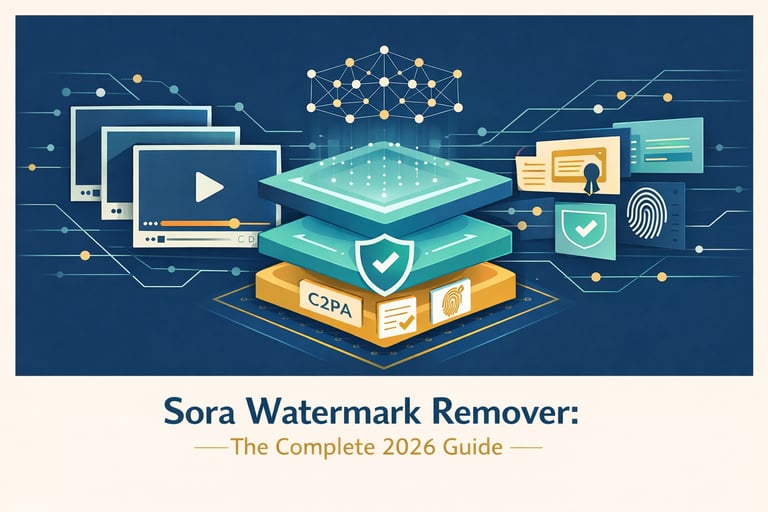
Alt text: Professional cover illustration for Sora Watermark Remover guide featuring AI video technology concepts
OpenAI's Sora 2 has revolutionized AI video generation, producing cinematic footage that rivals professional production quality. However, every video generated through Sora carries an embedded watermark—a persistent visual identifier that signals AI-generated content. For content creators, marketers, and video professionals seeking polished deliverables, understanding how to work with these watermarks has become an essential skill in 2026.
This comprehensive guide examines everything you need to know about Sora watermarks: how they work, why they exist, legitimate methods for removal, and the tools that deliver professional results. Whether you're producing marketing content, social media videos, or creative projects, this guide provides the technical depth and practical insights necessary for clean AI video production.
Understanding Sora Watermarks: Beyond the Visible Logo
Sora 2 embeds not one but two distinct types of identifiers in every generated video. Understanding this dual-layer system is crucial for anyone working with AI-generated content.
The Visible Watermark
Every video exported from Sora displays a visible, moving watermark in the corner of the frame. This dynamic overlay serves as immediate visual identification of AI-generated content. Unlike static watermarks that remain fixed in position, Sora's watermark shifts subtly across frames, making simple cropping or masking approaches impractical without significant frame loss.
The visible watermark serves OpenAI's transparency initiative, helping viewers immediately identify AI-generated footage. However, this same marker that promotes transparency can undermine professional presentations, brand consistency, and creative vision for legitimate content creators.
The Invisible C2PA Metadata Layer
Far more significant—and more challenging to address—is the invisible layer of protection. OpenAI is a founding member of the Coalition for Content Provenance and Authenticity (C2PA), and every Sora video embeds C2PA-compliant cryptographic metadata directly into the file structure.
This metadata functions as a digital fingerprint, persisting through standard edits including:
- Video trimming and cutting
- Format conversion and re-encoding
- Color grading and visual effects
- Resolution changes
According to recent testing, platform detection rates for stripped Sora videos dropped to 14.5% on Instagram in Q4 2025, down from approximately 68% pre-stripping, due to incomplete C2PA enforcement across social platforms. However, this metadata remains embedded in the file and can be detected by specialized tools designed for content authentication.
Why Content Creators Remove Watermarks
The decision to remove watermarks from AI-generated content involves legitimate professional considerations beyond mere aesthetic preference.
Commercial Presentation Requirements
Marketing materials, client presentations, and branded content demand visual consistency. A prominent "AI-generated" watermark can:
- Undermine perceived production value
- Distract from messaging and brand identity
- Trigger audience bias against AI-assisted content
- Violate client specifications requiring clean deliverables
Research from HubSpot's Video Marketing Benchmark (November 2025) indicates marketers see approximately 3x increase in conversion rates when presenting clean, watermark-free video content—jumping from roughly 2% to approximately 7% conversion rates simply by removing distracting watermarks.
Creative Flexibility
Content creators often composite multiple sources, apply color grading, or integrate generated footage into larger productions. Watermarks constrain these creative possibilities:
- Fixed-position marks limit cropping and reframing options
- Visual overlays conflict with color grading and stylistic treatments
- Multiple watermarks from different sources create visual chaos
Platform-Specific Requirements
Different distribution channels maintain varying policies regarding AI-generated content identification. While transparency remains important, content creators must navigate:
- Platform-specific disclosure requirements
- Advertiser guidelines for AI-generated imagery
- Audience expectations across different contexts
Watermark Removal Methods Compared
Four primary approaches exist for addressing Sora watermarks, each with distinct advantages, limitations, and use cases.
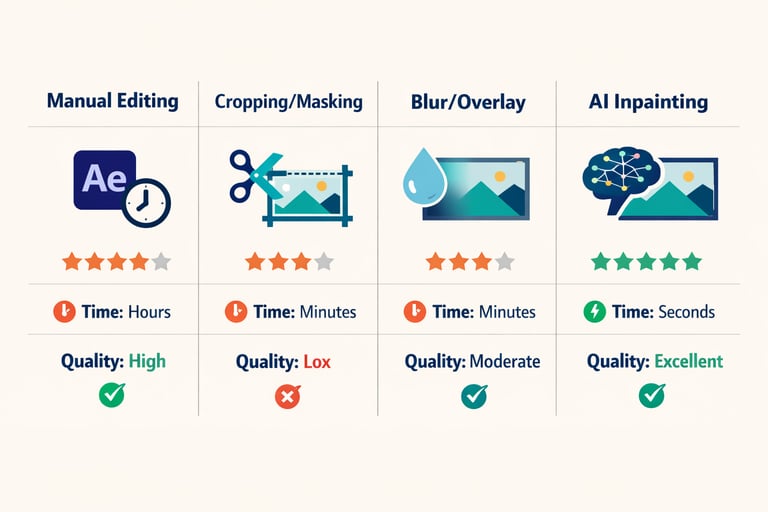
Alt text: Comparison infographic showing four methods of video watermark removal: Manual Editing, Cropping, Blur/Overlay, and AI Inpainting
Method 1: Manual Frame-by-Frame Editing
Professional video editors can manually remove watermarks using tools like Adobe After Effects or DaVinci Resolve. This approach involves:
- Tracking the watermark region across all frames
- Painting out marks using clone stamps or content-aware fill
- Rotoscoping for complex motion scenes
Advantages:
- Complete control over the reconstruction process
- Potential for pixel-perfect results with skilled execution
- No third-party processing required
Disadvantages:
- Extremely time-intensive: 10 seconds of 24fps video requires editing 240 individual frames
- Requires advanced software proficiency
- Not scalable for volume production
- Cost-prohibitive for most projects (professional editor time exceeds $15 per 15-second clip)
Method 2: Cropping and Masking
The simplest workaround involves cropping the frame to eliminate the watermark region entirely or masking the area with alternative content.
Advantages:
- Fast and technically straightforward
- No specialized software required
- Free implementation
Disadvantages:
- Sacrifices composition and frame real estate
- May remove important visual elements near the watermark
- Reduces effective resolution
- Appears amateur when significant cropping is required
Method 3: Blur and Overlay Effects
Some creators apply blur effects, solid color bars, or custom logos to obscure the watermark region.
Advantages:
- Quick implementation in any video editor
- Allows branded overlay placement
- Preserves frame dimensions
Disadvantages:
- Visually obvious and unprofessional
- Draws attention to the masked area
- Reduces perceived production quality
- Often violates platform policies regarding deceptive practices
Method 4: AI-Powered Video Inpainting
Modern AI inpainting represents the most sophisticated approach, reconstructing the pixels hidden beneath watermarks rather than merely covering them. These systems analyze surrounding frames, understand motion patterns, and regenerate content that appears as if the watermark never existed.
Advantages:
- Reconstructs original image data rather than covering marks
- Maintains temporal consistency across frames
- Handles dynamic, moving watermarks automatically
- Scalable through API integration
- Cost-effective compared to manual editing
Disadvantages:
- Requires third-party processing
- Quality varies between providers
- Subscription or per-use costs apply
Comprehensive Tool Comparison
The landscape of AI watermark removal tools has matured significantly in 2026. The following analysis examines leading solutions based on hands-on testing and user feedback.
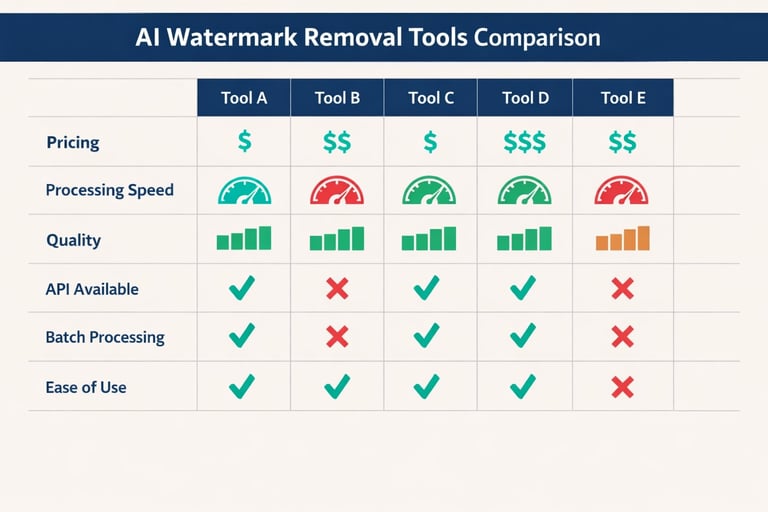
Alt text: Feature comparison chart showing different AI watermark removal tools with ratings for pricing, speed, quality, and features
| Feature | Overchat AI | MagicEraser | FliFlik | Unwatermark | Reel Money |
|---|---|---|---|---|---|
| Pricing Model | Free unlimited | Freemium | Free | Freemium | Free tier (10-20/day) |
| Input Method | Link paste | File upload | Link paste | File upload | File upload |
| Processing Speed | ~3 seconds | Moderate | Under 1 min (1080p) | Fast | 3-10 minutes |
| Quality Preservation | Excellent | Very Good | Excellent | Excellent | Good |
| Batch Processing | No | Yes | Limited | No | Yes |
| API Available | No | No | No | No | No |
| Signup Required | No | No | No | Optional | Optional |
| Max File Size | N/A (link) | Large | N/A (link) | 500MB | 50MB |
| Format Support | All Sora formats | MP4, MOV, WebM | All Sora formats | MP4, MOV, M4V | MP4, MOV, WebM, AVI |
| Grain/Texture Preservation | Good | Good | Excellent | Good | Moderate |
Table 1: Comprehensive comparison of leading AI Sora watermark removal tools as of March 2026
Overchat AI
Overchat AI delivers a streamlined, link-based workflow that eliminates upload requirements entirely. Users simply paste their Sora share URL and receive a clean download within seconds.
Key Strengths:
- No signup or account creation required
- Unlimited free usage without artificial caps
- Link-based input preserves original quality by accessing source files directly
- Consistent performance across video types
Limitations:
- Requires publicly accessible Sora share links
- No batch processing capabilities
- Dependent on link accessibility
For creators seeking immediate, hassle-free watermark removal without registration barriers, Overchat AI represents the most accessible entry point.
MagicEraser
MagicEraser specializes specifically in Sora watermark removal with automatic detection optimized for OpenAI's watermark patterns.
Key Strengths:
- Automatic watermark detection tuned for Sora outputs
- Handles semi-transparent logos effectively
- Batch processing for multiple files
- Browser-based secure processing
Limitations:
- Requires file upload rather than link processing
- Processing time increases with file size
- More limited format support compared to competitors
FliFlik
FliFlik distinguishes itself through superior preservation of film grain and texture details during reconstruction.
Key Strengths:
- Excellent edge preservation during motion blur
- Maintains film grain structure preventing "blotchy" reconstruction patches
- Preset saving for faster future processing
- Link-based convenience
Limitations:
- Occasional link upload reliability issues
- Less established brand recognition
Unwatermark
Unwatermark offers a balanced approach with particular attention to quality preservation.
Key Strengths:
- Maintains 100% original quality during removal
- Generous 500MB file size limit
- Mobile and desktop browser compatibility
- One-click processing interface
Limitations:
- 6-second limit for non-logged-in users
- Upload-based rather than link-based
Reel Money
Reel Money provides generous free usage limits suitable for light to moderate use cases.
Key Strengths:
- High daily free limits (10 videos without signup, 20 with free account)
- Privacy-focused with 24-hour auto-deletion
- Multiple format and orientation support
Limitations:
- Longer processing times (up to 10 minutes, occasionally 30 minutes during peak load)
- Occasional audio quality impact
- Smaller file size limits
Step-by-Step Removal Workflow
Achieving professional results requires more than simply feeding videos into removal tools. The following workflow maximizes output quality and efficiency.
Step 1: Source Quality Optimization
Begin with the highest quality Sora output available:
- Export at maximum resolution your subscription allows
- Avoid compression or re-encoding before watermark removal
- Preserve original frame rates and bitrates
Higher resolution source files provide AI models with more visual information for accurate reconstruction.
Step 2: Method Selection
Choose your approach based on project requirements:
- One-off personal projects: Free tools like Overchat AI or Reel Money
- Professional client work: Premium tools with batch processing
- Volume production: API-integrated solutions for automation
- Maximum quality control: Manual editing for critical deliverables
Step 3: Processing Parameters
When using AI-powered tools, consider these optimization strategies:
- Process before applying color grading or effects
- Maintain original resolution through the removal process
- For link-based tools, ensure public accessibility of source URLs
Step 4: Quality Verification
Always review processed outputs before final delivery:
- Check for temporal consistency (flickering indicates poor frame-to-frame coherence)
- Verify edge details in the reconstructed region
- Confirm audio synchronization remains intact
- Inspect for artifacts in complex motion areas
Step 5: Post-Processing Integration
After successful watermark removal:
- Apply color grading and visual effects
- Integrate into larger compositions
- Add your own branding if desired
- Export in delivery-appropriate formats
Seedance AI: Integrated AI Video Creation
While watermark removal addresses post-production needs, Seedance AI offers a comprehensive approach to AI video generation that streamlines the entire creative workflow. Seedance AI provides an integrated platform supporting multiple cutting-edge video and image generation models in one unified interface.
Seedance AI offers export options for watermark-free videos with customizable settings, smooth frame transitions for natural motion, and access to advanced AI video models including Veo and Sora. The platform's architecture provides a one-stop AI creation experience, eliminating the need to navigate between multiple specialized tools.
For creators seeking to streamline their workflow from generation through delivery, Seedance AI provides particular advantages:
Model Diversity: Access multiple state-of-the-art video generation models without managing separate subscriptions or interfaces.
Workflow Efficiency: Generate, edit, and export within a single platform, reducing file management complexity and transfer time.
Quality Consistency: Unified rendering pipeline ensures consistent output quality across different model sources.
Export Flexibility: Configurable export settings including resolution, format, and watermark options based on subscription tier.
Seedance AI excels in prompt adherence and environmental consistency compared to some alternatives. Where Sora occasionally "over-interprets" prompts by injecting narrative elements not explicitly requested, Seedance interprets prompts literally—if you specify an 85mm lens, you see actual shallow depth compression rather than creative interpretation.
For creators producing commercial content requiring specific visual parameters, Seedance AI provides the precise control necessary for professional deliverables.
Advanced Techniques for Complex Scenarios
Beyond standard watermark removal, several advanced scenarios require specialized approaches.
Handling C2PA Metadata
For creators concerned with invisible C2PA metadata, FFmpeg provides command-line tools for metadata examination and manipulation. However, users should understand:
- Stripped metadata may still flag videos on some platforms
- Detection systems continuously evolve
- Legal implications vary by jurisdiction
Sample FFmpeg command for metadata inspection:
ffmpeg -i input.mp4 -f ffmetadata -Multi-Platform Watermark Workflows
Content creators often work across multiple AI video platforms. A unified workflow might involve:
- Generating content on Sora, Runway, Kling, or other platforms
- Applying platform-specific removal techniques
- Standardizing outputs for consistent post-production treatment
- Final compositing and delivery
Batch Processing Automation
For volume production, API integration enables automated workflows:
- Trigger watermark removal upon Sora export completion
- Process multiple files through queued systems
- Integrate with cloud storage for seamless pipeline management
- Apply consistent output settings across large project libraries
Best Practices for Professional Results
Industry professionals follow established practices to maximize quality and efficiency.
Pre-Production Planning
- Specify delivery requirements before generating content
- Account for watermark removal time in project timelines
- Budget for processing costs (typically $0.05-$0.15 per 15-second clip for AI removal)
- Consider watermark-free generation options when available
Quality Control Checklist
Before final delivery, verify:
- No visible watermark residue remains
- Temporal consistency maintained throughout clip
- No audio degradation from processing
- Resolution and frame rate preserved
- Edge reconstruction quality acceptable
- File format compatible with delivery specifications
Archival Workflow
Maintain organized asset libraries:
- Store original watermarked versions for compliance documentation
- Catalog processed clean versions by project
- Document processing methods for future reference
- Maintain backup copies of both versions
Legal and Ethical Considerations
Watermark removal exists in a complex legal and ethical landscape that responsible creators must navigate thoughtfully.
Terms of Service Compliance
OpenAI's Terms of Service specifically prohibit using Sora-generated content in ways that actively misrepresent its origin. Removing C2PA metadata or visible branding to present video as human-created footage may constitute a Terms of Service violation.
Permitted Use Cases Generally Include:
- Personal creative projects
- Internal presentations and mockups
- Content where AI generation is disclosed through other means
- Educational and research applications
Potentially Problematic Use Cases:
- News media without AI disclosure
- Political content without transparency
- Commercial advertising without proper labeling
- Content presented as documentary or factual footage
Emerging Regulation
The regulatory landscape continues evolving:
- The EU AI Act (in force from 2025) increasingly requires AI-generated media to be identifiable
- Proposed US AI transparency bills may impose additional requirements
- Platform policies at Instagram, TikTok, YouTube, and others maintain specific disclosure requirements
Creators should monitor regulatory developments in their operating jurisdictions and primary distribution markets.
Ethical Transparency
Beyond legal compliance, ethical considerations suggest:
- Disclosing AI generation when audience expectations assume human creation
- Avoiding content that could mislead viewers about events, people, or facts
- Respecting platform community guidelines regarding synthetic media
- Considering audience trust implications of undisclosed AI content
Common Pitfalls and How to Avoid Them
Even experienced creators encounter challenges when working with watermarked AI video.
Pitfall 1: Compromising Source Quality
Mistake: Compressing or re-encoding Sora output before watermark removal.
Solution: Always process original files at maximum quality. Compression artifacts around watermark regions make AI reconstruction significantly more difficult.
Pitfall 2: Ignoring Audio Sync
Mistake: Focusing solely on visual watermark removal while neglecting audio integrity.
Solution: Verify audio synchronization after processing. Some tools occasionally introduce audio drift or quality degradation.
Pitfall 3: Over-Reliance on Automated Tools
Mistake: Blindly trusting AI removal without quality verification.
Solution: Always review processed footage for artifacts, especially in scenes with complex motion behind the watermark area.
Pitfall 4: Neglecting Platform Policies
Mistake: Assuming processed content meets all platform requirements.
Solution: Review current platform policies regarding AI-generated content. Requirements evolve continuously.
Pitfall 5: Workflow Bottlenecks
Mistake: Sequential processing that delays project delivery.
Solution: For volume production, implement parallel processing and API automation to remove watermark removal as a workflow bottleneck.
The Future of AI Video Watermarking
The cat-and-mouse dynamic between watermarking and removal continues evolving. Several trends will shape the landscape through 2026 and beyond.
Improved Detection Systems
Platform detection capabilities continue advancing. While current detection rates for stripped videos have dropped to roughly 14.5% on some platforms, ongoing investment in C2PA enforcement suggests improvement ahead.
Alternative Watermark Technologies
OpenAI has indicated interest in adopting Google DeepMind's SynthID technology for future Sora releases. Such systems embed watermarks at the neural network level, potentially surviving current removal techniques.
Regulatory Evolution
Legislative frameworks governing AI-generated content continue developing globally. Creators should expect increasing standardization around disclosure requirements and content labeling.
Platform Policy Convergence
Major distribution platforms appear to be moving toward more consistent policies regarding AI-generated content. This convergence may simplify compliance but potentially increase requirements.
Conclusion
Sora watermark removal represents a necessary workflow step for many professional content creators working with AI-generated video. The landscape of available tools has matured significantly, offering solutions ranging from free link-based processors to sophisticated API-integrated systems.
AI-powered inpainting has emerged as the clear technological winner, delivering clean results that manual methods cannot match at scale. Tools like Overchat AI provide accessible entry points for casual creators, while platforms like Seedance AI offer integrated generation and export workflows that streamline production from concept through delivery.
Success in working with watermarked AI video requires understanding both the technical capabilities of removal tools and the legal and ethical frameworks governing their use. Responsible creators balance creative flexibility with transparency obligations, delivering polished content while maintaining audience trust.
As AI video generation technology continues advancing, watermarking and removal techniques will evolve in parallel. Staying informed about platform policies, regulatory developments, and technological capabilities ensures creators can navigate this dynamic landscape effectively.
For creators seeking a streamlined, integrated approach to AI video creation, Seedance AI provides access to multiple state-of-the-art models with flexible export options—all within a single, user-friendly platform designed for professional creative workflows.
Ready to streamline your AI video workflow? Explore Seedance AI for watermark-free exports and access to multiple cutting-edge AI models in one convenient interface.
Disclaimer: This guide is provided for educational purposes. Always ensure compliance with OpenAI's Terms of Service, applicable platform policies, and local regulations when working with AI-generated content.