The AI video generation landscape has reached a pivotal moment. After months of incremental improvements across various platforms, ByteDance's Seedance 2 has emerged as what industry experts are calling the "ChatGPT moment" for video creation. This isn't hyperbole—it represents a fundamental shift in how creators approach video production, moving from simple text-to-video generation to sophisticated multimodal orchestration.
If you've been frustrated by the limitations of existing AI video tools—inconsistent character appearances, lack of control over camera movements, or the inability to reference specific styles—Seedance 2 addresses these pain points head-on. This comprehensive guide will walk you through everything you need to know to master this groundbreaking tool, from basic concepts to advanced techniques that professional creators are using right now.
What Makes Seedance 2 Different?
Before diving into the how-to, it's crucial to understand what sets Seedance 2 apart from competitors like Sora 2, Veo 3.1, Runway Gen-4, and Kling 3.0. The answer lies in its multimodal reference system—a capability that fundamentally changes the creative workflow.
The Multimodal Advantage
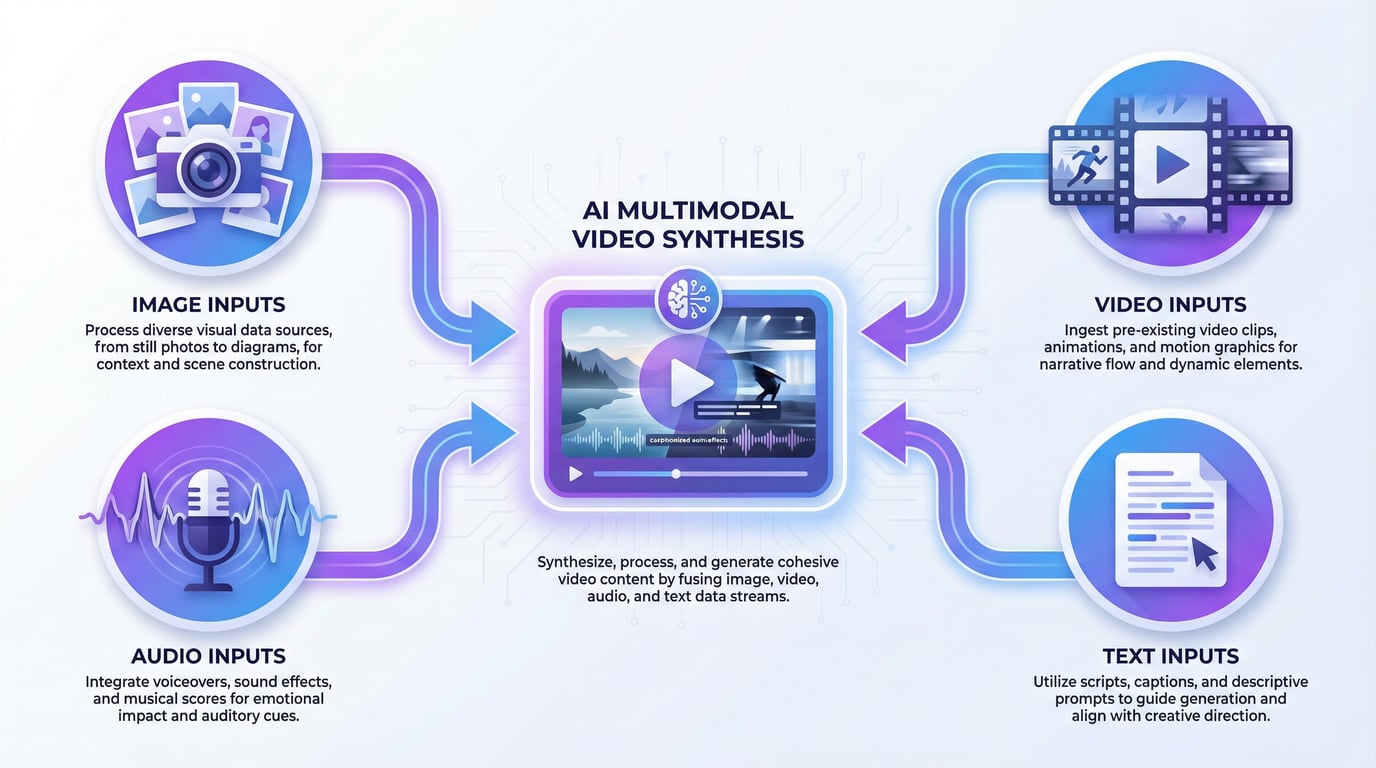
Traditional AI video generators operate on a simple premise: you describe what you want in text, and the AI generates a video. Seedance 2 flips this paradigm. Instead of forcing you to describe everything in words, it allows you to show the AI exactly what you want by combining up to 12 reference files across four modalities:
-
Up to 9 images for character consistency, scene composition, and visual style
-
Up to 3 videos (15 seconds combined) for camera movements, motion patterns, and choreography
-
Up to 3 audio files (15 seconds total) for rhythm synchronization and beat matching
-
Text prompts to guide the narrative and specify how references should be used
This multimodal approach solves one of the most persistent problems in AI video generation: consistency. According to recent testing by industry professionals, Seedance 2 maintains character appearance, clothing details, and visual style across frames with unprecedented reliability—a critical requirement for any commercial application.
How Seedance 2 Stacks Up Against the Competition
To understand Seedance 2's position in the market, let's examine how it compares to other leading models:
| Feature | Seedance 2 | Sora 2 | Veo 3.1 | Runway Gen-4.5 | Kling 3.0 |
|---|---|---|---|---|---|
| Max Resolution | 1080p (2K upscaling) | 1080p | 4K native | 1080p | 1080p |
| Max Duration | 4-15 seconds (extendable) | 25 seconds (Pro) | 8 seconds | 16 seconds | 10 seconds |
| Multimodal Input | ✓ (Image + Video + Audio) | Limited (Cameo) | Image only | Image only | Image only |
| Native Audio | ✓ (Sync + Effects + Music) | ✓ | ✓ | ✗ | ✓ |
| Reference System | @ mention system | Limited | Style transfer | Motion control | Basic |
| Physical Realism | Excellent | Best-in-class | Excellent | Very Good | Very Good |
| Price Point | Mid-range | $20-200/month | Varies | $95/month | Competitive |
Data compiled from multiple industry reviews and testing reports
Key Takeaway: While Sora 2 leads in physical realism and Veo 3.1 offers superior resolution, Seedance 2 wins decisively in controllability and reference-based generation. For creators who need to replicate specific styles, maintain character consistency, or synchronize motion with music, no other tool comes close.
Getting Started with Seedance 2
Accessing Seedance 2
Seedance 2 is currently available through multiple platforms, each with different access models:
Primary Access Points:
-
Jimeng (Dreamina) - ByteDance's official platform
- New users receive 3 free generations
- Daily allocation: 120 points
- Cost: 8 points per second of video
- Supports full feature set including 2K upscaling
-
SeaDance AI Platform - Unified access
- Access Seedance 2 alongside other cutting-edge video and image generation models
- Streamlined interface designed for professional workflows
- Flexible pricing options for different usage levels
- Visit https://seadanceai.com/seedance-2 to get started
-
Little Skylark (Xiao Yunque) - Mobile app with limited free tier
- Time-limited free trial (generations don't deduct points)
- Must manually select Seedance 2 from model dropdown
- Note: Real human face uploads are prohibited for compliance
Important Compliance Note: ByteDance has suspended features related to generating personal voice characteristics from facial photos due to privacy concerns. Always obtain consent for real-human likenesses and follow local regulations regarding AI-generated media.
Understanding the Interface
Once you've accessed Seedance 2, you'll encounter a creation interface with several key components:
- Reference Upload Area: Where you add your images, videos, and audio files
- Text Prompt Box: Where you write instructions using the @ mention system
- Generation Settings: Duration (4-15 seconds), aspect ratio (16:9, 9:16, 1:1, etc.), and quality options
- Preview and History: Access to your generated videos and iteration history
The @ Mention System: Your Key to Precision Control
The defining feature of Seedance 2 is its @ mention system—a natural language approach to specifying how each uploaded asset should be used. This system gives you "director-level control" over the generation process.
Basic @ Mention Syntax
The syntax is intuitive: @[asset_type][number] followed by instructions on how to use it.
Example Structure:
@image1 as the main character, wearing the outfit shown in @image2,
performing the dance moves from @video1, synchronized to the beat of @audio1
Practical @ Mention Examples
Character Consistency:
@image1 is a young woman with long black hair. She walks through a bustling
Hong Kong street market at sunset, looking at various stalls. Camera follows
her with a smooth tracking shot. Cinematic lighting with warm tones.
Motion Replication:
@image1 as the subject, replicating the exact camera movement and choreography
from @video1. The character performs an energetic dance routine on a rooftop
at dusk. Urban skyline in background.
Style Transfer with Audio Sync:
Create a fashion showcase video. @image1 shows the model's face and expression.
@image2, @image3, @image4 show different outfits. The model changes outfits
in sync with the beat drops in @audio1. Runway-style lighting and camera work.
Multi-Shot Storytelling:
0-3 seconds: Close-up of @image1, eyes focused and determined.
Sound: heartbeat.

4-8 seconds: Wide shot, @image1 stands in a fighting stance facing multiple
opponents in black, referencing the composition from @image2.
Camera circles around the scene.

9-12 seconds: Fast-paced action sequence, @image1 defeats opponents using
moves inspired by @video1. Quick cuts and dynamic camera angles.

13-15 seconds: Final shot, @image1 stands victorious, shouts "Who's next?"
Dramatic lighting with dust particles in the air.
This level of specificity—breaking down your video by time segments—is one of Seedance 2's most powerful features for creating professional-grade content.
Seven Essential Techniques for Mastering Seedance 2
Based on extensive testing by professional creators and analysis of thousands of successful generations, here are the core techniques that separate amateur results from professional output.
1. Director's Mindset: Thinking in Shots and Sequences
Traditional AI video tools generate single clips. Seedance 2 thinks like a director, automatically creating shot sequences with logical transitions, camera movements, and pacing.
How to Leverage This:
Instead of describing a single scene, structure your prompt as a sequence of shots with clear narrative progression:
A martial arts master's final battle:

Opening: Medium shot of the master's weathered face, eyes closed in meditation.
Ambient temple sounds.

Rising action: Camera pulls back to reveal he's surrounded by 20 opponents in
a circular courtyard. Tension builds with dramatic music.

Climax: Explosive action sequence—the master moves with lightning speed,
defeating opponents with precise strikes. Multiple camera angles: low angle
for power, high angle for choreography overview, close-ups for impact.

Resolution: Slow-motion final strike. Opponent falls. Master stands alone,
breathing heavily. Camera slowly orbits around him as dust settles.
Pro Tip: Seedance 2 excels at understanding cinematic language. Use terms like "rack focus," "dolly zoom," "Dutch angle," "tracking shot," and "crane shot" to specify camera movements. The model has been trained on professional cinematography and responds accurately to these technical terms.
2. The Perfect First Frame Strategy
One of the most reliable techniques for achieving consistent, high-quality results is the image-to-video workflow. Instead of starting with text alone, create or source a perfect first frame that establishes:
- Character appearance and expression
- Lighting and color palette
- Composition and framing
- Visual style and mood
Workflow:
- Generate your ideal first frame using an image AI tool (Nano Banana Pro, Seedream, Midjourney, etc.)
- Upload this image as @image1
- Write a prompt that describes the motion and changes you want, referencing @image1 as the starting point
Example:
@image1 shows a cyberpunk detective in a neon-lit alley. The camera slowly
pushes in on her face as rain begins to fall. Her expression shifts from
neutral to determined. Neon signs flicker in the background. Cinematic noir
lighting with strong color contrast—pink and blue neon against dark shadows.
This approach dramatically reduces the "character drift" problem that plagues text-only generation. According to experienced creators, using a reference image improves consistency by approximately 80% compared to text-only prompts.
3. Motion Reference: The "Do What That Does" Technique
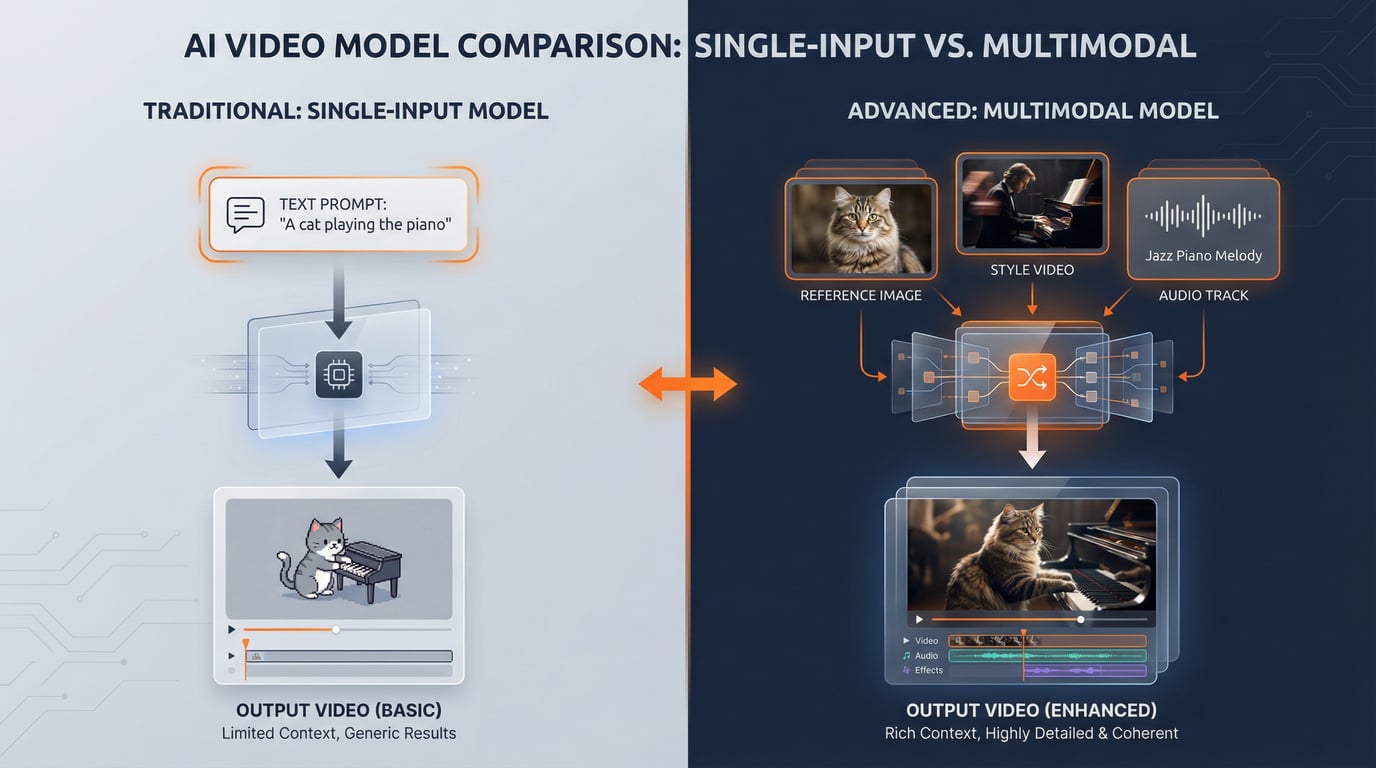
Seedance 2's video reference capability is revolutionary. You can upload a video demonstrating the exact camera movement, choreography, or action sequence you want, and the model will replicate it with your own characters and settings.
Use Cases:
Replicating Professional Camera Work:
@image1 as the product (a sleek drone). Replicate the camera movement and
lighting from @video1 (a luxury car commercial). Slow rotating camera with
dramatic lighting reveals. Studio environment with gradient background.
Emphasize the product's premium design and technical details.
Copying Dance Choreography:
@image1 is the dancer. Perform the exact dance routine shown in @video1,
but in a different setting—a rooftop at sunset instead of a studio.
Maintain the timing and energy of the original choreography.
Camera angles should match @video1's cinematography.
Action Sequence Templates:
@image1 and @image2 are the two fighters. Recreate the fight choreography
from @video1 (a professional martial arts film scene), but set it in a
modern office environment. Maintain the timing, intensity, and camera
angles of the reference.
Advanced Technique: You can reference multiple videos for different aspects. For example, use @video1 for camera movement, @video2 for character motion, and @video3 for pacing and editing rhythm. The model will synthesize these references intelligently.
4. Audio Synchronization: Beat-Perfect Video
Seedance 2's native audio generation is impressive, but its ability to synchronize video to uploaded audio is where it truly shines for creators working on music videos, dance content, or rhythm-based storytelling.
Beat-Matching Workflow:
- Upload your music track as @audio1
- Specify in your prompt that visual changes should sync with the beat
- Optionally, describe what should happen at specific beat markers
Example:
Fashion transformation video. @image1 is the model's face (consistent throughout).
@image2, @image3, @image4, @image5 show different outfits.

The model changes outfits on each beat drop in @audio1. Camera rotates 360
degrees around the model during each transformation. Runway-style lighting
with dramatic shadows. Each outfit change includes a brief flash transition.
Pro Tip: For maximum control, use audio editing software to add markers at key moments (beat drops, transitions, climaxes) before uploading. Reference these moments in your prompt: "At the 3-second mark when the bass drops, camera zooms in dramatically..."
5. Storyboard and Shot List Generation
Professional filmmakers work from storyboards and shot lists. Seedance 2 can interpret these directly, making it invaluable for creators with traditional production backgrounds.
Two Approaches:
A. Upload a Visual Storyboard:
Create a simple storyboard image showing your desired shots in sequence (even rough sketches work). Upload it as @image1 and prompt:
Follow the storyboard layout shown in @image1. Create a 15-second video
following this shot sequence:

Panel 1 (0-3s): Establishing shot of ancient temple
Panel 2 (4-7s): Medium shot of monk meditating
Panel 3 (8-11s): Close-up of monk's eyes opening
Panel 4 (12-15s): Wide shot revealing the monk is surrounded by students

Cinematic lighting, peaceful atmosphere, subtle camera movements.
B. Write a Detailed Shot List:
Professional documentary-style video about traditional craftsmanship:

Shot 1 (0-3s): Extreme close-up of weathered hands holding a carving tool.
Shallow depth of field. Natural window lighting from the left.

Shot 2 (4-7s): Medium shot revealing the craftsman at his workbench,
surrounded by tools and wood shavings. Camera slowly pulls back.

Shot 3 (8-11s): Over-the-shoulder shot showing the detailed carving work
in progress. Focus shifts from hands to the carved object.

Shot 4 (12-15s): Wide establishing shot of the traditional workshop interior.
Warm, golden-hour lighting through windows. Dust particles visible in light beams.

Audio: Ambient workshop sounds—gentle carving, wood shavings falling.
This technique is particularly effective for creators transitioning from traditional video production to AI-assisted workflows.
6. The Iteration Strategy: Small Changes, Big Improvements
One of the most common mistakes beginners make is completely rewriting their prompt when a generation doesn't meet expectations. Professional creators use a different approach: iterative refinement.
The Process:
- Generate your first version with a clear, detailed prompt
- Identify what worked and what didn't (save the good parts!)
- Change only one element for the next generation:
- Swap one reference image
- Adjust timing of one shot
- Modify one camera movement descriptor
- Change one lighting instruction
- Compare results and continue iterating
Example Iteration Sequence:
Generation 1:
@image1 walks through a forest at dawn. Camera follows from behind.
Misty atmosphere with soft lighting.Result: Good atmosphere, but camera angle feels static.
Generation 2 (only changed camera instruction):
@image1 walks through a forest at dawn. Camera circles around her while
moving forward, creating a dynamic tracking shot. Misty atmosphere with
soft lighting.Result: Better camera work, but lighting feels flat.
Generation 3 (only changed lighting):
@image1 walks through a forest at dawn. Camera circles around her while
moving forward, creating a dynamic tracking shot. Misty atmosphere with
dramatic god rays breaking through the trees. Strong backlight creates
silhouette moments.
Why This Works: Seedance 2 generates quickly enough (typically 2-3 minutes per video) that you can test 5-10 variations in 15-20 minutes. This iterative approach consistently outperforms trying to write the "perfect" prompt on the first attempt.
7. Reality Editing: Transforming Real Footage
One of Seedance 2's most practical applications is editing reality—taking real footage and transforming it with AI. This bridges the gap between traditional video production and AI generation.
Use Cases:
Style Transfer:
@video1 shows raw footage of a city street at night. Transform this into
a cyberpunk aesthetic with neon colors, holographic advertisements, and
futuristic vehicles. Maintain the original camera movement and composition,
but completely reimagine the visual style.
Adding Impossible Elements:
@video1 shows me walking through an empty hallway. Add supernatural elements:
flickering lights, shadows moving independently, mysterious fog creeping along
the floor. Horror movie atmosphere with desaturated colors and high contrast.
Keep my movements exactly as shown in the original footage.
VFX on a Budget:
@video1 shows an actor performing a hand gesture. Add magical energy effects
emanating from their hands—glowing particles, electrical arcs, and a summoning
circle appearing on the ground. Fantasy film aesthetic with dramatic lighting
responding to the magical elements.
Pro Tip: When using real footage as reference, shorter clips (5-10 seconds) work best. The model maintains better consistency with concise source material. For longer sequences, break them into segments and process separately, then stitch together in post-production.
Advanced Prompting Techniques for Professional Results
Once you've mastered the basics, these advanced techniques will elevate your work to professional standards.
Cinematic Language Vocabulary
Seedance 2 responds exceptionally well to professional cinematography terms. Incorporate these into your prompts for precise control:
Camera Movements:
- Dolly/Tracking shot: Camera moves horizontally alongside subject
- Crane shot: Camera moves vertically, often revealing scale
- Steadicam: Smooth, floating camera movement
- Handheld: Subtle shake for documentary/realistic feel
- Whip pan: Extremely fast horizontal camera movement
- Dolly zoom (Vertigo effect): Camera moves while zoom adjusts, creating disorienting effect
Shot Types:
- Establishing shot: Wide view showing location/context
- Master shot: Wide shot showing all characters and action
- Two-shot: Frame containing two subjects
- Over-the-shoulder (OTS): Camera behind one subject looking at another
- POV shot: Camera shows subject's perspective
- Insert shot: Close-up of important detail
Lighting Styles:
- Three-point lighting: Classic setup with key, fill, and back lights
- Rembrandt lighting: Triangular highlight on shadowed cheek
- Butterfly lighting: Light directly in front and above subject
- Rim lighting: Strong backlight creating outline
- Chiaroscuro: High contrast between light and shadow
- Golden hour: Warm, soft light of sunrise/sunset
Emotion and Performance Direction
While Seedance 2 excels at technical aspects, you can also direct emotional performance:
@image1 is an elderly man sitting alone in a café.

0-5s: He stares at an old photograph, expression shifting from neutral
to melancholic. Subtle performance—just the eyes and slight downturn of mouth.
Camera slowly pushes in to medium close-up.

6-10s: A small, bittersweet smile appears as he remembers. Camera holds steady,
letting the performance breathe. Natural window lighting creates soft shadows.

11-15s: He sets the photo down gently, takes a deep breath, and looks out
the window with quiet acceptance. Camera pulls back slightly. Ambient café
sounds with soft piano music.
Context Engineering for Consistency
When creating a series of related videos (e.g., for a campaign or story), maintain consistency by establishing context:
[CONTEXT: This is episode 3 of a sci-fi series. The protagonist is Dr. Sarah Chen,
a xenobiologist exploring an alien planet. Visual style: realistic sci-fi with
practical effects aesthetic, inspired by The Expanse. Color grading: desaturated
with teal shadows and warm highlights.]

Scene: @image1 (Dr. Chen in her spacesuit) discovers ancient alien ruins.
She approaches cautiously, scanning with her handheld device. Camera follows
from behind, then circles to show her face through the helmet visor—expression
of wonder mixed with scientific curiosity. The ruins glow faintly with
bioluminescent patterns. Atmosphere: mysterious but not threatening.
Sound: suit breathing, electronic beeps from scanner, ambient alien wind.
Common Pitfalls and How to Avoid Them
Even experienced creators encounter challenges with Seedance 2. Here are the most common issues and their solutions:
Issue 1: Inconsistent Character Appearance
Problem: Character's features, clothing, or proportions change between shots or within a single generation.
Solutions:
- Always use a reference image ( @image1) showing the exact character appearance
- Be specific about unchanging elements: "Throughout the entire video, @image1 maintains the same hairstyle, clothing, and facial features"
- For multi-shot sequences, generate each shot separately with the same reference image, then edit together
- Use closer shots (medium close-up, close-up) rather than wide shots for better facial consistency
Issue 2: Prompt Ignored or Misinterpreted
Problem: The generated video doesn't follow your instructions.
Solutions:
- Simplify your prompt—overly complex prompts confuse the model
- Put the most important instructions first
- Use clear, concrete language rather than abstract concepts
- Break complex scenes into multiple generations
- Verify your @ mentions reference the correct uploaded files
Issue 3: Unnatural Motion or Physics
Problem: Objects move strangely, physics don't look right, or motion feels "floaty."
Solutions:
- Use a video reference ( @video1) showing the correct motion
- Be specific about speed and timing: "rapid movement," "slow and deliberate," "sudden acceleration"
- Describe weight and momentum: "heavy object falling," "light fabric floating"
- For complex physics, use simpler prompts and rely on the model's training rather than over-describing
Issue 4: Audio Doesn't Match Visuals
Problem: Generated audio feels disconnected from the action, or uploaded audio isn't properly synchronized.
Solutions:
- When using uploaded audio, explicitly state: "All visual changes must sync precisely with @audio1"
- Describe audio-visual connections: "Character's footsteps sync with the beat," "Camera movements follow the music's rhythm"
- For dialogue, specify: "Character's lip movements must match the speech in @audio1"
- Consider generating video first, then adding custom audio in post-production for maximum control
Issue 5: Content Review
Problem: Generation fails due to content review, often without clear explanation.
Solutions:
- Avoid celebrity names, public figures, or copyrighted character names
- Don't upload photos of real people (especially faces) without proper rights
- Remove potentially sensitive keywords (weapons, violence, political terms)
- Rephrase prompts using more neutral language
- If a prompt repeatedly fails, try a completely different approach rather than minor edits
- Test with simpler prompts first, then gradually add complexity
Practical Workflows for Common Use Cases
Let's examine complete workflows for popular applications:
Workflow 1: Product Showcase Video
Goal: Create a premium product video for e-commerce or social media.
Steps:
-
Prepare Assets:
- High-quality product photo (clean background, good lighting)
- Optional: Luxury brand commercial video for camera movement reference
- Optional: Upbeat background music
-
Generation Prompt:
@image1 shows [product name]. Create a luxury product showcase video.

0-3s: Camera slowly orbits the product, starting from the front.
Studio lighting with soft shadows and subtle reflections.
Gradient background transitioning from deep blue to black.

4-8s: Camera moves closer, highlighting key features and details.
Lighting shifts to emphasize premium materials and craftsmanship.
Slow motion effect (60fps feel).

9-12s: Camera pulls back to show the product from a hero angle.
Dramatic rim lighting creates a glowing outline.
Product name fades in with elegant typography.

Reference the camera movement style from @video1 (if using reference).
Sync camera movements to the beat of @audio1 (if using music).

Aesthetic: Premium, sophisticated, Apple-style product video.
High contrast, perfect reflections, cinematic depth of field.- Post-Production:
- Add brand logo and text overlays
- Color grade for brand consistency
- Add final audio mix if needed
Workflow 2: Social Media Content Creation
Goal: Create engaging short-form content for TikTok, Instagram Reels, or YouTube Shorts.
Steps:
-
Concept: Trending dance, transformation, or storytelling format
-
Asset Preparation:
- AI-generated character or personal photo
- Reference video of the trend you're recreating
- Trending audio track
-
Generation Prompt:
@image1 is the main character. Recreate the viral dance trend from @video1,
but set in [unique location]. Match the choreography timing exactly.
Camera work should replicate @video1's angles and movements.

Sync all movements to the beat drops and rhythm of @audio1.
High energy, vibrant colors, optimized for vertical 9:16 format.

Lighting: Bright and flattering, with strong color saturation for
social media appeal.- Optimization:
- Generate in 9:16 aspect ratio
- Keep duration 7-15 seconds for maximum engagement
- Add captions and hashtags in post
Workflow 3: Educational/Tutorial Content
Goal: Create explainer videos or visual tutorials.
Steps:
-
Script Your Segments:
- Break complex topics into 3-5 visual segments
- Identify key concepts that need visual representation
-
Generate Each Segment:
Segment 1 - Introduction:
Animated diagram showing [concept]. Start with simple shapes, then
complexity builds as elements are added one by one. Clean, minimal
aesthetic with white background. Use arrows and labels to highlight
key relationships. Smooth, professional animation.

Segment 2 - Process Explanation:
Step-by-step visualization of [process]. Each step appears sequentially
with a brief pause for comprehension. Use consistent color coding:
blue for inputs, green for processes, orange for outputs.
Isometric perspective for technical clarity.

[Continue for each segment...]- Assembly:
- Combine segments in video editor
- Add voiceover or text explanations
- Include transitions between segments
Cost Optimization Strategies
Seedance 2's pricing model (8 points per second on Jimeng) means a 15-second video costs 120 points, or approximately $12-15 depending on your plan. Here's how to maximize value:
Strategy 1: Test with Shorter Durations
Generate 5-second test clips (40 points) to verify your concept works before committing to full 15-second generations. Once you've dialed in the perfect prompt and references, generate the full version.
Strategy 2: Use Image-to-Video for Consistency
Image-to-video generations have higher success rates than text-only, reducing wasted generations. The upfront cost of creating a perfect reference image pays off in fewer failed attempts.
Strategy 3: Batch Similar Content
If creating multiple videos with similar styles (e.g., a product line showcase), generate them in a single session. You can reuse reference videos and audio files, and your prompts become templates requiring only minor adjustments.
Strategy 4: Strategic Use of Extensions
Seedance 2 offers video extension features, but each extension is a separate generation. Plan your core content to fit within a single generation when possible, using extensions only when narrative truly requires longer duration.
Strategy 5: Leverage the SeaDance AI Platform
For professional creators and businesses requiring regular access to multiple AI models, using a unified platform like SeaDance AI can provide better value than managing multiple subscriptions. The platform offers:
- Access to Seedance 2 alongside other cutting-edge models
- Flexible pricing tiers based on usage
- Streamlined workflow without platform-switching
- Professional support and documentation
The Future of AI Video: What's Next?
Seedance 2 represents a watershed moment, but the technology continues to evolve rapidly. Based on industry trends and recent developments, here's what to expect:
Near-Term (2026):
- Extended duration capabilities (30+ seconds)
- Improved character consistency across even longer sequences
- Enhanced audio generation with more natural dialogue
- Better integration with traditional video editing workflows
Medium-Term (2027-2028):
- Real-time generation for live applications
- Full scene editing capabilities (modify specific elements in generated videos)
- Multi-character interaction with individual control
- Photorealistic human generation with proper consent frameworks
Long-Term Vision:
- Complete AI-assisted film production pipelines
- Personalized content generation at scale
- Seamless hybrid workflows combining real footage and AI generation
- Democratization of high-end visual effects
Conclusion: Your Next Steps
Seedance 2 isn't just another incremental improvement in AI video generation—it's a fundamental shift in how we approach video creation. The multimodal reference system, director-level control, and professional-grade output quality make it the first AI video tool truly ready for commercial production.
Your Action Plan:
- Get Access: Visit https://seadanceai.com/seedance-2 to start creating with Seedance 2 and explore other cutting-edge AI models in one convenient platform
- Start Simple: Begin with image-to-video generations using a single reference image and clear, concise prompts
- Master the Basics: Practice the @ mention system and experiment with different reference combinations
- Study Examples: Analyze successful videos from other creators to understand what works
- Iterate Relentlessly: Generate multiple variations, learn from each attempt, and refine your approach
- Build Your Library: Create a collection of reference videos, images, and audio files for different styles and use cases
- Join the Community: Engage with other creators sharing techniques and discoveries
The "ChatGPT moment" for video has arrived. Those who master these tools now will have a significant advantage as AI video generation becomes standard practice across industries. The question isn't whether AI will transform video production—it's whether you'll be leading that transformation or catching up later.
Start creating today, and discover what's possible when you combine human creativity with AI's unprecedented capabilities.
Ready to experience the future of video creation? Visit SeaDance AI to access Seedance 2 and start bringing your creative vision to life with the most advanced AI video generation tools available.