The AI video generation landscape has transformed dramatically in early 2026, and Kling 3.0 stands at the forefront of this revolution. Developed by Kuaishou Technology, Kling 3.0 has claimed the top position on Artificial Analysis's text-to-video leaderboard, outperforming competitors like Sora 2.0 and Veo 3.1 in prompt adherence, motion fluidity, and visual fidelity.
This comprehensive guide will walk you through everything you need to know about crafting effective Kling 3.0 prompts, from basic structure to advanced techniques that unlock the model's full potential. Whether you're a content creator, marketer, or filmmaker, mastering Kling 3.0 prompting will elevate your AI video production to professional standards.
What Makes Kling 3.0 Different from Previous AI Video Models
Kling 3.0 represents a fundamental shift in AI video generation capabilities. Unlike earlier models that functioned primarily as clip generators, Kling 3.0 operates as a true scene-level directing system with unprecedented creative control.
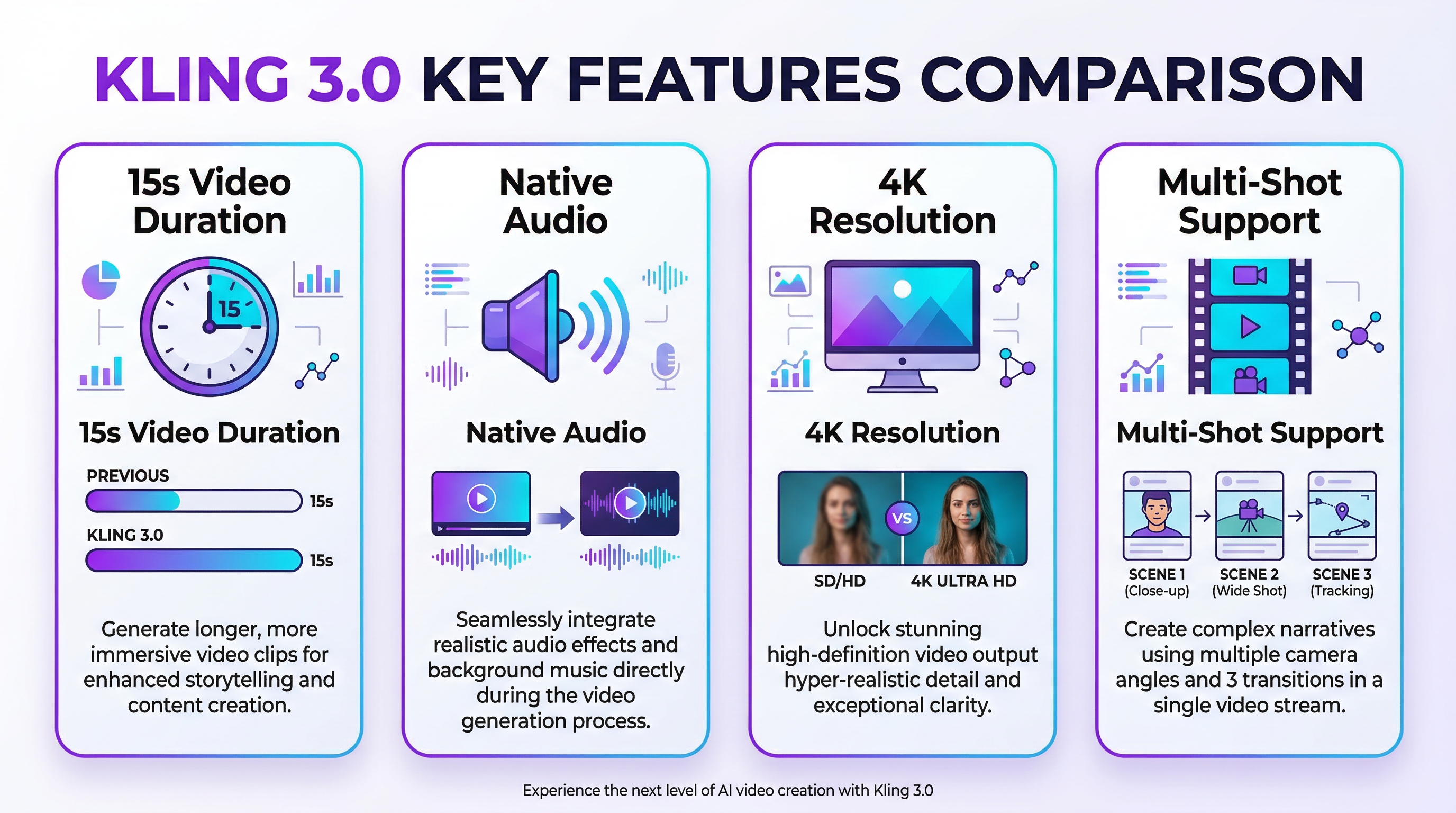
The model's standout features include support for up to 15 seconds of continuous video, native multilingual audio generation with synchronized dialogue, and advanced 3D Spacetime Joint Attention combined with Chain-of-Thought reasoning. This architectural innovation allows Kling 3.0 to maintain character consistency, execute complex camera movements, and simulate realistic physics in ways that previous generations simply couldn't achieve.
Independent benchmarks consistently highlight Kling 3.0's superiority in motion realism. The model currently holds the industry standard for natural human movement, handling complex actions like martial arts, dancing, and running without the "noodle limbs" or body warping that plagued earlier AI video systems.
For creators seeking a unified platform to access Kling 3.0 alongside other cutting-edge AI video models, Seedance AI offers an integrated solution that streamlines the entire creative workflow. With Seedance AI, you can leverage Kling 3.0's powerful capabilities without switching between multiple platforms, saving time and maximizing creative efficiency.
Understanding Kling 3.0's Core Capabilities
Before diving into prompt engineering, you need to understand what Kling 3.0 can actually do. The model offers several resolution options including 720p, 1080p, and even 4K output at 60fps—a capability no competing model currently matches.
Video duration ranges from 3 to 15 seconds, giving creators room for movement, pacing, and narrative escalation that shorter clips cannot accommodate. The model supports both text-to-video and image-to-video workflows, with the ability to upload up to 3 reference images at once and generate up to 6 output variations simultaneously.
One of Kling 3.0's most powerful features is its Omni mode, which brings together character consistency, element references, and voice-to-character binding with automatic lip-sync in a single unified framework. This allows creators to build reusable character libraries and maintain visual continuity across multiple shots—a game-changer for anyone producing serialized content or branded videos.
The model also excels at object permanence and spatial reasoning. When an object moves behind an obstruction, Kling 3.0's "Director Memory" correctly maintains the object's existence and accurately restores it when it reemerges. This level of world knowledge is essential for creating believable, professional-grade video content.
The Anatomy of an Effective Kling 3.0 Prompt
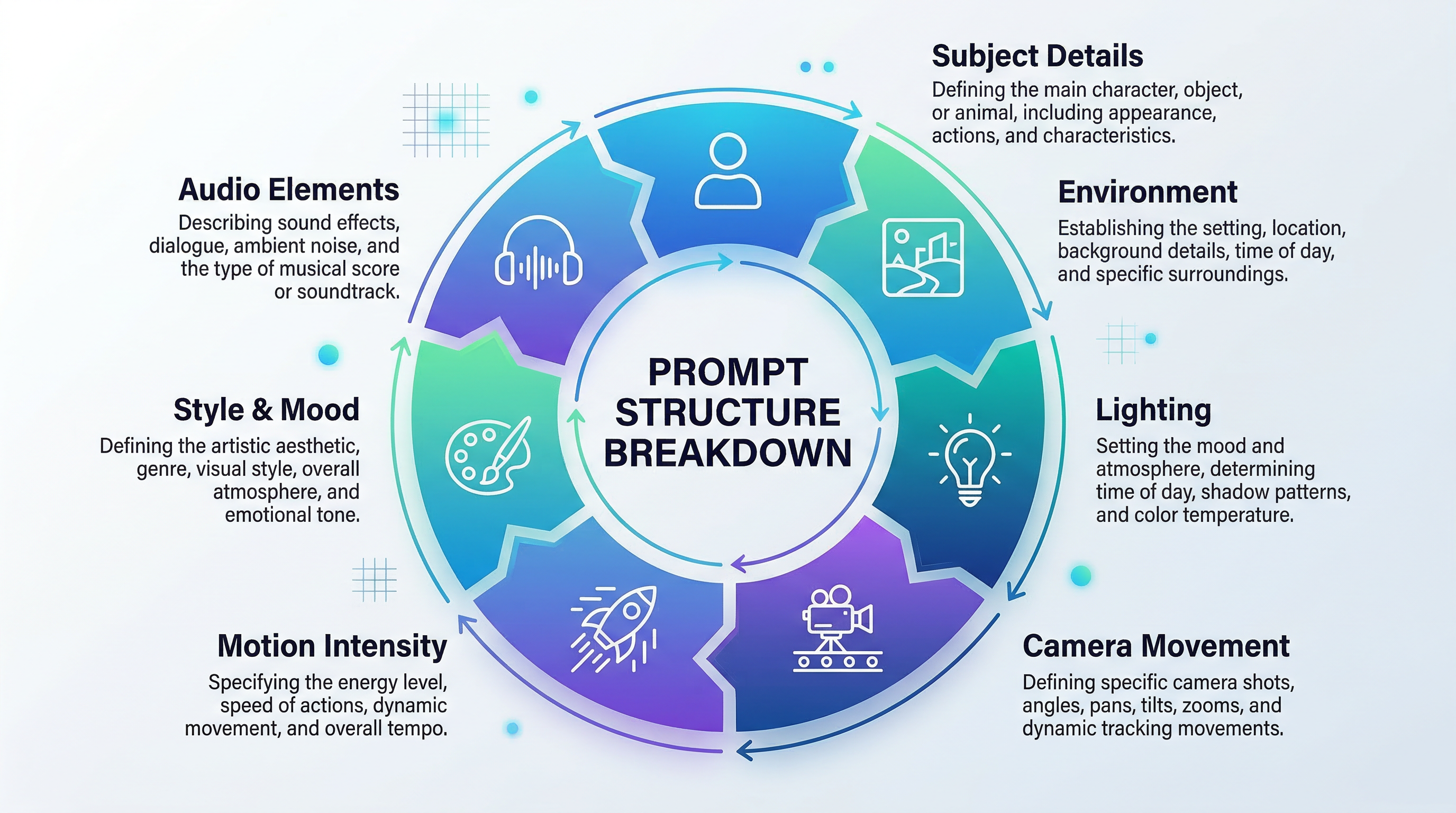
Crafting prompts for Kling 3.0 requires a structured approach that covers multiple dimensions of your desired output. Based on extensive testing and community feedback, a solid Kling 3.0 prompt typically includes seven core elements: subject details, environment description, lighting conditions, camera movement, mood and style, motion specifications, and dialogue or audio cues.
Subject Details
Begin by clearly defining your main subject. Specify physical characteristics, clothing, expressions, and any distinguishing features. For example, instead of writing "a woman walking," write "a woman in her mid-30s with shoulder-length auburn hair, wearing a charcoal gray wool coat and burgundy scarf, with a confident expression."
The more specific you are about your subject, the more consistent Kling 3.0's output will be. This is particularly important when creating multi-shot sequences where character consistency matters.
Environment and Setting
Describe the location with concrete details. Include architectural elements, natural features, weather conditions, and atmospheric qualities. "A snow-covered urban street at dusk, with Victorian-era brick buildings, warm light glowing from shop windows, and gentle snowfall creating a soft haze" provides far more direction than simply "snowy street."
Lighting Specifications
Lighting dramatically affects mood and visual quality. Specify the light source, direction, color temperature, and intensity. Terms like "golden hour sunlight," "soft diffused studio lighting," "harsh overhead fluorescent," or "dramatic side lighting with deep shadows" give Kling 3.0 precise guidance for rendering your scene.
Camera Movement and Framing
Kling 3.0 responds exceptionally well to cinematographic terminology. Specify shot types (wide, medium, close-up, extreme close-up) and camera movements (dolly-in, dolly-out, pan left, pan right, track, static, Dutch tilt).
For example: "Medium shot, slow dolly-in transitioning to close-up, maintaining eye-level perspective throughout" provides clear directorial instruction that Kling 3.0 can execute with remarkable accuracy.
Motion Intensity and Physics
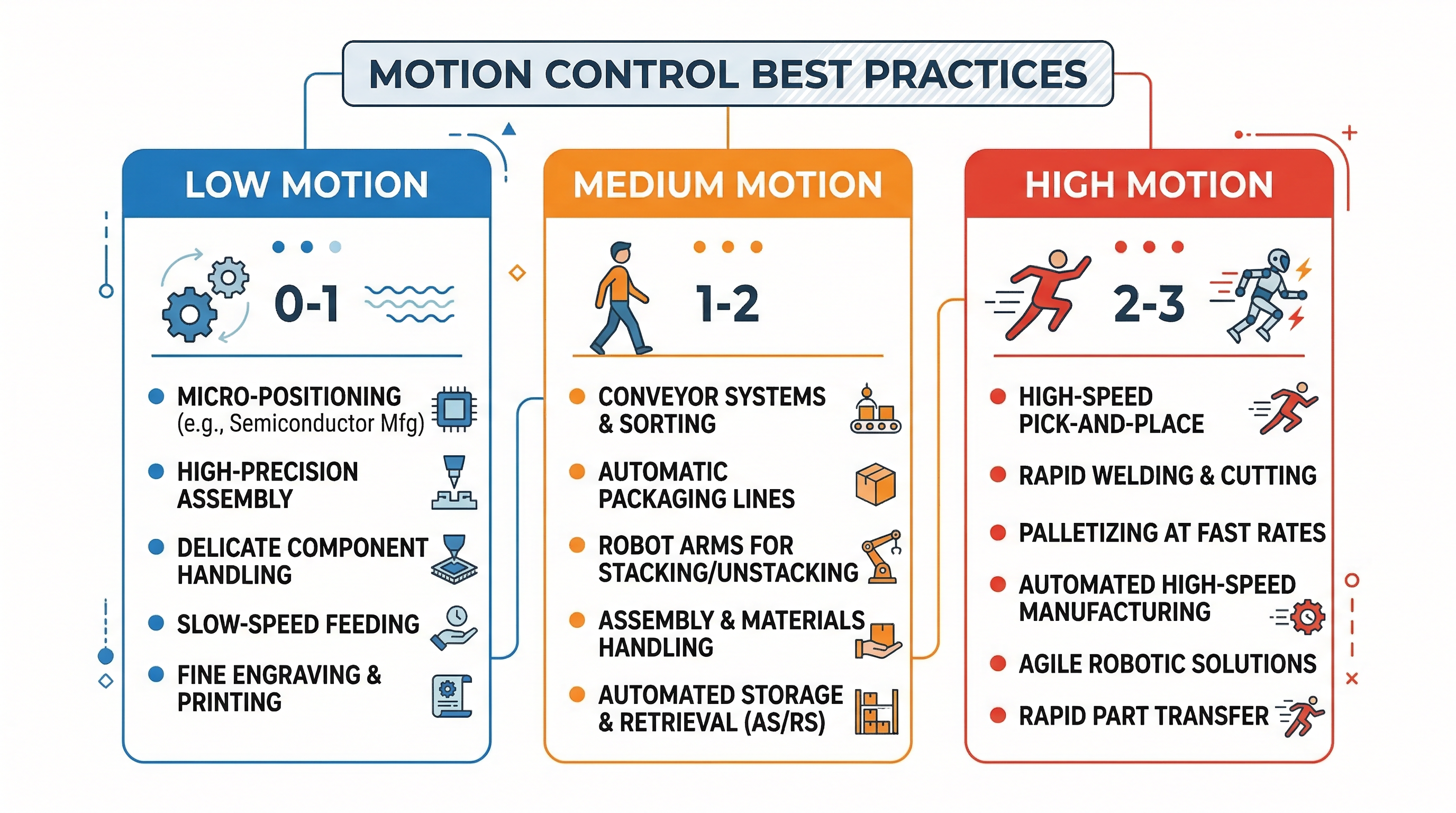
One of Kling 3.0's unique strengths is its motion intensity control system. You can specify motion intensity on a scale from 0 to 3, where 0 represents minimal movement and 3 represents dynamic, high-energy action.
This granular control allows you to avoid the common pitfall of unintended slow-motion effects that plague many AI video generations. For subtle movements like a person turning their head, use motion intensity 0.3-0.5. For energetic actions like dancing or running, specify 2.0-3.0.
Style and Mood
Define the overall aesthetic and emotional tone. Are you creating cinematic realism, stylized animation, documentary footage, or commercial polish? Specify color grading preferences, such as "warm color palette with slightly desaturated tones" or "high-contrast with vivid, saturated colors."
Dialogue and Audio Elements
If you're using Kling 3.0's native audio generation, describe the dialogue, voice characteristics, emotional tone, and background sounds. For example: "Female voice, mid-range pitch, speaking with warm enthusiasm, with subtle urban ambient sound in background."
Optimal Prompt Length and Structure
Research on Kling 3.0 performance reveals that prompt length significantly impacts output quality, but longer isn't always better. The optimal prompt length for Kling 3.0 falls between 80-150 words.
Prompts shorter than 80 words often lack sufficient detail for Kling 3.0 to generate nuanced, high-quality results. Prompts exceeding 200 words can introduce conflicting instructions or dilute the model's focus on key elements.
Structure your prompt in a logical flow that mirrors how a scene unfolds: establish the setting and subject first, then describe the action and movement, followed by technical specifications like camera work and lighting, and finally style and mood elements.
Multi-Shot Prompting for Complex Sequences
One of Kling 3.0's most powerful features is its ability to handle multi-shot sequences with explicit scene transitions. The model supports up to 6 shots per video, with customizable duration for each shot.
When creating multi-shot prompts, label each shot explicitly: "Shot 1: Wide exterior establishing shot...", "Shot 2: Medium shot tracking the subject...", "Shot 3: Close-up of subject's face..." This structure gives Kling 3.0 clear narrative beats and helps maintain continuity across cuts.
For each shot, specify:
- Shot number and duration (if the platform supports it)
- Framing and camera position
- Subject and key action
- Camera movement
- Transition type (cut, fade, dissolve)
This approach transforms Kling 3.0 from a clip generator into a true storytelling tool, allowing you to structure hook-reveal-payoff sequences for ads, create narrative arcs for short films, or develop educational content with clear visual progression.
Using Negative Prompts to Eliminate Artifacts
Kling 3.0 supports negative prompting, which allows you to explicitly exclude unwanted elements from your generation. This feature is particularly valuable for preventing common AI video artifacts that can undermine professional quality.
Effective negative prompts for Kling 3.0 typically include: "motion blur, face distortion, warping, morphing, inconsistent physics, floating objects, unnatural movements, extra limbs, background shifting, temporal flickering, color banding."
When working with human subjects, add specific anatomical exclusions: "deformed hands, incorrect finger count, asymmetrical facial features, unnatural joint angles." For product videos or branded content, include: "logo distortion, text warping, brand color shifts."
Negative prompting consistently improves output quality by giving Kling 3.0 explicit boundaries, reducing the need for multiple regenerations and saving both time and credits.
Advanced Techniques: Character Consistency and Element References
Kling 3.0's Element system allows you to create reusable assets—characters, objects, or environments—that can be referenced across multiple generations. This is transformative for creators producing serialized content, branded videos, or any project requiring visual continuity.
To use Elements effectively, first create a character or object by generating a high-quality reference image or video. Save this as an Element in your Kling 3.0 workspace. In subsequent prompts, reference the Element using the @ mention system: " @CharacterName walks through @EnvironmentName carrying @ObjectName."
This approach ensures that your character maintains consistent appearance, proportions, and style across all shots, eliminating one of the most frustrating challenges in AI video production. The Element system works seamlessly with Kling 3.0's Omni mode, allowing you to build comprehensive asset libraries for ongoing projects.
Motion Control: The Feature That Changes Everything
Motion control is where Kling 3.0 truly distinguishes itself from competitors. The model's physics-aware motion system produces actions that look natural and believable, from subtle gestures to dynamic athletic movements.
To maximize motion quality, follow these community-tested principles:
- Be explicit about motion speed and intensity. Instead of "person running," specify "person sprinting at high speed, motion intensity 2.8, with realistic arm swing and foot strike."
- Describe the physics of the movement. For object interactions, include details like "ball bouncing with decreasing height, realistic gravity and deformation on impact."
- Use reference videos for complex movements. Kling 3.0's image-to-video mode accepts video references, allowing the model to extract and apply specific motion patterns to your scene.
- Avoid conflicting motion instructions. Don't ask for both "slow, contemplative movement" and "dynamic, energetic action" in the same prompt. Choose one motion direction and commit to it.
Kling 3.0 vs. Competing Models: When to Choose What
Understanding how Kling 3.0 compares to other leading AI video models helps you make informed decisions about which tool to use for specific projects.
| Feature | Kling 3.0 | Sora 2.0 | Veo 3.1 | Seedance 2.0 |
|---|---|---|---|---|
| Max Duration | 15 seconds | 20 seconds | 8 seconds | 10 seconds |
| Native Audio | Yes, multilingual | Limited | No | Yes, advanced |
| Motion Realism | Excellent | Very Good | Good | Excellent |
| Character Consistency | Excellent (Elements) | Good | Fair | Excellent ( @ system) |
| Prompt Adherence | Excellent | Very Good | Very Good | Very Good |
| Physics Simulation | Very Good | Excellent | Good | Very Good |
| Resolution Options | 720p, 1080p, 4K | 1080p | 720p, 1080p | 1080p |
| Multi-Shot Support | Yes (6 shots) | Limited | No | Yes (advanced) |
Kling 3.0 excels when you need precision control over camera movements, character consistency across shots, and production-ready output with minimal post-processing. Its combination of high-resolution output, native audio, and robust motion control makes it ideal for commercial work, branded content, and professional video production.
Sora 2.0 may be preferable when physics accuracy is paramount—its neural world simulator excels at complex physical interactions and environmental effects. Veo 3.1 offers faster generation times for projects with tight deadlines. Seedance 2.0 provides the most sophisticated multimodal input system, accepting up to 12 files across images, videos, audio, and text.
For creators who want access to all these models without platform-switching friction, Seedance AI provides a unified interface where you can experiment with Kling 3.0, compare results with other leading models, and choose the best tool for each specific shot or sequence. This integrated approach maximizes creative flexibility while minimizing workflow complexity.
Common Kling 3.0 Prompting Mistakes and How to Avoid Them
Even experienced creators make predictable mistakes when first working with Kling 3.0. Understanding these pitfalls will accelerate your learning curve and reduce wasted credits.
Mistake 1: Vague Motion Descriptions Writing "person moving" or "camera moving" gives Kling 3.0 insufficient direction. The model will default to generic movements that rarely match your vision. Always specify the type, speed, and direction of movement with precise terminology.
Mistake 2: Ignoring Motion Intensity Settings Failing to specify motion intensity often results in unwanted slow-motion effects. This is one of the most common complaints from new Kling 3.0 users. Always include motion intensity values appropriate to your desired action speed.
Mistake 3: Overloading Single Prompts Trying to accomplish too much in a single generation leads to inconsistent results. If your scene requires multiple distinct actions or significant changes in perspective, use multi-shot prompting instead of cramming everything into one prompt.
Mistake 4: Neglecting Lighting Specifications Lighting profoundly affects mood, depth, and visual quality. Omitting lighting details forces Kling 3.0 to make arbitrary choices that may not align with your creative vision. Always include specific lighting direction and quality.
Mistake 5: Inconsistent Style Language Mixing conflicting style descriptors—like "photorealistic" and "stylized animation" in the same prompt—confuses the model. Choose one aesthetic direction and use consistent terminology throughout your prompt.
Practical Prompt Examples for Different Use Cases
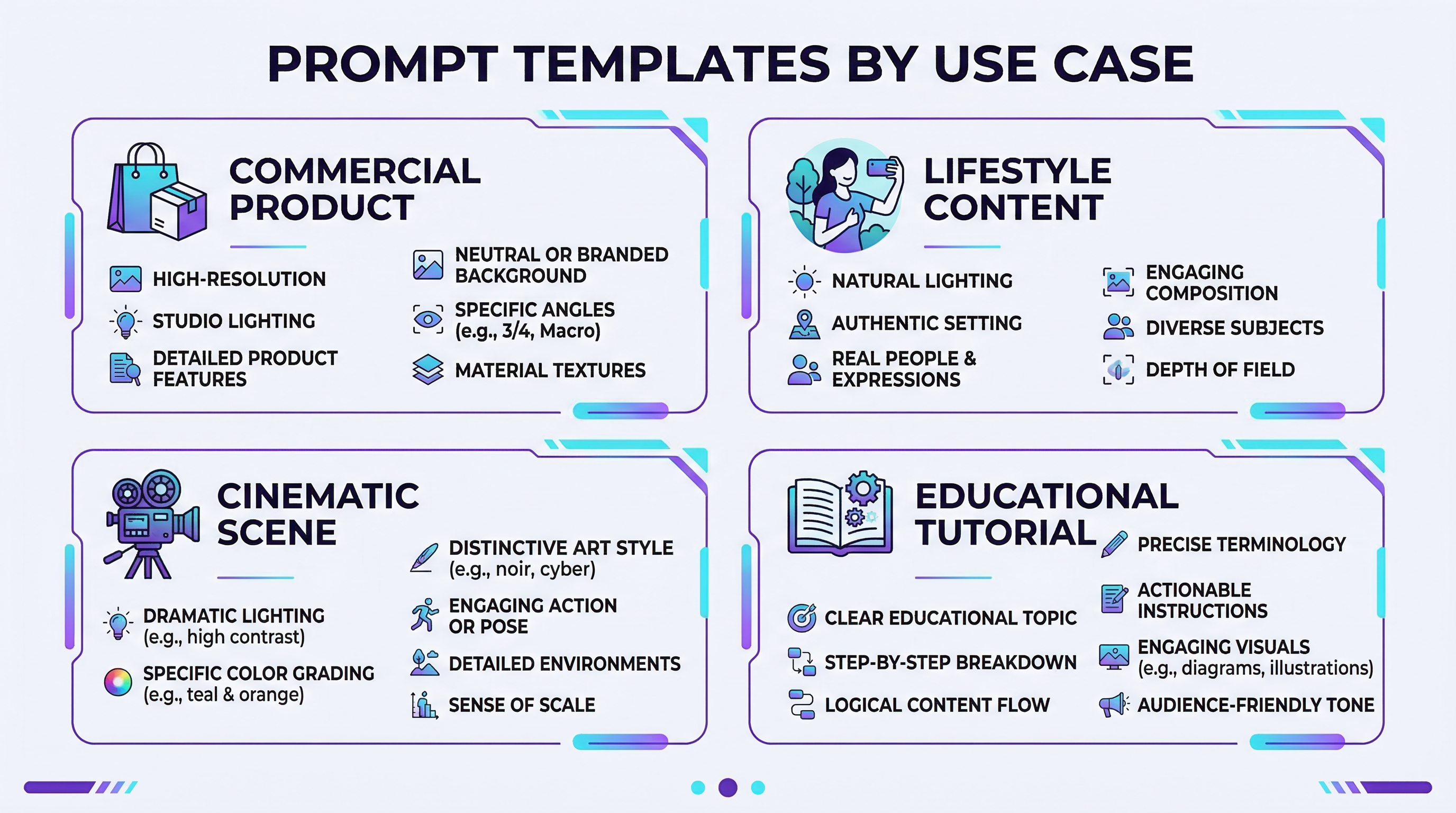
Commercial Product Video
"Medium shot of sleek silver smartphone on minimalist white marble surface, slow 180-degree orbital camera movement, motion intensity 0.5, studio lighting with soft shadows, subtle reflections on screen surface, clean modern aesthetic, 1080p, photorealistic rendering, duration 8 seconds. Negative: motion blur, surface scratches, color banding."
Lifestyle Content for Social Media
"Close-up of hands pouring golden honey from wooden dipper into ceramic bowl filled with Greek yogurt and fresh berries, slow-motion pour with motion intensity 1.2, warm natural window light from left, shallow depth of field, cozy morning atmosphere, soft color grading with slightly elevated saturation, duration 6 seconds. Negative: unnatural hand positions, floating objects, inconsistent lighting."
Cinematic Character Scene
"Shot 1 (5s): Wide shot, woman in red coat walking through misty forest path at dawn, slow dolly-in, motion intensity 0.8, diffused morning light filtering through trees, atmospheric haze, cinematic color grading. Shot 2 (5s): Medium shot tracking alongside subject, maintaining profile view, gentle camera movement matching walking pace. Shot 3 (5s): Close-up of subject's face as she stops and looks up, subtle expression change from contemplation to wonder, static camera, soft focus on background. Negative: face distortion, unnatural walking motion, temporal flickering."
Educational Tutorial
"Medium shot of instructor's hands demonstrating origami folding technique, overhead camera angle, well-lit workspace with neutral background, clear visibility of paper and hand movements, motion intensity 1.5, clean professional aesthetic, duration 10 seconds. Female voice narration: 'Fold the corner diagonally to create a triangle,' warm instructional tone, clear articulation. Negative: hand deformities, motion blur, shadow interference."
Optimizing for Different Output Resolutions and Frame Rates
Kling 3.0's support for multiple resolution and frame rate options requires strategic decision-making to balance quality and resource consumption.
For social media content destined for mobile viewing, 720p at 30fps provides excellent quality while conserving credits. The quality difference between 720p and 1080p is minimal on small screens, making higher resolutions an unnecessary expense for these applications.
For professional presentations, client deliverables, or content that will be displayed on large screens, 1080p at 30fps represents the optimal balance of quality and cost. This resolution maintains professional standards while keeping generation times and credit consumption reasonable.
Reserve 4K output at 60fps for flagship projects where maximum visual fidelity is essential—hero shots for major campaigns, festival submissions, or content that will undergo significant post-production manipulation.
A cost-effective workflow strategy involves iterating at 1080p until you've refined your prompt to produce exactly what you want, then generating the final version at 4K. This approach dramatically reduces credit expenditure while maintaining final output quality.
Integration with Post-Production Workflows
While Kling 3.0 produces remarkably polished output, understanding how to integrate AI-generated clips into professional post-production workflows maximizes their value.
Kling 3.0's native audio generation is impressive, but for commercial projects requiring specific music, sound effects, or professional voiceover, plan to replace or augment the AI-generated audio in post-production. The model's audio serves as an excellent placeholder during the creative development phase.
Color grading remains an essential post-production step even with Kling 3.0's advanced rendering. While the model produces well-balanced footage, final color correction ensures consistency across multiple clips and allows you to match specific brand guidelines or creative visions.
When planning multi-clip sequences, generate individual shots with slight overlap in action or framing. This provides editing flexibility and allows for smoother transitions than relying solely on Kling 3.0's built-in multi-shot transitions.
The Future of Kling 3.0 and AI Video Generation
Kling 3.0's position at the top of current benchmarks represents a snapshot of a rapidly evolving field. Kuaishou Technology continues to refine the model, with community feedback suggesting that future updates will focus on extending maximum duration beyond 15 seconds, improving fine-grained facial expression control, and enhancing the Element system's capabilities for complex scene composition.
The broader trajectory of AI video generation points toward increasingly sophisticated world modeling, where AI systems don't just generate visually appealing clips but truly understand spatial relationships, object permanence, and narrative causality. Kling 3.0's "Director Memory" and 3D Spacetime Joint Attention represent early steps toward this future.
For creators, this evolution means that the skills you develop in prompt engineering for Kling 3.0 today will remain valuable as models become more capable. The fundamental principles—clear communication of creative intent, structured prompting, understanding of cinematographic language—will transfer to future generations of AI video tools.
Conclusion: Mastering Kling 3.0 for Professional Results
Kling 3.0 represents the current pinnacle of AI video generation technology, offering unprecedented control, quality, and creative flexibility. Mastering its prompt engineering requires understanding the model's capabilities, structuring prompts with precision, leveraging advanced features like multi-shot sequencing and Element references, and developing an intuitive sense for how the model interprets creative direction.
The investment in learning Kling 3.0's nuances pays dividends in reduced iteration time, higher-quality output, and expanded creative possibilities. Whether you're producing commercial content, social media videos, educational materials, or cinematic projects, Kling 3.0 provides the tools to execute your vision with professional polish.
For creators seeking the most efficient path to mastering AI video generation, platforms like Seedance AI eliminate the friction of managing multiple tools and subscriptions. With integrated access to Kling 3.0 and other leading models, you can focus on creativity rather than technical logistics, experimenting freely to discover which approaches work best for your specific projects.
The future of video creation is here, and with the techniques outlined in this guide, you're equipped to harness Kling 3.0's full potential. Start experimenting, iterate based on results, and watch as your AI video production capabilities transform from experimental to professional-grade.