The AI video generation landscape has undergone a seismic shift with the arrival of Seedance 2.0, ByteDance's groundbreaking multimodal video model. Released in February 2026, this isn't just another incremental update - it represents a fundamental reimagining of how creators interact with AI video tools. While competitors like Sora 2, Veo 3.1, and Kling 3.0 continue to refine their approaches, Seedance 2.0 introduces a director-level control system that transforms video generation from guesswork into precision filmmaking.
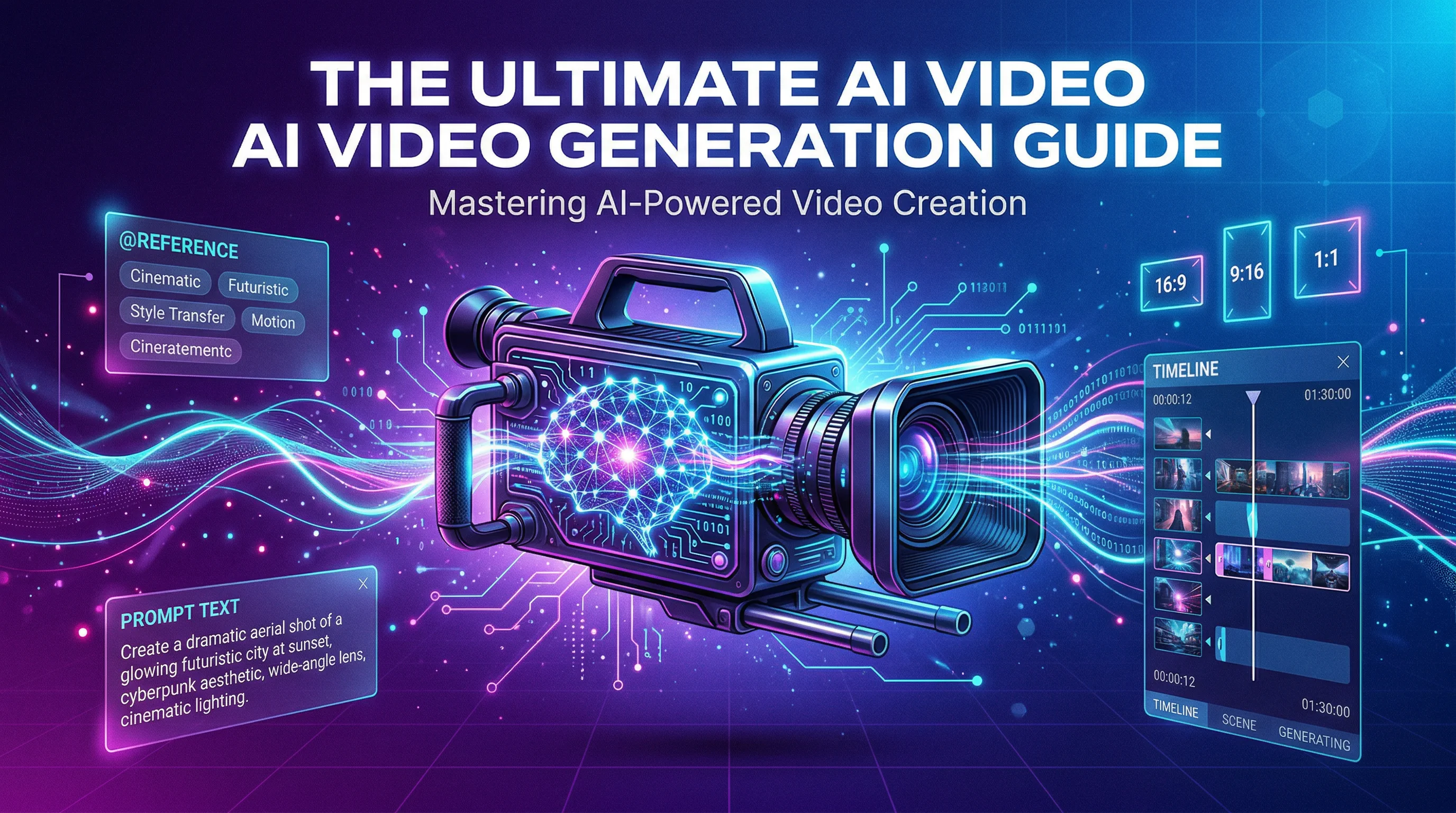
For creators frustrated by the "black box" nature of first-generation AI video tools - where you'd type a prompt, cross your fingers, and hope the output matched your vision - Seedance 2.0 offers a radically different paradigm. Through its innovative @reference system and multimodal architecture, you can now orchestrate every element of your video with the same level of control a director exercises on set. This guide will show you exactly how to harness that power, with practical prompt frameworks, technical insights, and strategies drawn from real-world testing and community feedback.
What Makes Seedance 2.0 Different from Other AI Video Models
Understanding Seedance 2.0's unique architecture is essential before diving into prompting techniques. Unlike traditional text-to-video models that treat prompts as vague suggestions, Seedance 2.0 employs a dual-branch diffusion transformer that processes visual and audio data simultaneously. This architectural choice eliminates the common problem of audio-visual drift - where footsteps don't sync with walking or explosions feel disconnected from their visual impact.
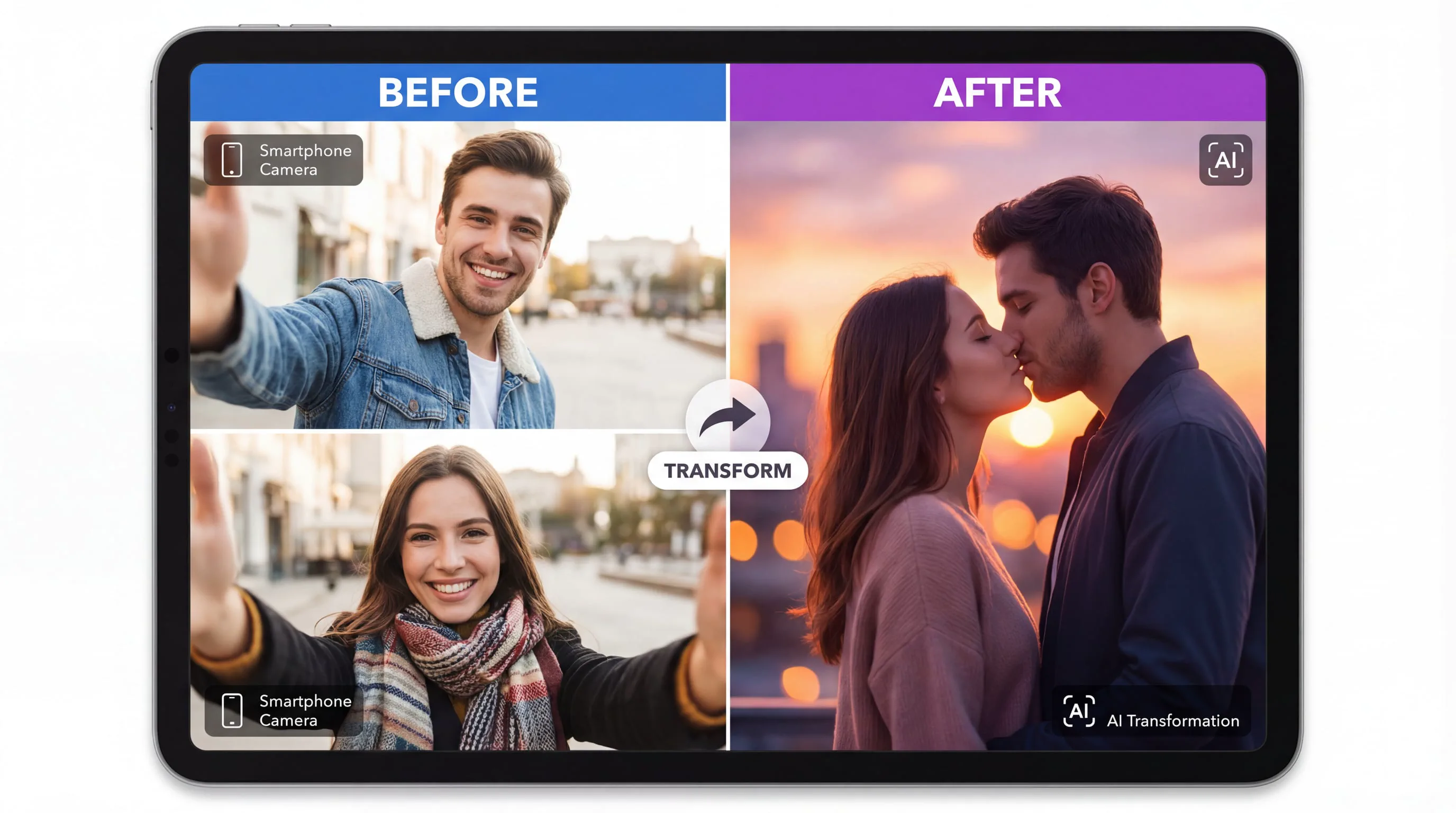
The model's multimodal input system accepts up to 12 reference files in a single generation: 9 images for characters, environments, and style references; 3 video clips totaling 15 seconds for camera movements and action choreography; and 3 audio files totaling 15 seconds for music, dialogue, and sound effects. Each reference can be tagged and specifically directed using the @reference notation system, giving you granular control over how each element influences the final output.
What truly distinguishes Seedance 2.0 is its understanding of real-world physics. The model doesn't just animate objects - it simulates how they behave under physical forces. When you describe a car drifting, Seedance 2.0 calculates weight distribution, tire friction, and momentum. When you prompt for falling debris, it understands gravity, collision dynamics, and material properties. This physics-aware generation produces videos that feel authentic rather than artificially smooth, a critical distinction for professional applications.
Seedance AI offers creators access to this cutting-edge technology through an intuitive platform that integrates multiple state-of-the-art video and image generation models. With Seedance AI, you can leverage Seedance 2.0's powerful capabilities alongside other industry-leading tools, all within a single, streamlined workflow designed for maximum creative efficiency.
The Three Core Prompt Frameworks That Actually Work
After extensive community testing and analysis of successful generations, three prompt frameworks have emerged as the foundation for consistent, high-quality results. These aren't arbitrary templates - they're structural patterns that align with how Seedance 2.0's neural architecture interprets instructions.
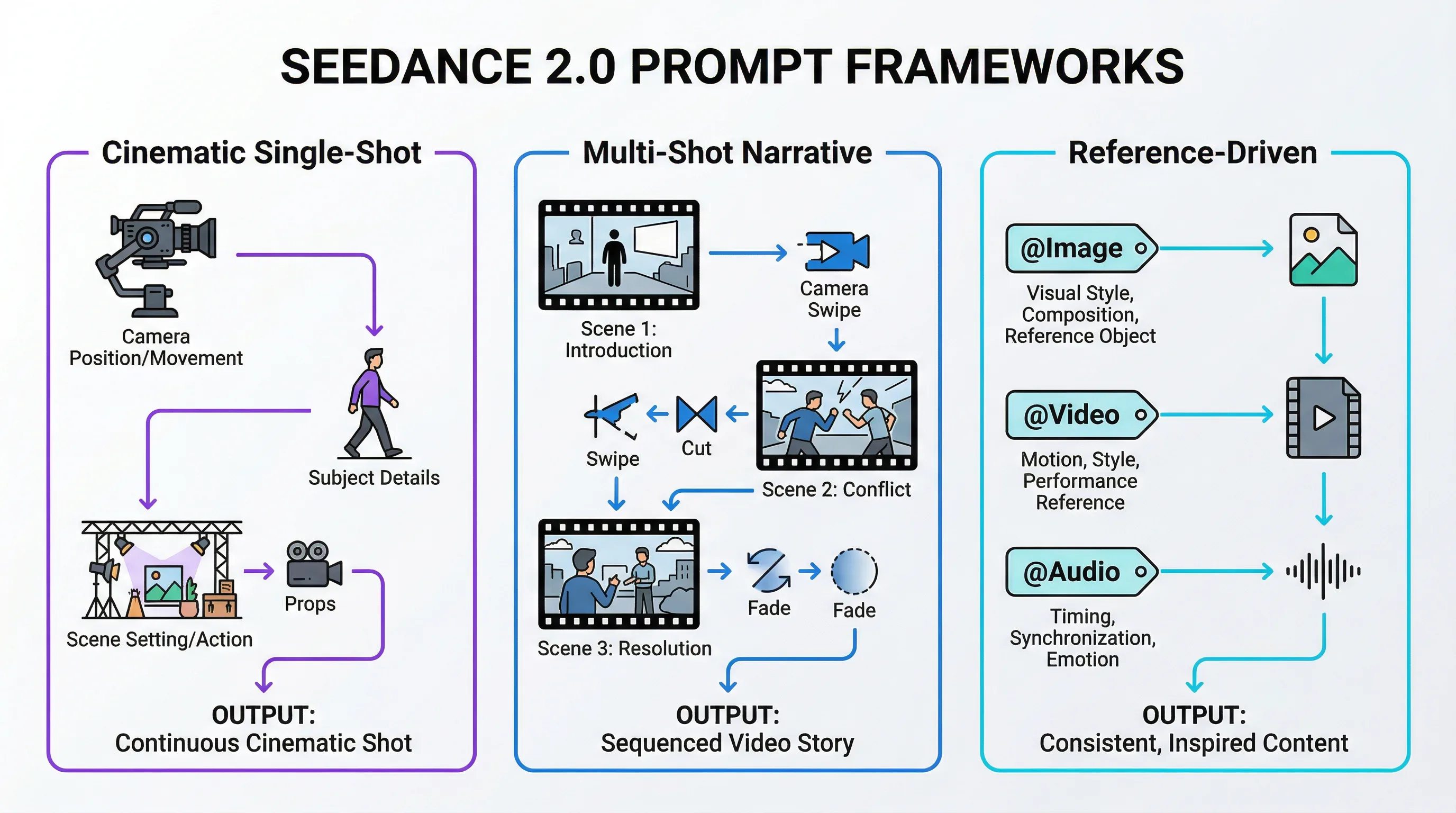
Framework 1: The Cinematic Single-Shot Structure
This framework works best for continuous action sequences and emotionally resonant moments where maintaining visual coherence across the entire duration is paramount.
Core Logic: Subject + Scene/Atmosphere + Action/Performance + Camera Movement + Style/Lighting
Example Prompt:
"A young woman in a red leather jacket stands at the edge of a rain-soaked rooftop at night, neon signs reflecting in puddles around her feet. She turns slowly toward the camera, wind catching her hair, as distant thunder rumbles. The camera pulls back in a smooth dolly movement, revealing the sprawling cyberpunk cityscape behind her. Cinematic lighting with high contrast, film grain texture, moody color grading with teal and orange tones."
This structure gives Seedance 2.0 clear answers to the questions its architecture needs to resolve: Who or what is the subject? Where does this take place? What happens during the shot? How does the camera capture it? What's the visual aesthetic? When these elements are explicitly defined, the model can allocate its computational resources efficiently rather than making assumptions.
Framework 2: The Multi-Shot Narrative Sequence
Seedance 2.0's unique capability to generate videos with natural cuts and transitions within a single 15-second output makes this framework particularly powerful for storytelling applications.
Core Logic: Shot 1 description -> Transition cue -> Shot 2 description -> (optional) Shot 3 description
Example Prompt:
"Shot 1: Close-up of hands assembling a mechanical device, precise movements, overhead lighting casting sharp shadows. Cut to: Medium shot of an inventor's workshop cluttered with blueprints and tools, the device now complete on the workbench. Cut to: Wide shot through the workshop window as an explosion of light erupts from the device, illuminating the entire room. Quick cuts with increasing energy, documentary-style handheld camera, warm tungsten lighting transitioning to cool blue light."
The key to this framework's success lies in using explicit transition cues ("Cut to," "Transition to," "Shift to") that signal shot boundaries to the model. Without these markers, Seedance 2.0 might attempt to create smooth camera movements between compositions that should be distinct shots, resulting in awkward in-between frames.
Framework 3: The Reference-Driven Composition
This advanced framework leverages Seedance 2.0's @reference system to achieve unprecedented control over specific visual elements, motion patterns, and audio synchronization.
Core Logic: Base description + @Image references for visual elements + @Video references for motion + @Audio references for rhythm
Example Prompt:
"A dancer performs contemporary choreography in an abandoned warehouse. Use @Image1 as the character reference for the dancer's appearance and costume. Reference @Video1 for the fluid, expressive movement style - specifically the arm extensions and floor work. Apply @Image2 for the industrial warehouse environment with broken windows and dramatic shafts of light. Sync the movement beats to @Audio1's musical rhythm. Camera executes a 360-degree orbit around the dancer, maintaining medium distance. High-contrast lighting with volumetric light rays, desaturated color palette with selective color on the dancer's costume."
This framework requires careful preparation - your reference files must be high-quality (minimum 1080p for images, clear action in video references) and conceptually aligned. The model performs best when references serve distinct purposes rather than overlapping. For instance, don't use multiple images that all attempt to define the character; instead, use one for character, one for environment, and one for lighting style.
Technical Parameters and Settings That Impact Output Quality
Beyond prompt structure, understanding Seedance 2.0's technical parameters allows you to optimize for specific use cases and quality requirements.
Resolution and Aspect Ratio Selection
Seedance 2.0 generates videos at resolutions up to 1080p, though it's important to note that the actual native generation resolution is 720p, which is then upscaled. This distinction matters for professional applications where color grading and post-production integration are required. The limited color depth compared to native 1080p or 4K footage can create challenges when matching AI-generated content with traditionally filmed material.
The model supports six aspect ratios, each optimized for different distribution channels:
| Aspect Ratio | Best Use Case | Generation Quality |
|---|---|---|
| 16:9 | YouTube, traditional video, landscape content | Excellent - most training data |
| 9:16 | TikTok, Instagram Reels, vertical mobile content | Excellent - optimized for social |
| 4:3 | Vintage aesthetic, nostalgic content, TV format | Good - less common but supported |
| 3:4 | Portrait photography style, product showcases | Good - vertical with more headroom |
| 21:9 | Cinematic widescreen, dramatic compositions | Excellent - true cinematic feel |
| 1:1 | Instagram feed posts, profile videos, symmetric compositions | Good - square format flexibility |
Choosing the right aspect ratio isn't just about where you'll publish - it affects how Seedance 2.0 composes the shot. The model has learned different compositional conventions for each ratio, so a 21:9 prompt will naturally favor wider establishing shots and horizontal movement, while 9:16 prompts tend toward vertical action and portrait-oriented framing.
Duration Strategy: 4-Second Clips vs. 15-Second Sequences
Seedance 2.0 offers generation lengths from 4 to 15 seconds, but the optimal choice depends on your content complexity and intended use.
4-7 Second Generations:
-
Best for: Single action beats, reaction shots, establishing shots, social media clips
-
Advantages: Higher consistency, fewer opportunities for drift, faster generation times
-
Prompt approach: Focus on one clear action or moment
10-15 Second Generations:
-
Best for: Multi-shot sequences, narrative arcs, complex choreography, music video segments
-
Advantages: Natural pacing, room for shot transitions, complete story beats
-
Prompt approach: Structure with clear beginning-middle-end or shot-by-shot breakdown
For projects requiring longer content, the recommended workflow is to generate 15-second segments and use the final frames as reference material for the next generation, creating seamless extensions. This technique maintains visual consistency while bypassing the single-generation length limit.
Advanced Prompting Techniques: Camera Control and Motion Dynamics
One of Seedance 2.0's most celebrated capabilities is its sophisticated understanding of cinematography. The model responds accurately to professional camera terminology, allowing you to direct shots with the same language you'd use with a real camera operator.
Professional Camera Movements That Work
Seedance 2.0 executes complex camera work that earlier AI video models struggled to interpret correctly. Here are the movements that consistently produce excellent results:
Dolly Movements:
-
"Dolly in" or "Push in" - Camera moves forward toward subject
-
"Dolly out" or "Pull back" - Camera moves backward, revealing more context
-
"Dolly zoom" or "Vertigo effect" - Simultaneous zoom and dolly in opposite directions
Tracking and Following:
-
"Tracking shot following [subject]" - Camera moves alongside subject
-
"Handheld following shot" - Adds natural shake and human feel
-
"Steadicam glide" - Smooth, floating movement through space
Rotational Movements:
-
"360-degree orbit around [subject]" - Circular movement maintaining distance
-
"Crane up and over" - Vertical rise followed by forward tilt
-
"POV switch from [A] to [B]" - Perspective change mid-shot
Focus Techniques:
-
"Rack focus from [foreground] to [background]" - Shift focus plane
-
"Shallow depth of field on [subject]" - Blurred background, sharp subject
-
"Deep focus maintaining sharpness throughout" - Everything in focus
The key to successful camera direction is specificity. Rather than "camera moves," describe "slow dolly in over 8 seconds" or "handheld tracking shot with slight vertical bounce." The more precisely you define the movement's character, speed, and trajectory, the more accurately Seedance 2.0 will execute it.
Physics-Aware Action Prompting
Seedance 2.0's physics simulation engine requires prompts that acknowledge real-world forces and material properties. Generic action descriptions produce generic results; physics-specific language produces convincing dynamics.
Instead of: "A car turns sharply"
Write: "The car's tires smoke as it drifts 90 degrees, rear end sliding out while the front wheels maintain grip, weight shifting visibly to the outside"
Instead of: "Objects fall from a shelf"
Write: "Glass bottles tumble from the shelf in sequence, shattering on impact with the floor, fragments scattering outward with realistic momentum"
Instead of: "Fabric moves in wind"
Write: "Silk fabric billows and ripples in the wind, light material catching air and floating before settling, heavier edges pulling downward"
This physics-aware prompting tells Seedance 2.0 which physical principles to prioritize in its simulation. The model understands concepts like momentum, friction, gravity, elasticity, and collision dynamics - but you need to invoke them explicitly in your prompt to activate that understanding.
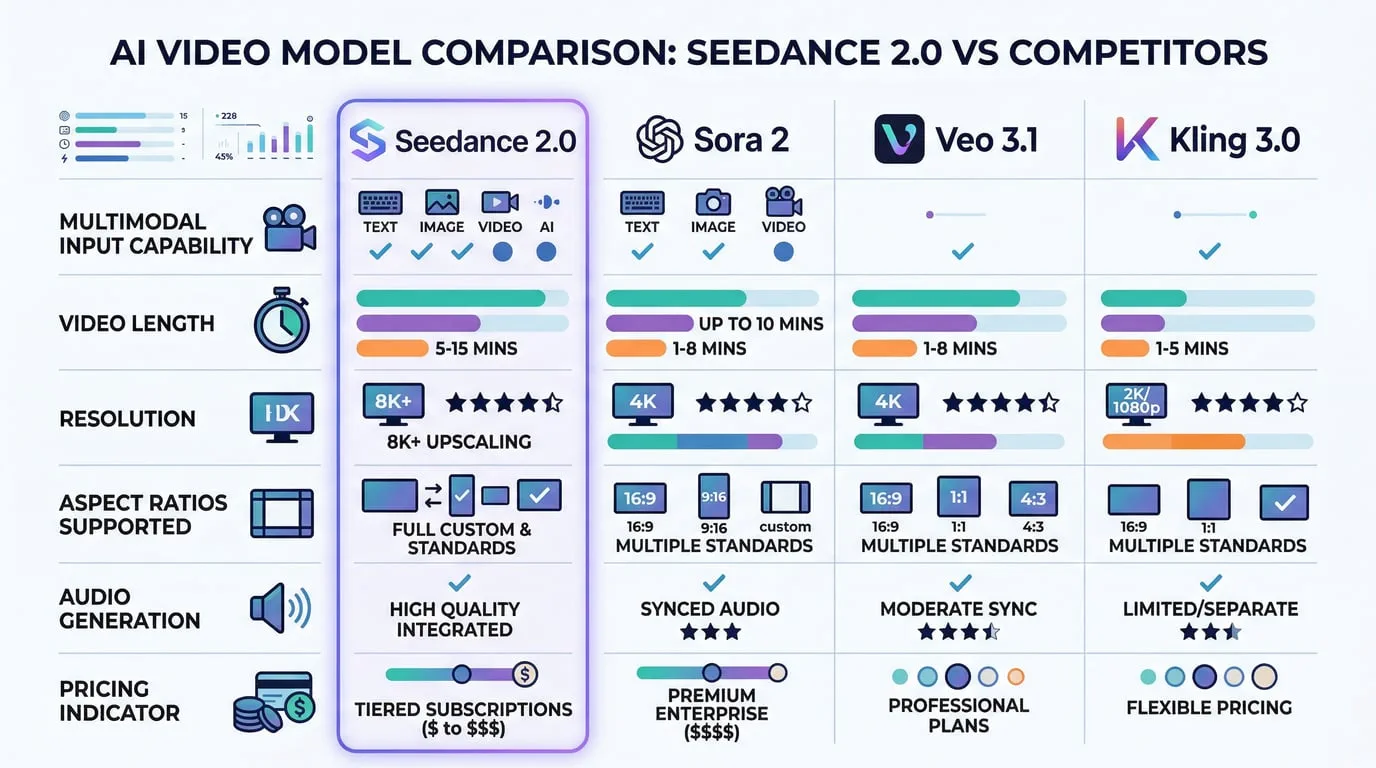
Comparative Analysis: Seedance 2.0 vs. Competing Models
Understanding where Seedance 2.0 excels relative to its competitors helps you choose the right tool for each project and set realistic expectations for output quality.
Seedance 2.0 vs. Sora 2 (OpenAI)
Sora 2 built its reputation on physics-first generation and emotional subtlety. The model excels at creating videos where objects and environments behave with physical conviction - gravity works correctly, materials respond authentically, and motion feels grounded in reality. For shots demanding naturalistic human emotion or subtle environmental interactions, Sora 2 often produces more nuanced results.
However, Seedance 2.0 surpasses Sora 2 in several critical areas. The multimodal reference system offers far greater creative control - you can directly specify motion patterns, character appearances, and audio synchronization rather than hoping the model interprets your text prompt correctly. Seedance 2.0 also generates longer clips (up to 15 seconds vs. Sora 2's typical 10-second limit) and offers more flexible aspect ratio support. Pricing strongly favors Seedance 2.0, with significantly lower per-generation costs.
Use Seedance 2.0 for: Reference-heavy creative work, action sequences, stylized content, multi-shot narratives, budget-conscious projects
Use Sora 2 for: Shots requiring physical conviction, emotional subtlety, naturalistic human behavior, when text-only prompting is preferred
Seedance 2.0 vs. Veo 3.1 (Google)
Google's Veo 3.1 benefits from tight integration with Google Cloud's Vertex AI infrastructure, making it attractive for enterprise deployments and developers already embedded in the Google ecosystem. Veo offers excellent resolution capabilities and strong performance on architectural and environmental content.
Community evaluations reveal inconsistent motion quality in Veo 3.1, particularly for complex action sequences and character animation. Seedance 2.0's motion stability and frame-to-frame consistency generally outperform Veo, especially for content involving human figures, animals, or dynamic camera work. The @reference system in Seedance 2.0 also provides more direct control over specific visual elements compared to Veo's text-and-image input model.
Use Seedance 2.0 for: Character animation, action sequences, projects requiring reference-based control, standalone creative work
Use Veo 3.1 for: Enterprise deployments, Google Cloud integration, architectural visualization, when GCP infrastructure is already in place
Seedance 2.0 vs. Kling 3.0 (Kuaishou)
Kling 3.0 carved out a reputation for rapid prototyping and fast iteration cycles. The model generates quickly and handles simple prompts efficiently, making it useful for concept exploration and rough draft creation.
In direct quality comparisons, Seedance 2.0 consistently outperforms Kling 3.0 in motion realism, visual coherence, and prompt adherence. Kling's outputs can appear more "robotic" or artificial, particularly in human motion and facial expressions. Seedance 2.0's audio generation capabilities also significantly exceed Kling's, with better synchronization and more natural sound design.
Use Seedance 2.0 for: Final deliverables, client work, content requiring polish, audio-visual synchronization
Use Kling 3.0 for: Rapid concept testing, early-stage ideation, when speed matters more than quality
The Hybrid Workflow Approach
Many professional production teams don't choose a single model - they use multiple tools strategically. A common workflow involves using Kling 3.0 for rapid prototyping and concept validation, refining promising directions with Seedance 2.0 for template-based work and multi-modal control, and then using Sora 2 or Veo 3.1 for final high-quality deliverables when maximum physical realism is required. This hybrid approach leverages each model's strengths while mitigating individual weaknesses.
Common Prompting Mistakes and How to Fix Them
Even experienced creators encounter consistent failure patterns when prompting Seedance 2.0. Understanding these pitfalls helps you avoid wasted generations and frustrating results.
Mistake 1: Overloading a Single Prompt
The Problem: Trying to pack multiple distinct actions, scene changes, and complex narratives into one prompt without clear structure.
Example of What Doesn't Work:
"A detective enters a dark room, finds a clue, has a flashback to a crime scene, then runs outside to chase a suspect through crowded streets while helicopters fly overhead and explosions happen in the background."
Why It Fails: Seedance 2.0 can handle complexity, but only when structured clearly. This prompt asks for multiple locations, temporal shifts, and simultaneous action threads without giving the model a coherent framework to organize them.
The Fix: Break complex narratives into separate generations or use explicit shot structure:
"Shot 1: Detective pushes open a creaking door, flashlight beam cutting through darkness, revealing a dusty room. Shot 2: Close-up of detective's face as recognition dawns, eyes widening. Shot 3: Quick cut to exterior - detective bursts through the door and sprints down the alley, camera tracking alongside."
Mistake 2: Vague Camera Direction
The Problem: Using generic camera descriptions that don't specify movement type, speed, or trajectory.
Example of What Doesn't Work:
"Camera moves around the scene"
Why It Fails: "Moves around" could mean orbit, pan, dolly, handheld walk-through, or crane movement - each producing completely different results. The model must guess your intent, often incorrectly.
The Fix: Use specific cinematography terminology:
"Camera executes a smooth 180-degree arc around the subject at medium distance, maintaining eye level, completing the movement over 10 seconds"
Mistake 3: Ignoring Audio-Visual Relationship
The Problem: Describing visual action without considering how generated audio should sync, or uploading audio references without explaining their role.
Example of What Doesn't Work:
"A drummer plays an intense solo" (with no rhythm specification or audio reference)
Why It Fails: Seedance 2.0 will generate both video and audio, but without guidance on their relationship, the drumstick hits may not align with the generated drum sounds.
The Fix: Explicitly connect audio and visual elements:
"A drummer plays an intense solo, drumsticks striking the snare in rapid sixteenth notes synced to @Audio1's rhythm track, cymbal crashes matching the audio peaks at 3-second intervals"
Mistake 4: Insufficient Environmental Context
The Problem: Focusing entirely on subject and action while neglecting setting, lighting, and atmospheric details.
Example of What Doesn't Work:
"A woman walks forward"
Why It Fails: Without environmental context, Seedance 2.0 must invent the setting, lighting, time of day, weather, and mood - often producing generic or inconsistent results.
The Fix: Establish complete scene context:
"A woman in a flowing white dress walks forward through a misty forest at dawn, soft golden light filtering through the trees, morning fog swirling around her feet, dappled shadows playing across her path"
Practical Workflow: From Concept to Final Video
Understanding the end-to-end process helps you plan projects efficiently and avoid common workflow bottlenecks.
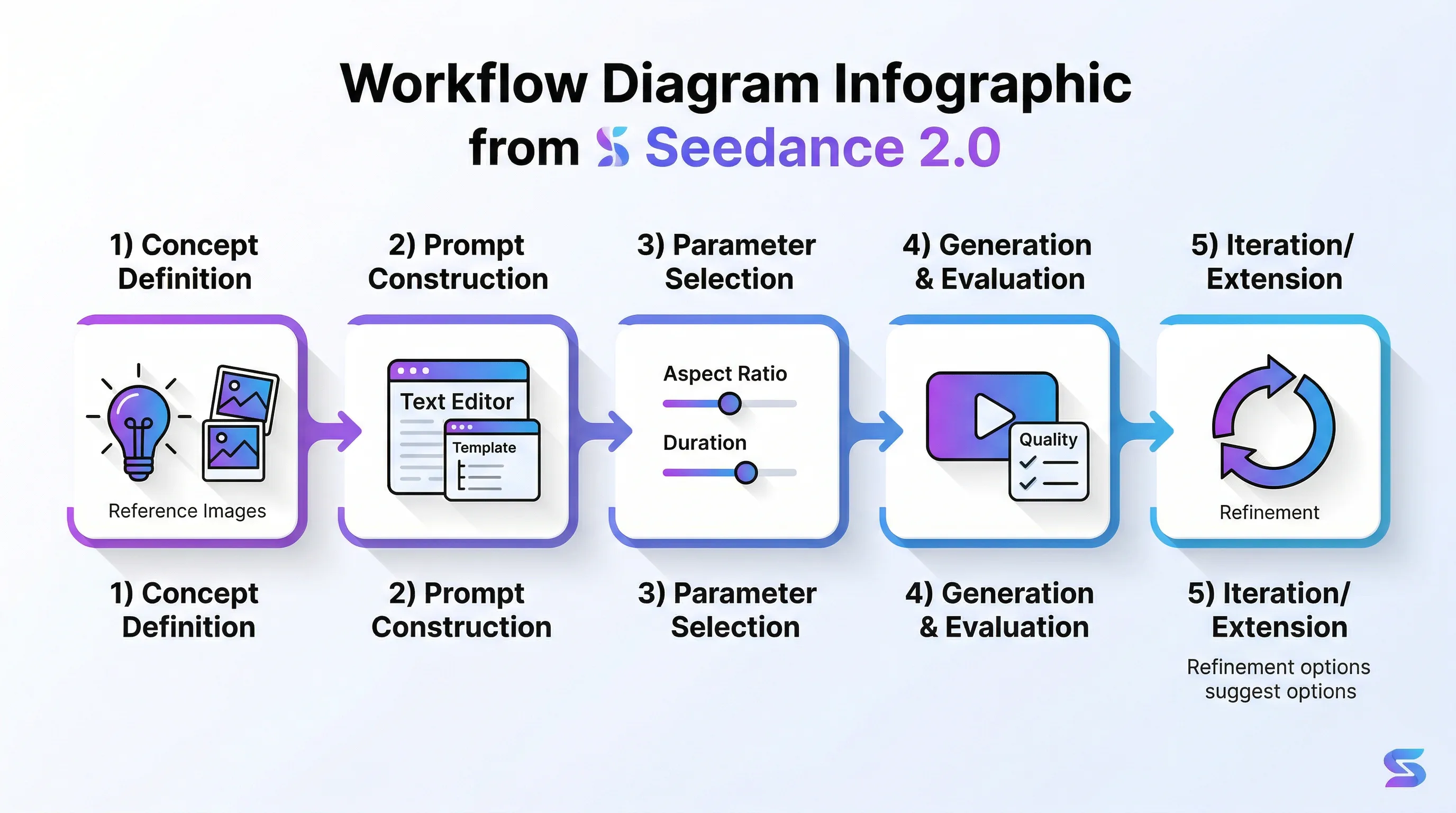
Step 1: Concept Definition and Reference Gathering
Begin by clearly defining what you want to create. Write a simple description in plain language: "I want a video of a futuristic motorcycle chase through a neon-lit city at night with dramatic camera angles."
Next, gather reference materials that represent your vision:
-
Character/Subject References: Photos or illustrations showing the visual style, costume, or appearance you want
-
Environment References: Images of locations, architectural styles, or atmospheric conditions
-
Motion References: Video clips demonstrating the movement style, action choreography, or camera work you're targeting
-
Audio References: Music tracks, sound effects, or dialogue that should sync with the visuals
Ensure all references are high quality - minimum 1080p for images, clear action in videos, clean audio without compression artifacts. Poor reference quality directly degrades output quality.
Step 2: Prompt Construction
Using one of the three core frameworks, build your structured prompt. Start with the basic elements, then layer in technical details:
Base Layer: Subject, setting, action
Technical Layer: Camera movement, lighting, style
Reference Layer: @Image, @Video, @Audio tags with specific instructions for each
Write your prompt in a text editor first, not directly in the generation interface. This allows you to refine language, check for clarity, and ensure all necessary elements are present before committing to a generation.
Step 3: Parameter Selection
Choose your technical parameters based on the content type and distribution channel:
-
Aspect Ratio: Match your publishing platform
-
Duration: 4-7 seconds for simple actions, 10-15 seconds for sequences
-
Resolution: 1080p for most applications (understanding the 720p native limitation)
Step 4: Generation and Evaluation
Generate your video and evaluate it against your original concept. Seedance 2.0 produces consistent results, but no AI model achieves 100% prompt adherence. Look for:
-
Motion Quality: Does movement feel natural and physics-appropriate?
-
Visual Consistency: Do characters, objects, and environments maintain stable appearance?
-
Audio Sync: Do generated sounds match visual actions?
-
Camera Execution: Did the camera movement follow your direction?
Step 5: Iteration or Extension
If the result doesn't meet your needs, identify the specific issue before regenerating. Don't just hit generate again with the same prompt - adjust the element that failed:
-
Motion problems -> Add more specific physics language
-
Visual inconsistency -> Add reference images for the unstable elements
-
Audio sync issues -> Provide audio reference or more explicit timing cues
-
Camera problems -> Use more precise cinematography terminology
For projects requiring content longer than 15 seconds, use the final frames of your successful generation as reference images for the next segment, maintaining visual continuity across multiple generations.
The Professional Reality: Where Seedance 2.0 Fits in Production Workflows
It's essential to set realistic expectations about AI video generation's current role in professional content creation. Despite impressive capabilities, Seedance 2.0 and its competitors haven't "replaced Hollywood" or eliminated the need for traditional filmmaking skills.
The model's 720p native resolution and limited color depth create challenges for professional post-production workflows, particularly when matching AI-generated content with traditionally filmed material or performing advanced color grading. The output quality, while impressive for AI-generated content, doesn't yet meet the technical standards required for major studio productions, broadcast television, or theatrical release.
However, Seedance 2.0 excels in several professional applications where its strengths align with project requirements:
Previsualization and Storyboarding: Generate quick visual representations of planned shots for client approval, director communication, or cinematography planning before committing to expensive production.
Social Media Content Creation: The 720p resolution is more than adequate for Instagram, TikTok, YouTube Shorts, and other social platforms where mobile viewing and compression dominate.
Indie Animation and VFX Augmentation: Independent creators can achieve visual effects and animated sequences that would be budget-prohibitive using traditional techniques.
Concept Development and Pitch Materials: Create compelling visual concepts for presentations, funding pitches, or creative exploration without full production investment.
Rapid Prototyping for Commercial Content: Test multiple creative directions quickly for advertising, marketing videos, or branded content before finalizing production approaches.
Seedance AI makes these professional applications even more accessible by providing a unified platform where you can work with Seedance 2.0 alongside other cutting-edge AI models. This integrated approach streamlines workflows, reduces technical barriers, and enables creators to focus on storytelling rather than tool management.
The gap between AI-generated visuals and traditional filmmaking continues to narrow with each model generation. Seedance 2.0 represents the current state of the art, demonstrating that AI video generation has crossed the threshold from impressive demo to genuinely useful tool for specific professional applications.
Conclusion: Mastering the New Language of AI Video Direction
Seedance 2.0 introduces a new creative language - one that blends traditional filmmaking knowledge with technical prompt engineering and multimodal orchestration. Success with this tool requires understanding not just what to prompt, but how the model interprets instructions, processes references, and simulates physical reality.
The three core prompt frameworks provide a foundation, but true mastery comes from experimentation, iteration, and developing an intuition for how your creative vision translates into the structured language Seedance 2.0 understands. Think like a director who must communicate clearly with a highly capable but literal-minded crew - specificity, structure, and technical precision produce the best results.
As AI video generation technology continues its rapid evolution, the skills you develop working with Seedance 2.0 will transfer to future models. The fundamental principles of clear communication, structured prompting, and strategic reference use remain constant even as the underlying technology advances.
The future of video creation isn't about AI replacing human creativity - it's about AI amplifying what creators can achieve, removing technical barriers, and enabling visual storytelling that was previously impossible or prohibitively expensive. Seedance 2.0 represents a significant step toward that future, and mastering its capabilities positions you at the forefront of this creative revolution.
Ready to start creating with Seedance 2.0? Seedance AI provides seamless access to this powerful model along with a comprehensive suite of AI video and image generation tools, all designed to help you bring your creative vision to life with unprecedented control and efficiency.